
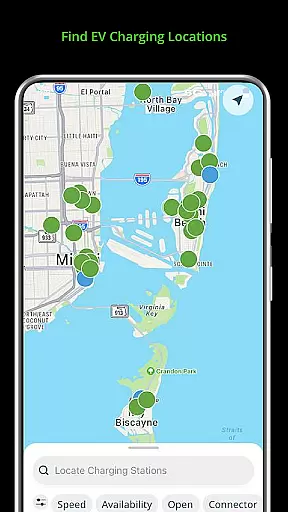
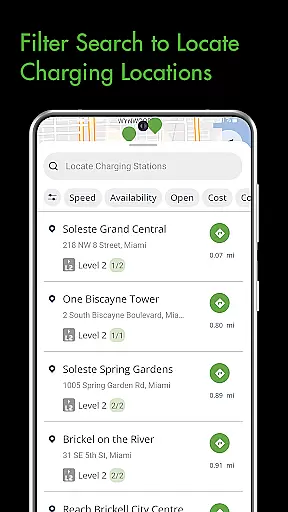
The Blink Charging Mobile App is a comprehensive solution for electric vehicle (EV) owners, designed to simplify and enhance the EV charging experience. This app allows users to locate public EV charging stations with ease, using various search criteria such as zip code or business name. It also provides real-time monitoring of charge sessions, including energy delivered and costs.
One of the standout features is the ability to manage home charging stations like the HQ 200 directly from the app, allowing users to track their charging history and configure settings remotely. Additionally, the app supports an expanded network that now includes SemaConnect stations, offering drivers more options and greater flexibility when charging their vehicles.
Whether you're at home or on the go, the Blink Charging Mobile App ensures that you have all the tools necessary to keep your EV charged and ready. Its seamless integration with social media platforms and customer support channels further enhances user engagement and satisfaction.
The Blink Charging Mobile App offers a range of sophisticated features tailored for EV owners. Users can locate EV charging stations through multiple search filters, ensuring they find the most convenient option. The app provides detailed insights into each charging session, displaying real-time data such as energy delivered, cost estimates, and charging speed.
Another significant feature is the ability to set up and manage the HQ 200 home charging station. This functionality allows users to control their home charging environment, view historical data, and adjust settings according to their preferences. Furthermore, the app's expanded network capabilities enable users to access both Blink and SemaConnect charging stations, providing a unified platform for managing all aspects of EV charging.
These features collectively ensure that EV owners have a reliable and efficient way to manage their vehicle's charging needs, whether they are at home or traveling. The app's integration with social media and customer support adds another layer of convenience and community engagement.
Understanding your vehicle's charging needs is crucial for efficient electric vehicle ownership. The Blink Charging mobile app provides comprehensive details about your EV charger, including real-time data during charging sessions.
Users can access specific information such as energy delivered, current vehicle charging speed, and estimated charging costs. This level of detail helps EV owners make informed decisions about their charging habits and expenses.
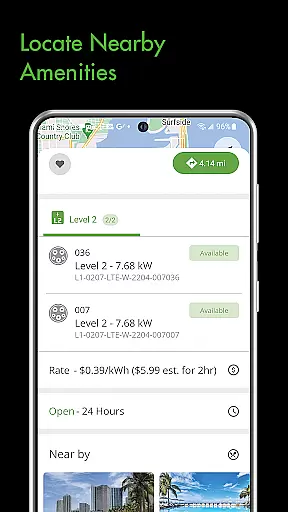
The app also displays detailed information about each charging station, including occupancy times and available chargers. This feature enables drivers to plan their charging stops more effectively, saving valuable time.
By offering such detailed vehicle and charging information, the Blink app empowers EV owners to optimize their charging routines while ensuring they have all necessary technical details at their fingertips.
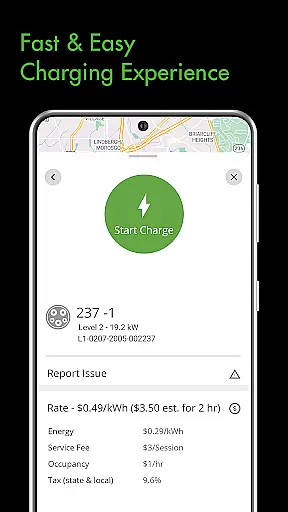
When it comes to EV charging, understanding costs is essential. The Blink Charging mobile app maintains complete price transparency throughout the charging process, ensuring users always know what they're paying.
Before starting a charging session, users can view estimated charging costs based on current rates and their vehicle's charging requirements. This upfront information allows drivers to budget accordingly and avoid unexpected expenses.
The app also provides detailed post-charging information, including exact costs and payment breakdowns. Users can track their charging expenses over time, helping them manage their EV-related finances more effectively.
This transparent approach to pricing builds trust with users and sets clear expectations for every charging session, whether at home or public stations.
User-friendly interface
Real-time charging data
Expanded network coverage
Remote management of home chargers
Integrated social media support
Limited to specific charger models
Occasional connectivity issues
Requires account registration
Some features are subscription-based
Not all locations have chargers

Easily notify car owners in urgent situations, safe, fast, multilingual.
 4.3
4.3
Realtime Charts is a plugin for the Torque Pro App (OBD 2 & Car)
4.20
App Mirroring for Tesla Car's Browser
2.80
Boost profits and hit your goals faster with GigU's amazing tools for gigworkers
4.00
AI Powered - Automotive Mechanic Assistant
4.30
Lexus app currently supports 2010 or newer vehicles (2018 or newer for Hawaii).
4.80
Secure mobile payments & fuel savings at Phillips 66®, Conoco® and 76® stations
4.40
7-Day Returns on All Cars
4.80
Quick and easy car diagnostics to get you the right fix.
4.70
Car Values, Research and More
4.80
DMV practice test 2025: Driver License permit test & written test for all states
4.70
Your go-to app for car, truck & SUV parts, DIY tools, and expert repair help.
4.70
DMV Test Pro offers all the updated FREE DMV tests online.
4.60
Get price alerts, vehicle history details and more for cars near you!
4.50
Launcher for use in the car
4.40
OBD2 car scanner and diagnostics: read Check Engine, DTC, economy....
4.30
Simplify your drive
3.90
Discover new and used cars in Syria easily! Browse ads and connect with sellers.
3.70
Wonder how much horsepower and torque your car/truck makes? Look no further.
3.40


User Reviews