

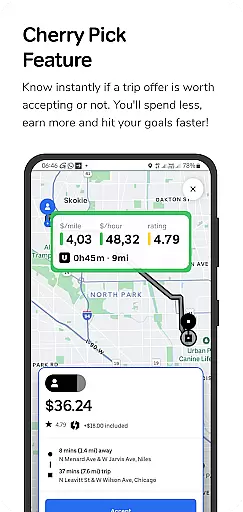
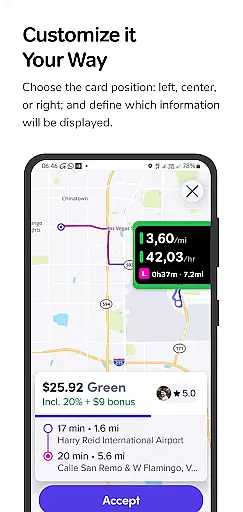
GigU is the ultimate smart assistant for rideshare drivers in the US, designed to maximize earnings on platforms like Uber and Lyft. The app's standout feature is Cherry Pick, which instantly evaluates trip offers, helping drivers make informed decisions that save time and increase profits.
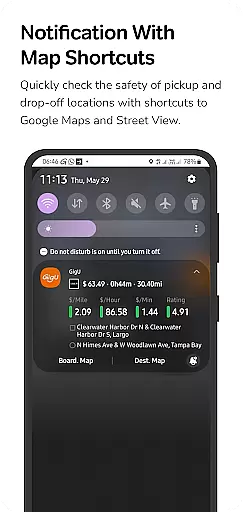
Key functionalities include live smart indicators showing earnings metrics, a color-coded grading system for trip quality, and quick map shortcuts for location safety checks. With voice notifications and a complete trip history, GigU ensures drivers stay informed without constant phone monitoring.
Ideal for rideshare drivers who want to optimize their work efficiency, GigU provides valuable insights that help achieve earning goals faster while maintaining security and privacy.
GigU offers a robust set of features tailored for rideshare drivers. Its Cherry Pick functionality uses advanced algorithms to assess trip profitability based on user-defined settings, ensuring smarter decision-making.
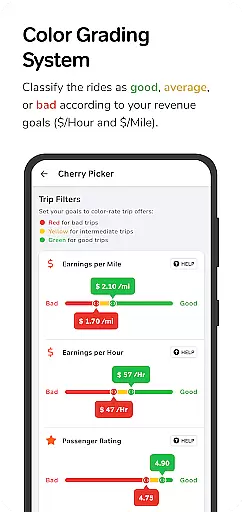
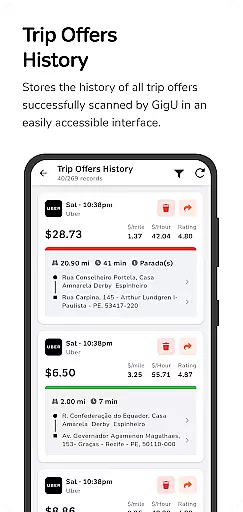
The app provides live smart indicators such as earnings per mile, hour, and minute, alongside a unique colored grading system that simplifies trip evaluation. Additional tools include Google Maps shortcuts for location safety, voice notifications for hands-free operation, and a detailed trip history for performance tracking.
All features are powered by Accessibility Services, which are securely implemented to ensure no personal data is collected or shared. This makes GigU both powerful and privacy-conscious, setting it apart from other driver assistance apps.
GigU provides comprehensive trip details that every rideshare driver needs to make informed decisions. The app's Live Smart Indicators display crucial metrics such as earnings per mile, hour, and minute, giving drivers clear insights into their potential income for each ride offer.
The innovative Colored Grading System evaluates and rates trips based on user-defined settings. This feature uses color-coded indicators to quickly communicate the quality of ride offers, ensuring drivers can assess opportunities at a glance without complex calculations or analysis.
Additionally, GigU maintains a complete Trip Offers History, documenting all scanned ride offers. This record-keeping functionality allows drivers to track patterns in ride availability and pricing, helping them optimize their driving schedules and strategies over time.
One of GigU's core features is its Cherry Pick functionality, which revolutionizes how drivers evaluate ride offers. By instantly analyzing each trip's financial viability, the app provides transparent information about potential earnings before accepting a ride.
The Quick Maps Shortcut Notification enhances this transparency by allowing drivers to verify pickup and drop-off locations through direct links to Google Maps and Street View. This feature ensures drivers can accurately estimate additional costs like fuel and time expenses associated with specific routes.
Furthermore, GigU's Voice Notification system delivers audible alerts about ride profitability, maintaining transparency even when drivers cannot immediately view their screens. This multi-channel approach to price information ensures drivers always have access to crucial data needed to make optimal decisions.
Instant trip evaluations
User-friendly interface
Enhances earning potential
Protects user privacy
Comprehensive ride history
Limited to rideshare drivers
Requires manual setup
Premium features may cost extra
Dependent on third-party apps
Learning curve for new users

Monitor specific TOYOTA parameters by adding this plugin to Torque Pro.
 2.00
2.00
Realtime Charts is a plugin for the Torque Pro App (OBD 2 & Car)
4.20
OBDII - ELM327 Terminal tool for 96-00 Volvos
4.50
DIY Vehicle Wheel Alignment
4.3
Lexus app currently supports 2010 or newer vehicles (2018 or newer for Hawaii).
4.80
Car Sounds Engine Sounds app welcomes Auto Lovers to feel Car Simulator Sound
4.20
Your Path to Driving Licensing Success Begins Here! Develop your driving skills.
4.40
Take state-specific DMV permit tests and ace the exam.
3.90
PayByPhone: A quick and easy way to pay for parking.
3.80
Car Values, Research and More
4.80
Find Your Local Store or Shop Online for the Car, Truck, or SUV Parts You Need
4.70
Quick and easy car diagnostics to get you the right fix.
4.70
OBD1 ECMs application. Data log or tune directly from your phone or tablet!
4.60
Instantly redesign your car with AI. From sporty to futuristic, try it all.
4.50
OBD2 car scanner and diagnostics: read Check Engine, DTC, economy....
4.30
myAudi offers users services and Audi connect services for Audi drivers
4.10
BlueDriver® is a Premium Diagnostic OBD2 Scan Tool. www.BlueDriver.com
3.90
App Mirroring for Tesla Car's Browser
2.80
Theme for Car Launcher
4.2


User Reviews