
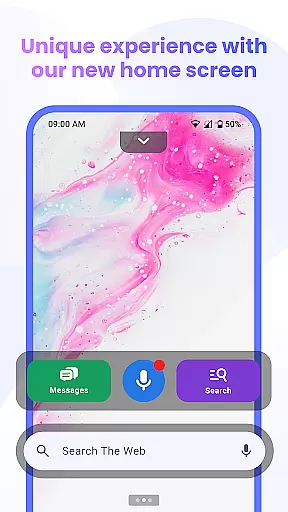


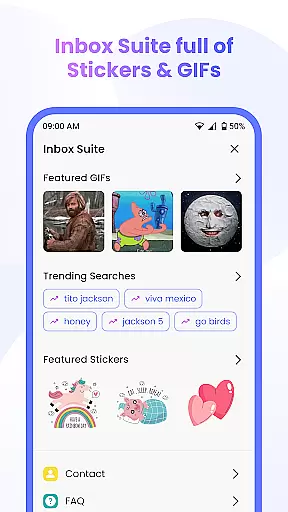

Messenger Chat Home is a unique personalization app that transforms your Android home screen into a smart, easy-to-use messenger. It allows users to send and receive SMS & MMS messages, start group chats, and express themselves with free stickers, GIFs, and emojis directly from the home screen. The app combines the simplicity of classic texting with the power of a modern Android launcher, offering fast, organized, and private texting without switching between apps.
With its innovative home screen launcher access, Messenger Chat Home provides instant access to your inbox and recent chats in one swipe. The app also features a smart widget for quick message previews and replies, voice-to-text functionality for hands-free messaging, and an ad-light experience for minimal interruptions. Whether you're sending a quick text or engaging in group conversations, Messenger Chat Home keeps every conversation simple, secure, and easily accessible.
Messenger Chat Home offers a comprehensive set of features designed to enhance your messaging experience. One of its standout features is the ability to send SMS & MMS messages directly from the home screen, ensuring reliable and fast communication. The app's home screen launcher access lets you open your inbox and recent chats with just one swipe, streamlining your messaging workflow.
In addition to basic messaging, Messenger Chat Home allows users to express themselves with thousands of free stickers, GIFs, and emojis. Group chat functionality enables seamless media sharing with friends and family, while the smart widget provides quick previews of unread texts and allows for rapid responses without opening the app. The voice-to-text feature supports hands-free messaging, making it convenient for users on the go. With its lightweight design and minimal interruptions, Messenger Chat Home ensures a focused and efficient messaging experience.
Customization is at the heart of Messenger Chat Home, allowing users to tailor their messaging experience to fit their personal style. With a wide array of customization options, users can modify their chat backgrounds, choose from different themes, and even adjust notification settings to suit their preferences.
The app offers thousands of free stickers, GIFs, and emojis that enable users to express themselves in unique ways. This vast library of expressive tools ensures that every conversation can be as individual and creative as the user desires, enhancing both fun and authenticity in communication.
Moreover, Messenger Chat Home provides a home screen launcher feature that streamlines access to messages and recent chats. Users can customize this launcher to display their most-used features prominently, ensuring that everything they need is just a swipe away. This level of personalization not only improves accessibility but also significantly boosts productivity by reducing the time needed to navigate through the app.
By offering diverse customization options, Messenger Chat Home empowers users to create a personalized and engaging messaging environment. This flexibility not only enhances user satisfaction but also encourages longer app engagement, making every interaction more enjoyable and efficient.
Messenger Chat Home excels in theme compatibility, ensuring that users can seamlessly integrate their preferred aesthetics across their messaging platform. The app supports a wide range of themes, allowing users to synchronize the look and feel of their chat interface with their deviceu2019s overall design language.
This compatibility extends beyond mere visual appeal; it encompasses functional consistency as well. Whether using a dark mode for reduced eye strain or a vibrant theme to brighten up conversations, users can expect uniformity in both appearance and performance. Such cohesion enhances the user experience by providing a smooth and intuitive interface that feels native to their device.
In addition to supporting various pre-installed themes, Messenger Chat Home allows users to download and apply third-party themes. This flexibility ensures that users are not limited to default options and can continuously refresh their chat environment to keep it dynamic and engaging. The ability to switch themes effortlessly keeps the platform feeling new and exciting.
Ultimately, the robust theme compatibility of Messenger Chat Home contributes to a cohesive and visually pleasing user experience. By aligning with users' aesthetic preferences and maintaining operational consistency, the app fosters an immersive and satisfying environment for all messaging needs.
User-friendly interface
Fast and reliable messaging
Free stickers and GIFs
Smart widget functionality
Ad-light experience
Limited customization options
No end-to-end encryption
Occasional bugs reported
Requires constant updates
Privacy concerns

Only for Wear OS devices!
 4.90
4.90
Themes - Widget & Wallpaper: Customize home screen, icon changer w unique themes
4.30
Turn your lock screen into fun with smile live wallpapers & animated wallpapers!
2.50
Transfer your live wallpapers from Windows to Android using Wallpaper Engine!
4.00
Design your screen with unique, vibrant clocks
3.80
Your home screen, just the way you like it.
4.30
350+ widgets with a premium glass-style finish, perfect for home & lock screens.
4.70
Transform your phone with stunning video wallpapers and a unique, personal touch
3.80
Install amazing sticker packs: endless styles, always cool.
4.70
Make your phone look simple & luxury, like iDevice
4.60
Bring adorable pets to life on your screen. Playful, interactive and full of fun
4.60
Handcrafted pixel art icons, widgets & wallpapers
4.60
Ultra realistic gold analog watch face with lots of customization options.
4.50 4.50
4.50
Transform your device in a game console
4.40
Run multiple accounts of the same app on a single device
4.10
Crystal-clear, square icon provides a sleek and sophisticated visual upgrade
4.00
Customize glowing edges, wallpapers, and caller screen with EdgeAura.
3.50
⭐ OneUI inspired Fluffy Icon Pack – Soft. Stylish. Standout. ⭐
4.3


User Reviews