
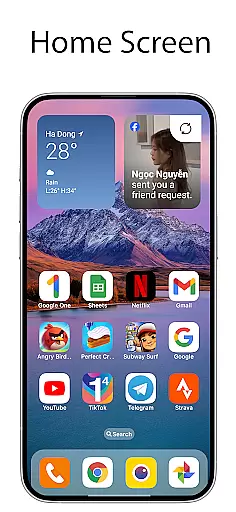
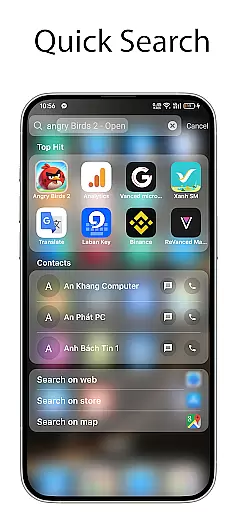
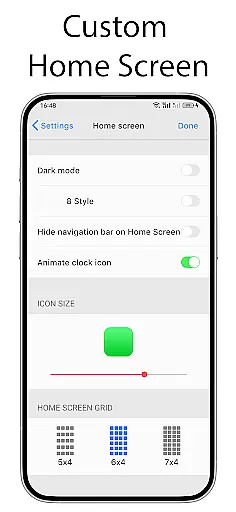
OS Launcher 18 - Phone 16 Max is a personalization app that transforms the visual appearance of Android devices into a more simple and luxurious interface. This launcher provides users with a customized experience, including redesigned app icons, unique wallpapers, and other specific features that mimic the Simple interface while maintaining the full functionality of the Android operating system.
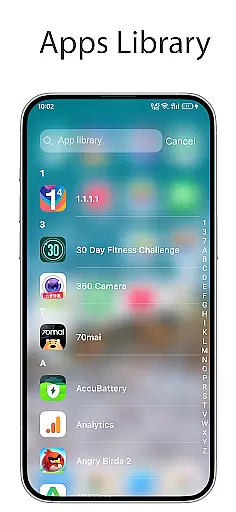
The app offers several key features such as an Apps Library to organize apps into categories, a Today View for weather information and calendar events, and customizable app icons and names. Additionally, it includes options like hiding apps, unread notification dots, and beautiful widgets for the home screen. These features allow users to personalize their device's look and feel while keeping essential Android functionalities intact.
With OS Launcher 18 - Phone 16 Max, users can enjoy a streamlined and elegant interface that enhances their device's usability. Whether you want to simplify your home screen or add luxury to your everyday interactions, this app provides the tools needed to create a personalized and efficient mobile experience.
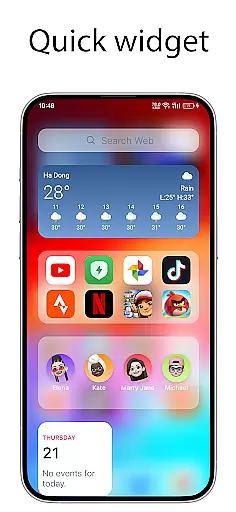
OS Launcher 18 - Phone 16 Max stands out with its rich set of customization features designed to enhance user experience. One of its main highlights is the Apps Library, which allows users to group their apps into categories, making navigation easier and more organized. The Today View feature displays essential information such as weather updates, favorite contacts, and calendar events right on the home screen, ensuring users have quick access to important details.
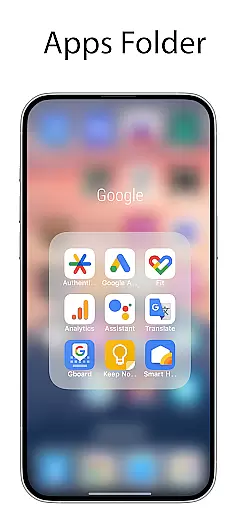
Another significant feature is the ability to create Apps Folders by dragging and dropping apps onto each other, streamlining app management. Users can also customize app icons and names, hide apps from the home screen, and use the Weather widget to get detailed forecasts. The Unread Notification Dot feature visually alerts users to unread messages, enhancing productivity and communication.
These features collectively offer a highly personalized and functional experience, allowing users to tailor their Android devices to match their preferences while enjoying the benefits of a clean and efficient interface.
OS Launcher 18 - Phone 16 Max offers a wide array of customization options that allow users to personalize their Android devices extensively. This includes the ability to modify app icons and names, hide apps from the home screen, and create folders by simply dragging and dropping apps onto each other.
The launcher also features an Apps Library that categorizes your apps neatly, making it easier to manage and access them. Additionally, users can add various cool widgets to their home screen for quick access to important information and functions.
With the Today View feature, users can see weather information, favorite contacts, and calendar events directly on their home screen. The Unread Notification Dot is another useful customization that alerts users to unread messages by showing a dot on the respective app icon.
This extensive range of customization options ensures that users can tailor their device's interface to match their personal preferences and needs, enhancing both aesthetics and functionality.
Theme compatibility in OS Launcher 18 - Phone 16 Max ensures that users can seamlessly integrate various themes into their device's interface. This compatibility allows for a cohesive visual experience across all elements of the device, including app icons, wallpapers, and widgets.
The launcher supports customizable icons, enabling users to change the appearance of individual apps to better fit with their chosen theme. This flexibility extends to wallpapers, where users can select images that complement their overall design scheme.
Furthermore, the Weather feature provides beautifully designed forecasts that align with different themes, displaying essential information like temperature, wind speed, and humidity in a visually appealing manner. These thematic elements work together to create a unified and immersive user experience.
By ensuring high theme compatibility, OS Launcher 18 - Phone 16 Max not only enhances the visual appeal of the device but also maintains usability and accessibility, providing a personalized yet functional interface.
User-friendly interface
Highly customizable
Beautiful widgets
Efficient app organization
Enhanced privacy controls
Limited to Android
Some features may need permissions
Potential battery usage
Occasional bugs
Not all icons are uniform

Beautiful realistic hybrid watch face with numerous customization options.
 4.50
4.50
Unique Android Launcher
4.60
Customizable screen pets that play, climb, and keep you company.
4.50
Wallpaper HD 4K Live - Thousands of high-quality Anime backgrounds for you.
4.80
⭐ OneUI inspired Fluffy Icon Pack – Soft. Stylish. Standout. ⭐
4.2
300+ Stunning and well-designed widgets inspired by NOTHING.
4.70
200+ Material Inspired Widgets
4.50
Emoji Maker app - Design custom emojis and effortlessly blend them with Mixer
3.80
Transform your phone with stylish zipper lock themes and 4D live wallpaper
4.10
Sparkle your screen with Glitter Wallpapers For Girls and Cute Backgrounds!
4.80
One 8 icons glass color version
4.80
Glass style colourful icons with a One UI look and feel
4.60
Bring adorable pets to life on your screen. Playful, interactive and full of fun
4.60
Ultra realistic gold analog watch face with lots of customization options.
4.50
Vibrant Adaptive Icons with Material You and Enhanced Monet Colors.
4.50
Run multiple accounts of the same app on a single device
4.10
Your go to Weather App & Home Screen. Get your weather at a swipe of a finger!
3.80
Turn your lock screen into fun with smile live wallpapers & animated wallpapers!
2.50
Custom edge gestures for volume control, brightness, apps, and shortcuts.
4.2


User Reviews