
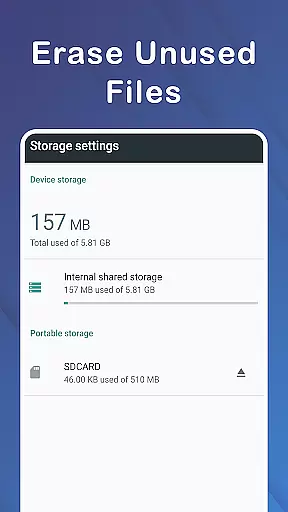
Micro SD Card Formatter is a specialized Libraries & Demo app designed to help users format and repair damaged SD cards directly from their mobile devices. The app offers an efficient solution for erasing and formatting memory cards while ensuring data security.
Key features include the ability to browse all folders and files on both internal storage and Micro SD Cards, select specific memory types for formatting, and recover lost data such as pictures, videos, and files. It also allows users to manage file transfers between phone storage and SD cards.
This app is particularly useful for individuals who frequently use memory cards for data storage and need a reliable tool to maintain their functionality and recover lost data when necessary.
The Micro SD Card Formatter app stands out with its comprehensive feature set tailored for memory card management. One of its core functionalities is the ability to format damaged SD cards with efficiency and security, allowing users to transform their malfunctioning cards into usable storage again.
Beyond formatting, the app provides tools for browsing all device and SD card folders, selecting specific memory types for formatting, and recovering lost data. Users can also utilize the app to clean up memory, copy, and move files between phone storage and SD cards, making it a versatile tool for overall memory management.
What sets this app apart is its lightweight design and user-friendly interface, which ensures ease of use without compromising performance. These features collectively make the Micro SD Card Formatter a reliable choice for anyone needing to maintain or recover their SD card's functionality.
When it comes to formatting and recovering data from a damaged SD card, the Micro SD Card Formatter app offers comprehensive functionality. This app is not just limited to formatting; it extends its capabilities to data recovery, file management, and storage optimization.
The app allows users to format their SD cards efficiently, erasing all data while ensuring that the process is secure. Additionally, it provides options to browse through all folders and files on both the device and the Micro SD card, making file management seamless. Users can select whether they want to format the internal memory or the SD card, offering flexibility in managing different types of storage.
One of the key features of this app is its ability to recover lost data such as pictures, videos, and files from a damaged SD card. This ensures that even if your card is corrupted, you have a reliable tool to retrieve important information. Moreover, the app supports copying and moving files between the phone and the SD card, enhancing its utility beyond mere formatting.
With functionalities ranging from formatting to data recovery and file management, the Micro SD Card Formatter app ensures that users have a complete set of tools at their disposal. Its lightweight nature and ease of use make it an essential app for anyone looking to maintain and optimize their mobile storage solutions.
Usability is a critical factor when considering any application, and the Micro SD Card Formatter app excels in providing a smooth operational experience. Designed with user-friendliness in mind, the app ensures that even those who are not tech-savvy can easily navigate and utilize its features.
The interface of the app is straightforward, allowing users to perform complex tasks like formatting and data recovery without hassle. The app's design emphasizes simplicity, ensuring that users can browse through files, select memory types, and initiate formatting processes with minimal effort. This ease of use significantly reduces the learning curve associated with similar applications.
Operational smoothness is another highlight of the Micro SD Card Formatter app. It performs tasks quickly and efficiently, whether it's formatting an SD card or recovering lost data. The app operates without lags or crashes, providing a seamless experience. Furthermore, its lightweight nature ensures that it does not consume excessive system resources, maintaining optimal device performance.
Overall, the Micro SD Card Formatter app stands out due to its excellent usability and operational efficiency. By combining an intuitive interface with robust performance, it delivers a superior user experience, making it a reliable choice for managing and optimizing mobile storage solutions.
Efficient formatting
Data recovery
User-friendly
Versatile file management
Lightweight design
Limited to Android
Requires technical knowledge
No cloud backup
Basic UI design
Occasional bugs

The Free Catholic Latin American Bible in complete Spanish
 4.60
4.60
Demo for Key Attestation feature of the Android system.
4.80
With Endoscope Camera Connector you can connect your phone with endoscope cam
3.70
You can remote control and play much easier.
4.10
TV USB connector app provides you a seamless cast option from your phone to tv.
4.70
Mobs maker Minecraft help MCPE creators make their own mob by using Blockbench
3.50
Mirror link car connector to share your screen with car dashboard
3.80
Ps2 plugins for 64 bit artitechture
3.70
Phone Software Update Quick Checker helps you to keep your phone apps up to date
4.50
SmartCast mirrors Android phone to TV screen With Cast Screen, Chromecast.
4.80
Enjoy Minecraft Mod Scary Neighbor Granny for Minecraft PE.
4.30
Al QURAN-القرأن الكريم app to read Quran offline just like an actual Quran book
4.30
Manage apps & elevate your gaming experience with Game Launcher: Gaming Hub app.
4.30
Do you want to drive easy ? do you wanna full mirror link Mobile with your car
4.10
The best PS2 games from your childhood come to life in their mobile version!
4.00
Use your Phone as Drone Controller.
3.70
CloudEye 365 is a easy-handling APP
3.60
Connect and Find your smart tag via our app.our app is compatible with smarttag.
3.30
Collection of high-quality, trendy skins and outfits!
4.2


User Reviews