
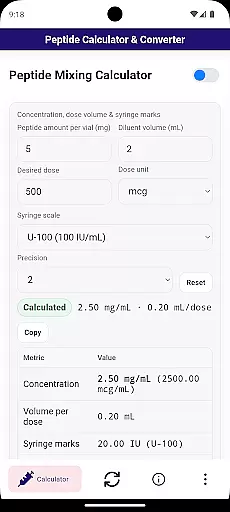
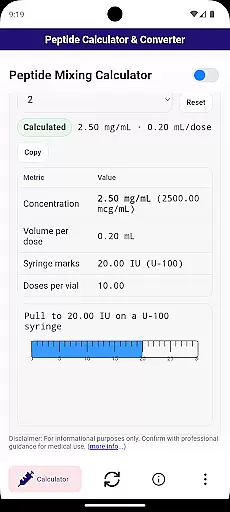
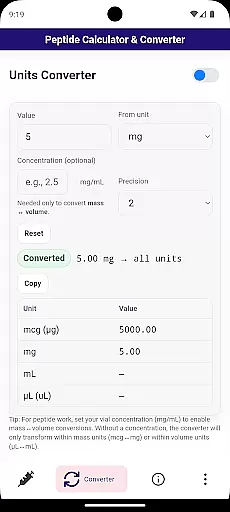

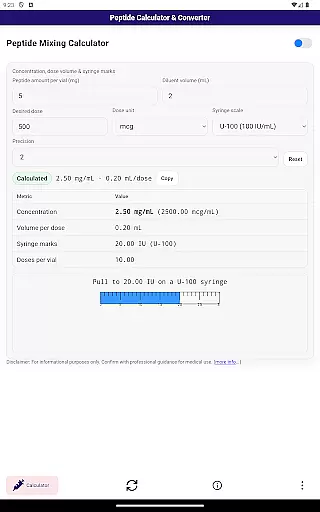
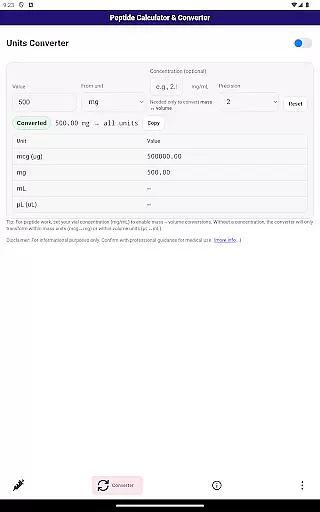

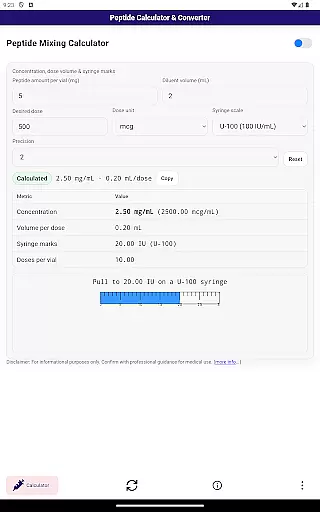

Peptide Mixing Calculator PRO is a specialized tool designed for researchers and professionals in the Health & Fitness field. This application simplifies the process of calculating peptide doses, particularly when working with insulin or tuberculin syringes. It provides accurate measurements in milligrams (mg), micrograms (mcg), and even handles conversions between units such as milliliters (mL) to microliters (uL).
The app's core functionality lies in its ability to measure reconstitution and dosage requirements for peptides. Whether you're dealing with microgram measurements on an insulin syringe or need precise calculations for research purposes, this calculator ensures accuracy and ease of use. Its intuitive interface makes it suitable for both beginners and experienced users who require reliable dose computations.
One key scenario where Peptide Mixing Calculator PRO shines is during laboratory research. By offering quick access to essential calculations, it helps streamline workflows and ensures precision in every step of your experiments. The value it brings to users includes time savings, error reduction, and enhanced reliability in their scientific endeavors.
Peptide Mixing Calculator PRO stands out due to its comprehensive set of features tailored specifically for peptide research. First and foremost, the app offers precise calculation capabilities that allow users to determine how many milligrams (mg) of research material are present in each unit of a non-insulin syringe. This feature alone can significantly improve the accuracy of dosing procedures.
In addition to basic calculations, the app includes advanced measurement tools. Users can work with microgram (mcg) measurements to find exact dosages indicated by tick marks on insulin syringes. Furthermore, the integrated converter facilitates seamless transitions between different units of measurement, such as converting mcg to mg or mL to uL. These functionalities ensure that all necessary conversions are handled within the app, eliminating the need for external tools.
Each feature has been carefully designed to enhance user experience and productivity. For instance, the straightforward interface allows researchers to focus on their work without being distracted by complex navigation. Overall, these characteristics make Peptide Mixing Calculator PRO an indispensable tool for anyone involved in peptide-related studies.
Personalized planning in the Peptide Mixing Calculator PRO offers tailored solutions for researchers and scientists who need precise calculations for peptide dosages. This feature ensures that each user can customize their calculation parameters to match their specific research requirements.
The calculator allows users to input unique variables such as reconstitution volumes and desired dosages, providing accurate measurements in milligrams or micrograms. By adjusting these settings, users can achieve exact dosing for every unit of an insulin syringe, ensuring consistency and reliability in their research.
With personalized planning, users benefit from increased accuracy and efficiency in their experiments. The ability to save and modify different calculation profiles makes it easier to manage multiple projects simultaneously, streamlining workflows and enhancing productivity.
This functionality is crucial for professionals working with peptides, as it minimizes errors and maximizes the precision of dosage calculations. Ultimately, personalized planning empowers researchers to focus more on their scientific objectives rather than getting bogged down by manual calculations.
Progress visualization in the Peptide Mixing Calculator PRO provides clear graphical representations of your peptide mixing calculations. This feature helps users understand their data trends and patterns over time, making it easier to track progress and make informed decisions.
Users can view detailed charts and graphs that display key metrics such as reconstitution volumes, dosages, and conversion rates between units like milligrams to micrograms. These visual aids simplify complex data sets, allowing researchers to quickly grasp important insights without sifting through numerical data.
By leveraging progress visualization, researchers gain a comprehensive overview of their work, facilitating better communication of results and findings. Visual reports can be shared with colleagues or included in presentations, enhancing collaboration and transparency within research teams.
Ultimately, this feature not only improves data interpretation but also boosts confidence in experimental outcomes. Researchers can rely on accurate visual feedback to refine their methodologies and achieve more reliable results in their peptide studies.
User-friendly interface
Accurate calculations
Integrated unit converter
Time-saving solution
Reliable research support
Limited to peptide research
No offline functionality
Premium version required
Occasional bugs reported
Steep learning curve

Text notifications, button control, heart monitor & more for your Amazfit.
 2.40
2.40
The simplest way to track your 21 Day Program containers, exercises, and water.
4.50
Relax to calm sounds, white noise, music, guided meditation and bedtime stories
4.40
Weight loss app: home workout for women to lose weight & burn calories.
4.80
Easy reconstitution calc for mixing peptides and creating protocols
4.70
50 HD sounds to help you relax during the day and sleep great at night!
4.40
Load the bar with this barbell & plate calculator. It's leg day, not brain day!
4.70
Relax. Sleep Better. Feel Better.
4.50
Turn your steps into cash, gift cards & rewards with our step counting pedometer
3.80
Step Counter, track steps when you walk or run
4.70
Measure your Pupil Distance for Eyeglasses and VR headsets in 3 quick steps.
4.70
Effortlessly and naturally release anxiety by harnessing the power of your brain
4.60
The Crunch Mobile app - Find a gym, manage favorites, reserve & cancel classes.
4.60
The OFFICIAL Couch to 5K® running training app! A 9 week walk-run workout plan.
4.50
Eat smarter with Eato, your personal calorie counter and nutrition tracker!
4.40
Find Paid Clinical Trials In Your Area
3.70
FitCloudPro takes care of your health every minute.
3.70
Your plan in your pocket 24/7
3.00
Using Recognise™ has been shown to reduce pain and improve performance.
4.5


User Reviews