
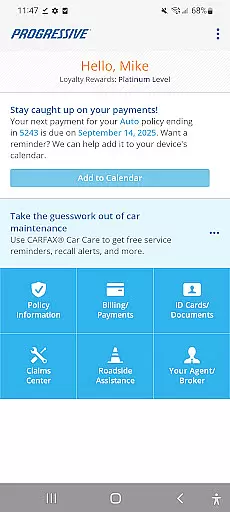
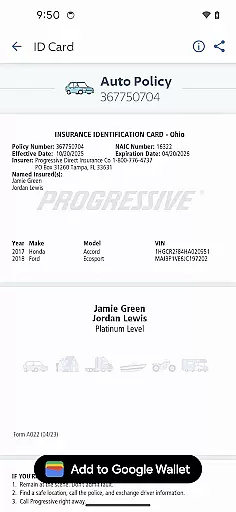
Progressive is a comprehensive financial and insurance management app designed to provide users with seamless access to their insurance policies and related services. The app allows you to view policy details, manage payments, and handle claims efficiently from your mobile device. With features like ID card access, document uploads, and direct communication with agents, Progressive ensures that all your insurance needs are met anytime, anywhere.
In addition to basic policy management, the app offers advanced functionalities such as Snapshot®, which lets users track their driving habits to potentially lower premiums. Whether it's paying bills, requesting roadside assistance, or getting in touch with a claims representative, Progressive provides a complete suite of tools to enhance your insurance experience.
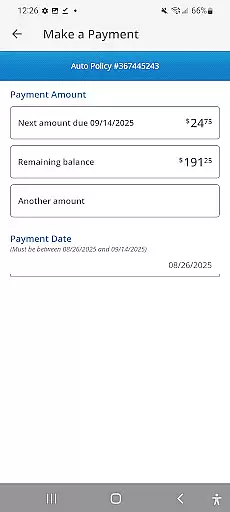
Progressive stands out with its robust set of features tailored for insurance management. Users can easily view their coverage details, discounts, and billing history through an intuitive interface. The app supports various payment methods including credit cards, debit cards, and checking accounts, making bill payments hassle-free.
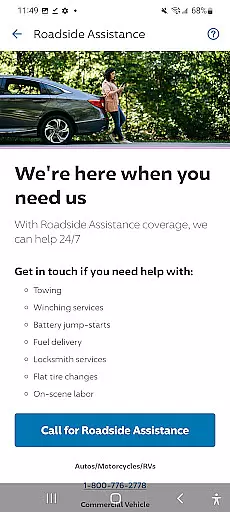
One of the unique features is the Snapshot® program, allowing users to monitor their driving behavior and potentially reduce insurance costs. Additionally, the app facilitates claims reporting with photo uploads, requests for roadside assistance, and direct contact with insurance agents and claims representatives. These capabilities ensure that users have all necessary support at their fingertips, enhancing both convenience and peace of mind.
Account and fund security is a critical aspect of any financial application, ensuring that users' sensitive information and transactions are protected. The Progressive app provides robust security measures to safeguard your insurance data and payment details.
The app employs advanced encryption protocols to protect your personal information from unauthorized access. This ensures that all your policy details, billing history, and payment schedules remain confidential and secure at all times.
In addition to encryption, the app offers secure payment options including credit card, debit card, and checking account payments. These methods comply with industry standards to prevent fraud and ensure that your financial transactions are safe.
By prioritizing account and fund security, the Progressive app allows users to manage their insurance policies with peace of mind, knowing that their data and financial information are well-protected against potential threats.
A seamless transaction experience is essential for any finance-related app, allowing users to perform necessary actions quickly and efficiently. The Progressive app excels in providing a smooth and intuitive transaction process for managing insurance policies.
Users can easily pay their bills using various payment methods such as credit card, debit card, or checking account. The app's interface is designed to make these transactions straightforward, reducing the time and effort required to complete payments.
Beyond payments, the app also supports other essential transactions like reporting claims and submitting photos. This comprehensive functionality ensures that users can handle all aspects of their insurance needs within a single platform.
Overall, the transaction experience in the Progressive app is crafted to enhance user satisfaction by offering quick, reliable, and hassle-free interactions, making insurance management more accessible than ever before.
User-friendly interface
Comprehensive policy management
Multiple payment options
Snapshot® discount program
24/7 customer support
Limited to insurance services
Occasional bugs reported
Requires account setup
Some features region-specific
Internet connection needed

Bitcoin gpu app helps you remote mine using your cell phone easily .
 3.60
3.60
Bill Manager is a simple app to help you keep track of your upcoming bills.
4.0
Manage your credit card account with the Credit One Bank mobile app.
4.70
Powerful Money Manager, Expense & Savings Tracker, Budget Planner - Pro Version
4.70
Manage budget, save money, or file tax. Build, track & improve your credit score
4.40
Make your paycheck work harder for you with Perpay.
4.10
Wells Fargo Mobile allows you to access your investment and bank accounts.
4.80
Navigate your unique financial path confidently with help from Credit Karma.
4.70
Banking with no monthly fees, fee-free overdraft, and early payday.
4.70
Secure, simple money transfer app. Send money to Mexico and worldwide fast.
4.80
Money transfer made easy. Send money to friends and family with great rates.
4.70
No credit check, no interest, no worries.
4.70
Cash Advance, Credit Cards, Credit Lines, Score Monitoring, Saving, Budgeting
4.70
Over 180 currencies conversion rates with live exchange rates and offline mode.
4.60
Need help before payday? Get cash advances with no interest or credit checks.
4.60
Payday cash advance & Instant cash advance: Borrow money instantly, Get cash now
4.60
Manage and cancel subscriptions, lower bills, track expenses, create budgets.
4.60
Manage your account, make a payment, and redeem your rewards on the go.
4.50
Secure Amex Account Access: View Balance, Make Payments, Redeem Rewards & more
3.60


User Reviews