
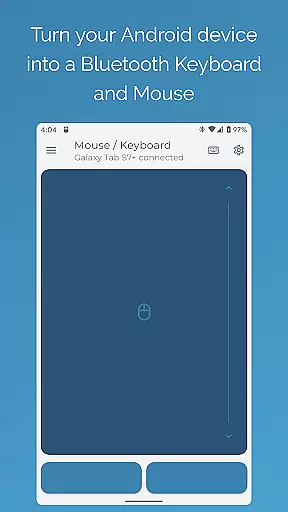
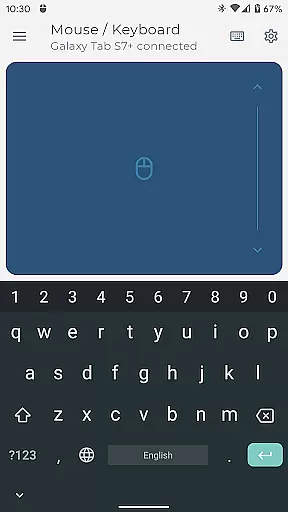
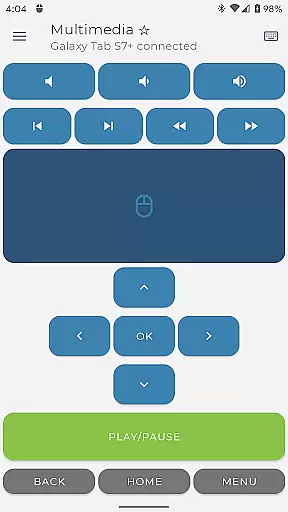
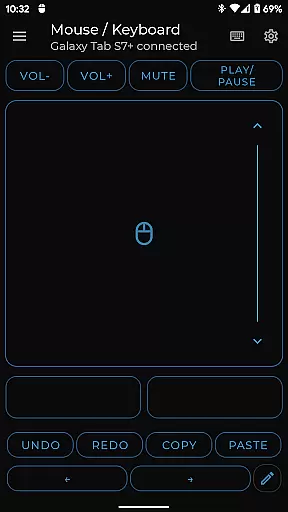

Bluetooth Keyboard & Mouse Pro revolutionizes the way you interact with your devices by turning your Android phone into a versatile Bluetooth remote control. This powerful tool combines the functionality of a keyboard, mouse, and presentation controller without requiring additional software or server connections.
The app offers advanced features like Keep-Alive Mode, international keyboard layouts, and multimedia controls through a secure direct Bluetooth connection. Its professional-grade toolkit makes it ideal for business presentations, remote work scenarios, and creative professionals who need precise control across multiple devices.
Whether you're managing presentations, controlling media playback, or needing to keep your workstation active during critical tasks, this application provides a comprehensive solution that enhances productivity while maintaining security and privacy.
This application stands out with its comprehensive feature set designed for maximum versatility. The precision control module includes a responsive virtual keyboard, multi-touch trackpad capabilities, and intuitive scrolling functions that mimic physical peripherals.
Advanced functionalities cater to professional needs - the Keep-Alive Mode prevents system lockouts during important tasks, while the presenter mode offers complete slide navigation and pointer control. The integrated QR code scanner streamlines inventory management, and custom layout options allow users to design personalized control interfaces for specific applications.
All features are accessible through a universal Bluetooth connection that works seamlessly across major operating systems including Windows, iOS, Android, and Chrome OS. The direct connection architecture ensures minimal latency and maximum security without relying on third-party servers or additional software installations.
Bluetooth Keyboard & Mouse Pro delivers exceptional core functionality through its versatile and precise control options. The app transforms your Android device into a powerful serverless keyboard, mouse, and presentation tool, ensuring seamless interaction with your connected devices.
The application's direct Bluetooth connection guarantees instant response times without the need for additional software. This approach not only enhances performance but also ensures privacy and security during use. Whether you're controlling a computer, tablet, or media center, the app provides unmatched versatility.
Among its standout features is Precision Control, which includes a highly responsive keyboard, mouse, and multi-touch trackpad with intuitive scrolling capabilities. These tools allow users to perform tasks efficiently and accurately, making it an ideal solution for both professional and personal use.
By integrating advanced functionalities such as Keep-Alive / Jiggler Mode, Full PC Keyboard support, and Presenter Mode, the app caters to diverse user needs. These features collectively enhance productivity and offer a comprehensive toolkit that adapts to various workflows and environments.
Bluetooth Keyboard & Mouse Pro excels in providing an interface that balances simplicity with intuitiveness, ensuring users can easily navigate and utilize its robust features. The app's design focuses on delivering a straightforward user experience without compromising on functionality.
Upon launching the app, users are greeted with a clean layout that organizes controls logically. This thoughtful arrangement allows even first-time users to quickly grasp how to operate their devices remotely. The inclusion of familiar elements like a standard keyboard layout and intuitive trackpad gestures further simplifies the learning curve.
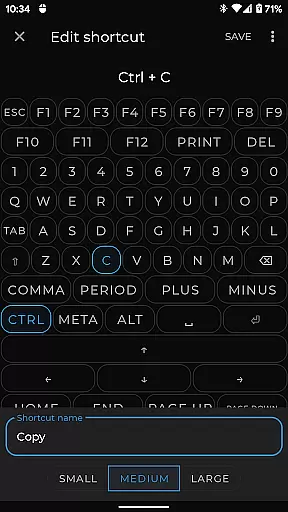
Custom Layouts enable users to engineer personalized remote interfaces tailored to specific applications or games. This feature empowers users to create an environment that best suits their workflow, enhancing overall efficiency. Additionally, the app supports over 100 international language layouts, accommodating global users effortlessly.
Overall, Bluetooth Keyboard & Mouse Pro combines essential tools with an accessible interface, making it a reliable choice for anyone seeking to elevate their digital interactions. Its blend of powerful features and user-friendly design ensures that both novice and experienced users can maximize their productivity.
Serverless operation
Multi-platform support
Secure Bluetooth connection
Customizable interface
Professional presentation tools
Premium features locked
Complex setup required
Limited free functionality
High system requirements
Occasional connectivity issues

Connect instantly to a fast, encrypted VPN with one tap
 4.60
4.60
Keep track of your Palia friendships, tasks, and inventory with Palia Notebook
4.60
An open-source APK explorer for Android!
4.10
Signal Strength, Mobile, Wifi, Speed Test, Bad Signals, Cellular, 5G, LTE, 4G
4.20
Screen Mirroring with sound for Samsung TV, LG TV, Sony TV, Smart TV and Browser
4.20
Clean up large files and similar photos, fast and easy to use
4.40
Mobile Security with Scam Protection | Malware & Virus Cleaner | Safe Browser
4.70
Fast VPN USA for any country. Super secure VPN for calls, streaming, games, TV.
4.40
The ideal app to be the digital eye of your family
3.40
Enjoy smooth gameplay with Game Booster
4.90
Best leveling tool for your Android device. Hang paintings like a pro.
4.90
Easily install aab(Android App Bundle) files on your Android device with our app
4.80
Remote Play with FSR upscaling, low latency & full controller support
4.80
ADB support Android 4.X-Android 13(Support wireless pair mode).No root required!
4.70
NFC Tools can read and write NFC tags.
4.70
Protect your device with antivirus, storage cleanup, and system monitoring
4.70
Introducing Smart Printer, your ultimate destination for printing solutions!
4.00
A recovery soft,it features photo recovery, video recovery, file recovery.
3.40
A non-root local ADB shell client. READ BELOW!
3.40


User Reviews