
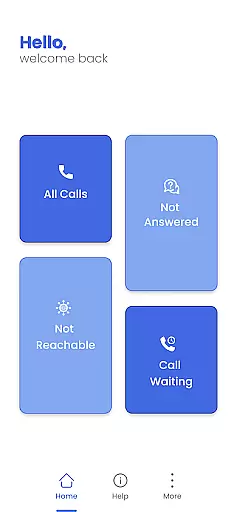
Call Forwarding Pro is a communication app designed to simplify the process of redirecting calls. With its one-tap solution, users can effortlessly forward their calls to any desired number without navigating through complex settings. The app offers an intuitive interface that makes call management easy and efficient.
Whether you're busy, unreachable, or simply want to divert calls, Call Forwarding Pro ensures seamless functionality for all conditions—busy, unanswered, or when you're on another call. Stay connected effortlessly with this app's customizable features and instant notifications.
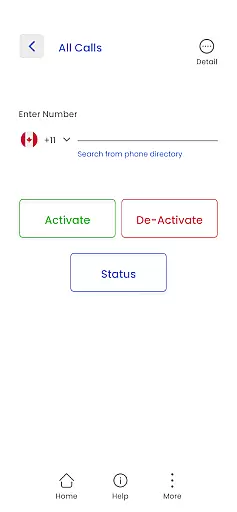
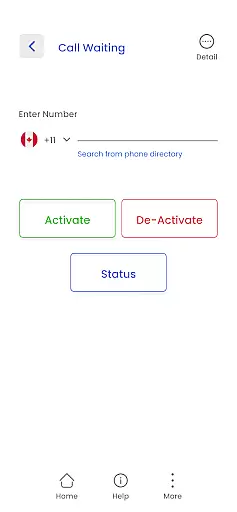
Call Forwarding Pro stands out with its user-friendly features tailored for efficient call management. The app allows users to input the target number in a simple text box and activate call forwarding instantly with just a tap. This eliminates the hassle of navigating through phone settings.
One of the key highlights is the notification system that confirms when call forwarding is active, ensuring users are always informed about their call redirection status. Whether you need to forward calls in all scenarios or selectively, this app provides seamless functionality for various conditions such as busy signals, unanswered calls, or when you're already on another call.
Real-time messaging speed and reliability are crucial for any communication app, ensuring that messages are delivered instantly and without fail. Call Forwarding Pro excels in this area by providing users with a seamless experience when redirecting their calls. The app's infrastructure is designed to handle high volumes of call forwarding requests without delay, ensuring that every call is redirected as soon as it is received.
The technology behind Call Forwarding Pro ensures minimal latency, which means that call redirection happens almost instantaneously. This is particularly important for users who rely on the app to forward calls in real-time, such as professionals who can't afford to miss important calls due to technical delays. By tapping into advanced routing protocols, the app guarantees that each forwarded call reaches its destination promptly.
For users, this means peace of mind knowing that their calls will be redirected without any hiccups. Whether they're busy, unreachable, or simply want to divert calls to another number, they can trust that Call Forwarding Pro will deliver. This reliability not only enhances user satisfaction but also reinforces the app's reputation as a dependable tool for managing communications efficiently.
Media sharing support is an essential feature for modern communication apps, allowing users to share various types of media seamlessly. Although Call Forwarding Pro primarily focuses on redirecting voice calls, it indirectly supports media sharing by enabling uninterrupted connectivity. Users can maintain constant contact and choose the most appropriate device or platform for sharing media files during their conversations.
While Call Forwarding Pro may not directly handle multimedia content, its efficient call forwarding capabilities ensure that users can transition their calls to environments better suited for media sharing. For instance, if a user receives a call but wishes to share a video or document during the conversation, they can forward the call to a device equipped for such exchanges. This flexibility empowers users to optimize their communication methods based on their current needs.
Ultimately, while Call Forwarding Pro might not offer direct media sharing features, its robust call management system facilitates smoother transitions between different modes of communication. Users benefit from enhanced control over how and where they engage in media-rich discussions, making the app a valuable asset in scenarios requiring versatile communication options.
Effortless call forwarding
User-friendly interface
Instant activation
Customizable options
Reliable notifications
Limited to call management
Requires internet connection
Premium features may cost extra
Occasional bugs reported
Not compatible with all devices

Tether to Windows, OS X, Linux PCs or Android tablets. No root. No tether fees.
 3.90
3.90
Pure modern IRC experience for Android
3.70
Use this Dialer app alone or as a TREK: Total Interface companion.
4.70
Save 10% automatically on your first international mobile top up.
4.60
At select facilities, you now have an easy way to video visit your loved ones!
3.30
Fun, free app that lets kids video call and message family and close friends.
3.80
Comprehensive and powerful scan tool app with enhanced functions
3.00
Watchgram for Telegram: Experience seamless Telegram messaging on your watch
1.80
Stay in touch with the people who matter most.
4.60
Browse fast on Opera Mini, with Data Saving, News, Football Scores, and Download
4.60
Say “hello” to privacy.
4.60
Experience real private browsing without tracking, surveillance, or censorship.
4.50
Simplify texting with Messages SMS, offline messaging, themes & smart tools!
4.30
RemoteHams.com Android RCForb Client Pre-Release
4.30
Fast Dialer & Contact Manager with Caller ID and Spam Protection
4.00
Weargram is an unofficial Telegram Client for Wear OS.
3.50
Fast, Simple And Secure Application That Provides SMBv3 Server On Your Device
3.30
An app dedicated solely to marriage, not dating, and supported by a rigorous verification mechanism to ensure seriousness.
4.2
Bringing the functionality of Winlink to your Android device
4.0


User Reviews