
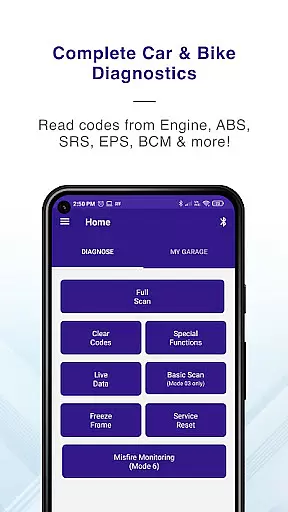
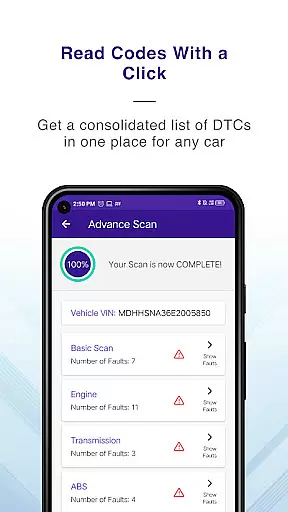
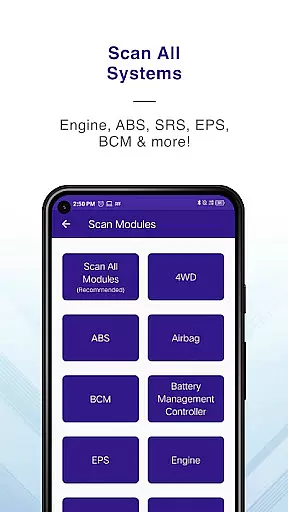
GaragePro is a comprehensive OBD scanning app designed for vehicle owners, repair shops, and DIY enthusiasts. It provides access to over 200 diagnostic functions across cars, bikes, and heavy vehicles, supporting multiple systems such as Engine, ABS, SRS, and more. The app works seamlessly with common OBD2 scanners like ELM327, offering advanced features including live data monitoring, injector coding, DPF regeneration, and steering angle reset.
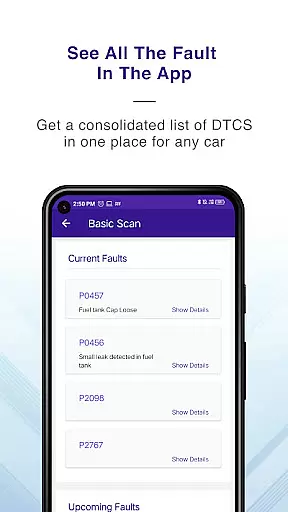
One of the standout capabilities of GaragePro is its ability to retrieve real-time data and trouble codes from various ECUs, alongside offering detailed explanations for efficient troubleshooting. Users can monitor crucial sensor data points in real-time, clear engine light warnings post-repair, and even generate shareable PDF reports. Its wireless Bluetooth connectivity ensures convenience while maintaining compatibility with all OBD2-compliant vehicles globally.
This app is particularly useful for automotive professionals and enthusiasts who need reliable diagnostic tools. By providing both basic and advanced functionalities, GaragePro empowers users to maintain their vehicles efficiently, saving time and money on repairs while ensuring optimal performance.
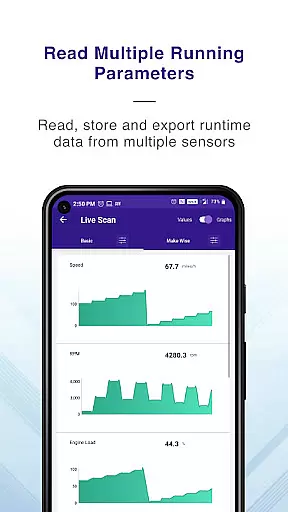
GaragePro stands out with its extensive range of features tailored for automotive diagnostics. The app offers advanced OBD scanning capabilities, retrieving real-time data and trouble codes from multiple vehicle systems, including Engine, ABS, Airbag, and Transmission. With support for over 100 live data parameters, users can track performance metrics like RPM, speed, and coolant temperature through intuitive graphs and customizable displays.
In addition to standard OBD functions, GaragePro includes specialized features such as Injector Coding, DPF Regeneration, Throttle Reset, and Steering Angle Reset. These functions cater to advanced users who require precise control over vehicle maintenance tasks. The app also supports Mode 06 readings for monitoring misfires and other critical system checks, enhancing diagnostic accuracy.
Another key advantage is its wireless Bluetooth connectivity, which eliminates the hassle of tangled cables. Compatible with most ELM327-based scanners, GaragePro ensures seamless integration and ease of use. Whether performing smog checks or resetting service lights, this app provides a professional-grade solution for all your vehicle diagnostic needs.
Accessing detailed vehicle information is crucial for effective diagnostics and maintenance. GaragePro provides comprehensive OBD coverage, allowing users to scan and retrieve real-time data from multiple systems such as Engine, ABS, SRS, EPS, BCM, Transmission, HVAC, and more.
The app goes beyond basic diagnostics by offering advanced features like Injector coding, DPF regeneration, Throttle Reset, ABS bleeding, and Steering angle reset. With over 200 diagnostic functions, it supports cars, bikes, and heavy vehicles, making it a versatile tool for vehicle owners, repair shops, and DIYers.
Users benefit from the ability to monitor over 100 crucial sensor data points in real-time, including RPM, speed, coolant temperature, and fuel trim. The intuitive graphs and customizable displays empower users to track vehicle performance and make informed decisions about maintenance and repairs.
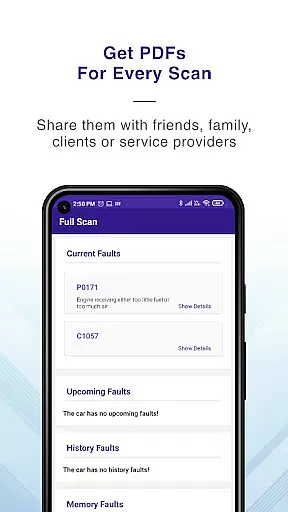
Additionally, GaragePro offers PDF reports with code descriptions, which can be shared with technicians or stored for future reference. This feature ensures that users have a clear understanding of their vehicle's health and can communicate effectively with professionals when needed.
Price transparency is essential for users to understand the value they receive from an application. GaragePro offers a freemium model where scanning and live data monitoring are free, providing users with valuable insights into their vehicle's performance without any initial cost.
For users requiring advanced features, GaragePro provides paid plans starting at just $10. These plans include higher-level diagnostic functions, ensuring that users only pay for the features they need. The pricing structure is straightforward, with no hidden fees or unexpected charges.
By clearly displaying the costs associated with each plan, GaragePro allows users to choose the level of service that best fits their needs and budget. This transparent approach builds trust and encourages users to explore the full range of features available.
Moreover, the app's compatibility with various OBD2 scanners, including affordable options like ELM327, ensures that users can access these features without needing to invest in expensive equipment. This combination of transparent pricing and flexible hardware options makes GaragePro an accessible solution for all vehicle owners.
User-friendly interface
Comprehensive diagnostic tools
Wireless convenience
Wide vehicle compatibility
Detailed code explanations
Paid features can be pricey
Bluetooth connection issues
Steep learning curve
Limited free functionality
Requires compatible scanner

Taximeter; the professional's choice
 4.30
4.30
Theme for Car Launcher
4.3
Play what you want through Android Auto
4.90
Buy and sell your boat
4.70
Control maps, media and messaging, with the Google Assistant while you drive
4.10
BlueDriver® is a Premium Diagnostic OBD2 Scan Tool. www.BlueDriver.com
3.90
Your Path to Driving Licensing Success Begins Here! Develop your driving skills.
4.40
Find, search, and browse 40,000+ used cars, SUVs, and trucks.
4.50
Earn and save with Fuel Rewards®
3.20
Quick and easy car diagnostics to get you the right fix.
4.70
Instant diesel savings. No credit checks or fees. Nationwide growing network.
4.40
Secure mobile payments & fuel savings at Phillips 66®, Conoco® and 76® stations
4.40
Autotrader is your online solution for buying and selling new and used cars.
4.40
AI Powered - Automotive Mechanic Assistant
4.30
Realtime Charts is a plugin for the Torque Pro App (OBD 2 & Car)
4.20
By enthusiasts, for enthusiasts
4.00
Blink Charging Mobile app makes finding an EV charger an intuitive experience.
3.80
Club Car Wash Mobile App—the fast lane to managing your wash membership.
3.30
App Mirroring for Tesla Car's Browser
2.80


User Reviews