

Add Watermark is a powerful photography tool designed to help users protect their digital images by adding customizable watermarks. This app allows you to embed text or logo watermarks into your photos, providing both branding and copyright protection.
The application offers extensive customization options including size adjustment, transparency settings, rotation control, and alignment preferences. Whether you're a professional photographer managing large batches of images or a casual user looking to secure personal photos, Add Watermark provides the necessary tools to efficiently process multiple images while maintaining high-quality output.
With support for advanced features like EXIF metadata handling, 360° panorama compatibility, and cloud backup options, this app ensures that your watermarking process is both professional and convenient. The ability to save in both JPG and PNG formats further enhances its versatility, making it an essential tool for anyone serious about protecting their visual content.
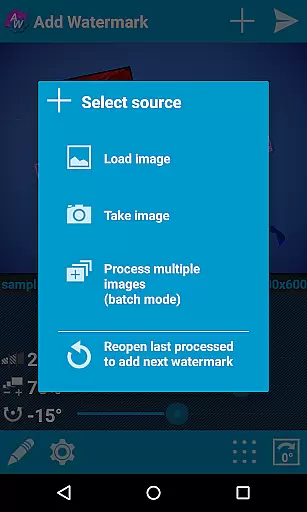
Add Watermark stands out with its comprehensive feature set tailored for both amateur and professional use. One of its key strengths is the batch processing mode, which allows users to watermark multiple images simultaneously, significantly speeding up workflow for large projects.
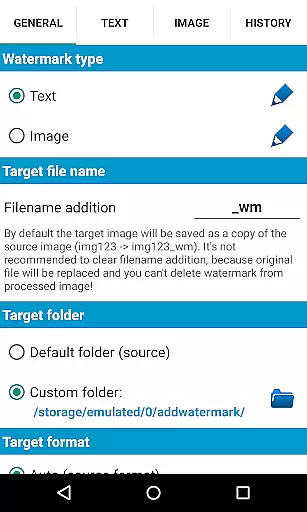
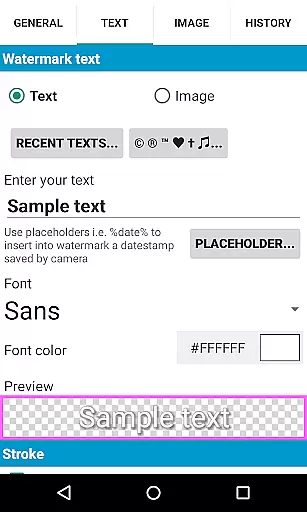
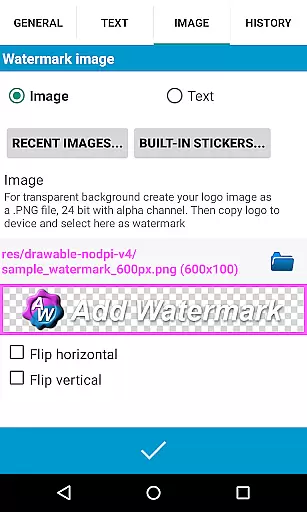
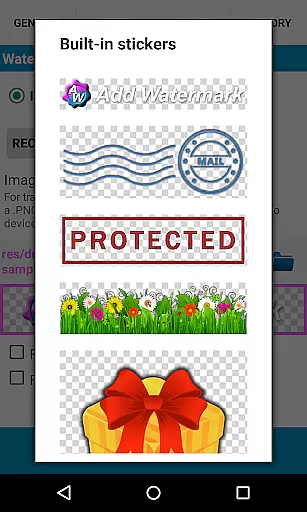
The app supports advanced text formatting options, including 72 built-in fonts and the ability to import up to 20 custom fonts. Users can also apply various color effects and styles to their text watermarks. For more complex branding needs, the application supports transparent PNG images as watermarks and includes a built-in sticker collection for additional creative options.
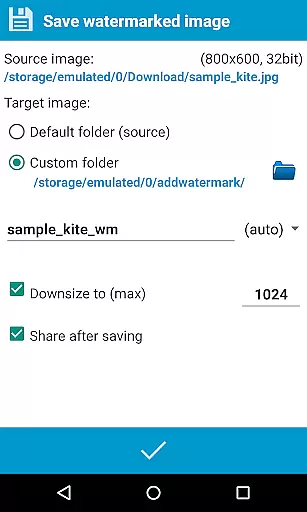
Professional photographers will appreciate the automatic processing feature that integrates with other apps through sharing functionality. The app maintains EXIF and XMP metadata integrity while processing images and offers specialized support for 360° panoramas. With quick sharing options to popular social media platforms and customizable timestamp insertion capabilities, Add Watermark delivers a complete solution for modern digital asset management.
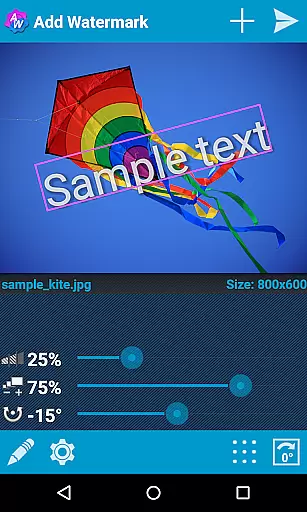
Real-time capture and preview functionality is essential for ensuring that users can see the results of their edits immediately. In Add Watermark, this feature allows photographers to visualize how watermarks will appear on their images before finalizing them.
The application provides a dynamic interface where users can adjust watermark size, transparency, rotation, and alignment while observing these changes in real-time. This immediate feedback loop enhances the user experience by allowing precise customization without guesswork.
For professional photographers and bloggers who rely on quick turnaround times, the ability to preview edits instantly streamlines their workflow. They can efficiently process multiple images with confidence, knowing exactly how each will look once processed.
This feature not only saves time but also improves accuracy in watermark placement, ensuring that the final image meets the user's expectations without requiring trial and error. The result is a more efficient editing process and higher-quality outputs.
While primarily focused on watermarking, Add Watermark also offers features that enhance the natural beauty of images through careful adjustments. Although it doesn't use AI in the traditional sense, its sophisticated tools allow for enhancements that preserve the authenticity of the original photo.
Users have access to various settings such as font selection, color effects, and transparency levels which contribute to creating visually appealing watermarks. These elements ensure that any additional text or logos blend seamlessly into the image without overpowering it.
The app supports transparent PNG images as watermarks, enabling subtle overlays that maintain the integrity of the underlying picture. This capability is crucial for professionals who wish to protect their work without compromising its aesthetic appeal.
By offering extensive customization options and supporting high-quality formats like PNG, Add Watermark ensures that enhancements are both effective and natural-looking. This balance between protection and presentation makes it an invaluable tool for anyone looking to safeguard their digital assets while maintaining visual excellence.
User-friendly interface
Batch processing mode
Extensive font options
Cloud backup support
Metadata preservation
Free version limitations
Premium features locked
Complex for beginners
Occasional bugs reported
Logo watermark restrictions

Photo Album Watch Face shows your favorite pictures as a Watchface.
 1.90
1.90
How would you look like with a differently shaped nose, chin or lips?
3.90
Find time and duration of different sunlight phases at any location
4.90
HD Photo gallery and photo manager to edit, hide private photos, videos & albums
4.4
Create & Edit with AI: AI Remove, Enhance, Retouch, Filter
4.10
Transform photos into videos! Create realistic or anime-style images easily!
4.50
Easily view, share, delete photos with Gallery.
4.70
Easily create custom gifts, cards, photo books & more on the Shutterfly app!
4.60
Try an anime version, cartoon yourself, and generate AI hug or aging videos!
3.70
Collage your moments in one tap: 1000+ layouts, filters, stickers, and texts.
4.90
Photo editor: AI filters, photo enhancer, pic collage maker, AI art generator.
4.80
Amazing Photo Effects - The most fun you can have with your photos!
4.70
See your baby AI baby face generator AI baby maker Face generator babymaker fun!
4.70
Photo editor: face & body editor, beauty cam, filters and quality enhancer.
4.00
Professional quality photo edits with the new Snapseed.
4.00
Astrophotography with your smartphone, photo live stacking and much more!
3.90
Perfect photos with body shaping, BG changer and object remover.
3.70
Pet Camera
3.70
Snap photos remotely using your Garmin watch as the camera trigger
4.3


User Reviews