
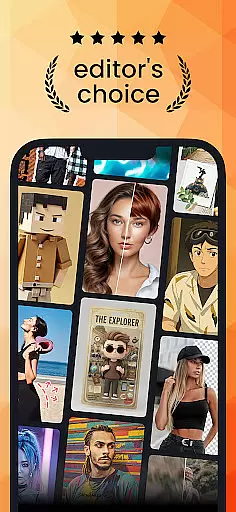
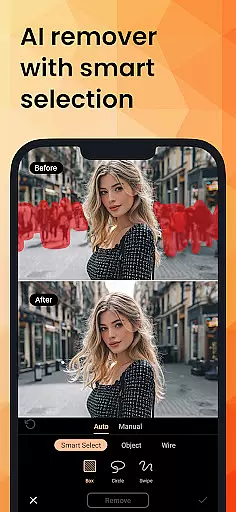
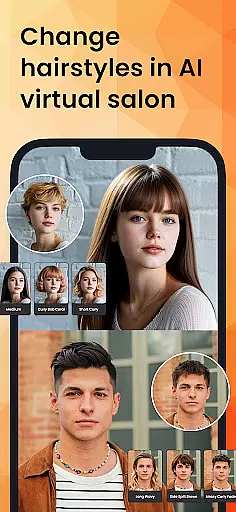
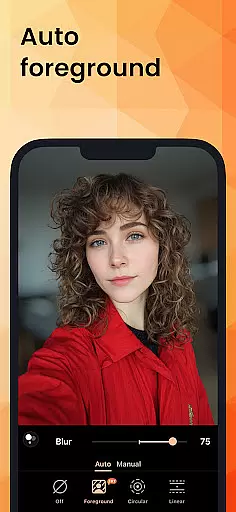
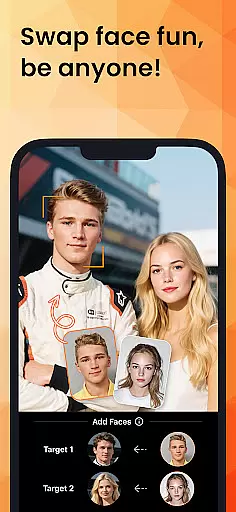
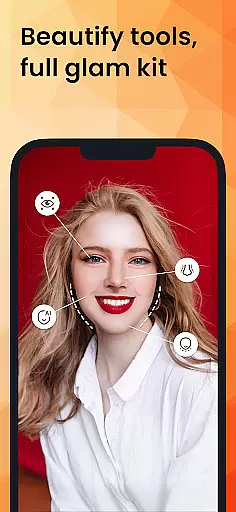
PhotoDirector is an intuitive AI-powered photo editor that empowers users to create and enhance stunning images effortlessly. With hundreds of styles, effects, templates, and tools at your disposal, this app transforms your photography experience. Whether you're a beginner or a professional, PhotoDirector offers groundbreaking features like AI Removal, AI Expand, and AI Hairstyle to bring your creativity to life.
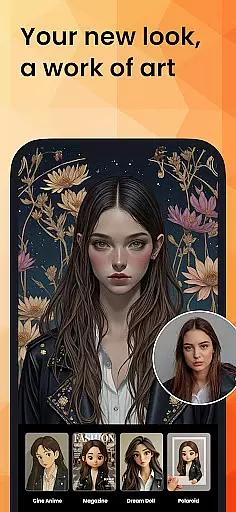
One of the standout features of PhotoDirector is its ability to turn photos into cartoonized artwork or aesthetic styles with ease. The Image to Video feature allows you to animate portraits, while AI Art provides options to transform images into sketches or cartoon styles. Additionally, AI Face Swap and AI Hairstyle let you experiment with different looks virtually. These innovative tools make it simple for users to explore their artistic potential.
PhotoDirector is perfect for anyone looking to enhance their photos with minimal effort. Its powerful AI features handle routine tasks efficiently, allowing users to focus on unleashing their imagination. Whether you need to remove unwanted objects, replace backgrounds, or enhance low-resolution images, PhotoDirector ensures your photos stand out with professional-quality edits.
PhotoDirector boasts a comprehensive suite of AI-powered features designed to revolutionize photo editing. The AI Removal tool allows users to erase unwanted items or wires in photos automatically, streamlining the editing process. Similarly, AI Replace enables instant changes to image elements, giving users unparalleled flexibility in their creative projects.
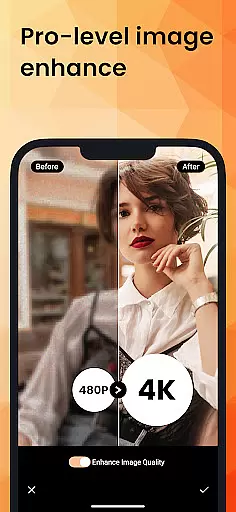
In addition to these powerful tools, PhotoDirector offers AI Expand, which transforms close-ups into long shots with a single click, and AI Background, which replaces plain backgrounds with visually appealing alternatives. The AI Enhance feature repairs low-resolution pictures, ensuring crisp, clear results every time. These capabilities not only save time but also elevate the quality of your edits significantly.
For those seeking efficiency, PhotoDirector includes Quick Action, which detects and enhances images instantly. The app also provides collage creation, body reshaping, makeup tools, and camera AR effects for creating engaging selfies. With thousands of stickers, text styles, frames, and effects available, users can personalize their photos extensively. Premium users enjoy unlimited access to additional content packs, Ultra HD 4K resolution saves, and a distraction-free interface for the smoothest editing experience possible.
Real-time capture and preview functionality is essential for ensuring that every photo taken meets the user's expectations without delay. PhotoDirector offers an intuitive AI-powered photo editor that enhances this process by allowing users to see adjustments and effects applied instantly.
The application leverages advanced AI features such as AI Removal, AI Expand, and AI Hairstyle, which provide real-time feedback as users edit their images. This immediate visualization helps in making precise modifications, thus improving the overall quality of the photograph on-the-fly.
Users benefit from this feature by experiencing a seamless editing process where changes appear instantly, allowing them to experiment with different styles and effects confidently. The instant feedback loop encourages creativity and exploration within the app.
This capability not only saves time but also significantly enhances user satisfaction by providing them with tools that make their vision a reality without any lag, thereby streamlining the entire photo editing experience.
AI Beauty and Enhancement Naturalness refers to the ability of an application to improve image quality while maintaining a realistic appearance. PhotoDirector excels in this area by offering features like AI Art, Image to Video, and various enhancement tools that ensure edits look natural and appealing.
The app uses sophisticated algorithms to transform photos into aesthetically pleasing artworks or videos effortlessly. With functionalities such as AI Face Swap and AI Hairstyle, users can explore different looks without compromising the authenticity of their images.
By integrating powerful AI features like AI Removal and AI Background, PhotoDirector allows users to remove unwanted objects or change backgrounds naturally. These capabilities empower users to create stunning visuals that retain their original essence, enhancing both personal and professional projects.
Ultimately, the emphasis on natural enhancement ensures that edited photos remain lifelike and engaging, offering users a high-quality editing experience that respects the integrity of their original content.
User-friendly interface
Extensive AI features
Versatile editing tools
High-quality results
Regular updates
Premium subscription required
Some features complex
Occasional bugs
Limited free content
Heavy on storage

A collection of tools and reference tables for DPs, ACs, DITs and Operators.
 4.70
4.70
Photo Album Watch Face shows your favorite pictures as a Watchface.
1.90
Safe & smart flight with Go Fly drone controller for 40+ drone camera, zone map
4.50
Edit like a pro with Hypic. Apply filters, AI effects, & magic touch.
4.40
Create AI photos & videos with Enhancer; restore, fix, beautify, enhance photos
4.50
AI Photo Editor with 100+ Filters, Effects! Remove BG, Retouch & Photo Enhancer.
4.80
Snap photos remotely using your Garmin watch as the camera trigger
4.5
A unique animation app. Powerful, easy to use, and lots of fun.
4.30
Try an anime version, cartoon yourself, and generate AI hug or aging videos!
3.70
Create funny photos and videos with the popular Time Warp Scan filter.
4.90
Photo editor: AI filters, photo enhancer, pic collage maker, AI art generator.
4.80
Amazing Photo Effects - The most fun you can have with your photos!
4.70
Light-weight Media Gallery app for Android made with Jetpack Compose
4.60
Unblur, enhance & restore photos with powerful AI photo enhancer tools.
4.60
Fit multiple photos on one post. Create carousels & scroll layouts for Instagram
4.50
Effortlessly organize, view and share your photos & videos with Gallery app!
4.40
AI portrait generator and polaroid AI selfie, fun AI generated AI photo creator!
4.30
An interval timer to automate photo taking process for timelapse
2.90
Remote control the phone camera shutter from your smartwatch and take a picture
1.60


User Reviews