



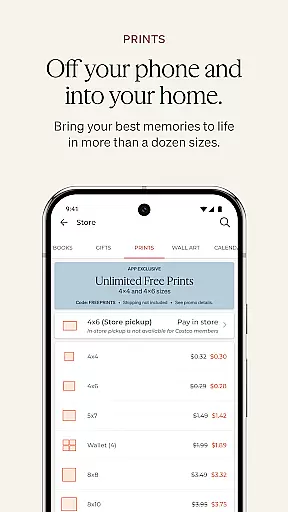


Shutterfly is a comprehensive photo editing and personalization app designed to help users create meaningful, customized photo gifts and products. With its intuitive interface, the app allows you to design personalized items such as photo books, holiday cards, home decor, prints, and calendars. Whether you're celebrating special occasions like weddings, birthdays, or graduations, Shutterfly helps you craft heartfelt invitations and announcements that carry emotional significance.
In addition to its core customization features, Shutterfly offers practical tools like return and recipient address printing for envelopes, saving you time when sending out your creations. The app also provides access to professional assistance through its 24-Hour Photo Book Designer Service, where designers help curate your photos into beautifully laid-out books. With artistic filters, improved navigation, and seamless integration with platforms like Google Photos and Instagram, Shutterfly ensures that every memory can be transformed into something truly unique.
Shutterfly stands out with its diverse range of creative features tailored to enhance your photo personalization experience. One notable feature is the 24-Hour Photo Book Designer Service, which allows users to upload their photos and have a professional designer arrange them into a polished photo book within a day. This service streamlines the process of creating high-quality keepsakes without requiring extensive effort on the user's part.
The app also includes artistic filters that transform regular photos into visually striking sketches, perfect for adding a creative touch to any personalized gift. Navigation has been significantly improved, making it easier than ever to browse through Shutterfly’s wide selection of products. Additionally, the app supports direct access to photos stored across multiple platforms including Amazon Photos, Google Photos, Facebook, and Instagram, ensuring that all your favorite memories are within reach when designing your projects.
Practical functionalities like automated envelope addressing further enhance the overall usability of the app, allowing users to save time while managing large-scale mailing tasks. These robust features collectively make Shutterfly an ideal choice for anyone looking to preserve their cherished moments in a uniquely personal way.
Real-time capture and preview functionality is essential for photography apps as it allows users to see exactly what the camera sees, ensuring they capture the perfect shot. Shutterfly offers this feature by providing users with a seamless interface that displays live camera feed directly on their device screens.
The app ensures that every photo taken benefits from immediate feedback, allowing users to adjust settings such as exposure, focus, and framing before capturing the image. This real-time capability empowers users to take high-quality photos without needing extensive photography knowledge.
Additionally, Shutterfly's real-time preview extends to its editing tools. Users can apply artistic filters and immediately see how these changes affect their images. This instant visualization helps in making informed decisions about which effects best suit their creative vision.
By integrating real-time capture and preview features, Shutterfly enhances user experience, making photo creation intuitive and enjoyable. Whether designing personalized gifts or simply capturing memories, users can trust that their final products will meet their expectations.
AI beauty and enhancement features are crucial for modern photography apps, offering users the ability to refine and beautify their photos effortlessly. Shutterfly leverages advanced AI technology to provide natural-looking enhancements that preserve the authenticity of each image.
The appu2019s AI algorithms analyze facial features and skin tones to apply subtle adjustments that enhance natural beauty without appearing artificial. This approach ensures that edited photos maintain their genuine feel while benefiting from improved clarity and vibrancy.
Shutterfly also includes a variety of artistic filters that use AI to transform ordinary photos into stunning works of art. These filters intelligently adapt to different lighting conditions and subjects, ensuring consistent quality across all edited images. The result is a collection of beautifully enhanced photos ready for personalization into gifts or sharing with loved ones.
With Shutterfly's AI-driven enhancements, users can achieve professional-grade results with minimal effort. The app strikes a balance between enhancing visual appeal and maintaining the emotional connection inherent in every captured moment, empowering users to create meaningful, personalized items.
User-friendly interface
Wide product selection
Professional design services
Artistic photo filters
Multi-platform photo integration
Limited advanced editing
Premium feature costs
Occasional glitches
Subscription required
Learning curve for new users

1M influencer's special filter
 4.60
4.60
Application for remote controlling DSLR
3.00
All-in-One Editor & AI Photo Enhancer, Collage, Cartoonify, Funny Stickers & BGS
4.10
Over 800 film simulation recipes for Fujifilm. Black Friday Offer!
4.3
Gallery Slideshow is slideshow maker app for slideshow from your gallery photos.
3.90
USB Storage Access for Photos, Videos, Music and Documents
3.80
Luminar: Photo Editor - easy picture editing with AI
4.20
Turn photos into cartoons & avatars! - Photo Editor, Cartoon Face!
3.90
Try an anime version, cartoon yourself, and generate AI hug or aging videos!
3.70
Easily view, share, delete photos with Gallery.
4.70
A collection of tools and reference tables for DPs, ACs, DITs and Operators.
4.70
The original Rarevision VHS look seen everywhere!
4.70
Safe & smart flight with Go Fly drone controller for 40+ drone camera, zone map
4.50
AI photo enhancer with Sora 2! Enhance, descratch, and colorize your old photos.
4.50
A light meter for true photographers.
4.20
Superimpose one photo on top of another using the original Superimpose app!
3.20
Long exposure camera with computational photography
2.60
Add a dreamy vibe to your selfies and videos with soft style filters
4.4
Snap photos remotely using your Garmin watch as the camera trigger
4.2


User Reviews