


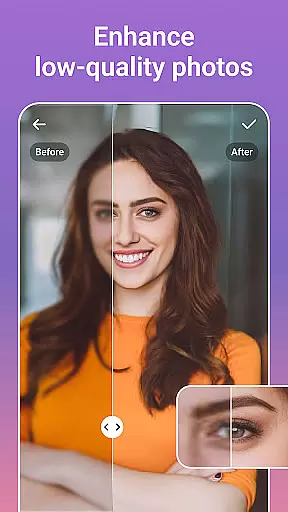



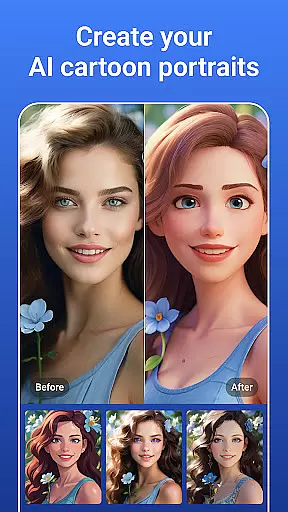

PicsLeap is an advanced AI-powered photo editing application that offers a comprehensive suite of tools for enhancing, transforming, and personalizing your images. With features like One-Tap Enhance, Magic Eraser, AI Face Swap, and AI Cartoon Filters, it caters to both amateur and professional photographers. The app also includes creative options such as Double Exposure effects, 100+ filters, and precise color adjustment tools like HSL and Curve.
Users can effortlessly remove unwanted objects, change backgrounds, and create stunning collages with customizable layouts. PicsLeap stands out with its ability to boost photo resolution, restore old photos, and turn regular snaps into whimsical cartoon art. Whether you want to share your creations on social media or preserve precious memories, PicsLeap provides the tools to do so with ease and professionalism.
PicsLeap distinguishes itself through its innovative use of artificial intelligence to simplify complex photo editing tasks. Its One-Tap Enhance feature allows users to instantly improve image quality, while the Magic Eraser intelligently removes unwanted elements and fills the gaps seamlessly. The AI Face Swap and AI Cartoon Filters provide fun and creative ways to experiment with your photos, offering everything from vintage charm to manga-style transformations.
The app's powerful collage maker lets users weave together multiple snapshots into visually appealing compositions, complete with adjustable grids and custom backgrounds. Additionally, PicsLeap's photo restoration capabilities make it easy to revive old, damaged photos without requiring professional skills. With over 100 filters, light effects, and precise color adjustment tools like HSL and Curve, PicsLeap empowers users to embrace their signature style and produce high-quality, watermark-free art.
Real-time capture and preview functionality is essential for any photography app as it allows users to see exactly what the camera sees before taking a shot. This ensures that users can make necessary adjustments on the fly, resulting in better-composed photographs.
PicsLeap offers an intuitive real-time capture experience with its advanced AI photo editor tools. Users can leverage features like One-Tap Enhance and Magic Eraser directly within the viewfinder, allowing them to visualize changes instantly. This immediate feedback loop empowers photographers to fine-tune their images without interrupting the creative process.
The benefit of PicsLeap's real-time capabilities extends beyond just capturing moments. With options such as AI Face Swap and AI Cartoon Filters available at the point of capture, users can experiment with different styles and effects while shooting. This not only saves time but also enhances creativity by enabling users to explore various artistic expressions in real-time.
Ultimately, PicsLeap's commitment to providing a seamless real-time capture and preview experience means that photographers of all skill levels can achieve professional-quality results effortlessly. By integrating powerful editing tools into the live view, PicsLeap transforms every snapshot into an opportunity for artistic expression.
In today's digital age, enhancing photos while maintaining natural aesthetics is crucial. AI beauty and enhancement features allow users to refine their images without making them appear overly processed or artificial.
PicsLeap stands out with its sophisticated AI-driven enhancement tools. The app includes functionalities such as AI Remove Background and AI Face Swap, which intelligently adjust elements within a photo while preserving its authenticity. These tools are designed to enhance the subject's best features subtly, ensuring that edits look genuine and lifelike.
Users will appreciate how PicsLeapu2019s enhancements elevate their photos without compromising on realism. Whether it's smoothing skin tones with precision or applying cartoon filters that retain facial characteristics, PicsLeap delivers polished yet believable outcomes. Such attention to detail helps maintain the emotional connection between the viewer and the image.
By prioritizing natural-looking enhancements, PicsLeap caters to both amateur and professional photographers who seek high-quality results. Its ability to balance enhancement with authenticity makes it an invaluable tool for anyone looking to beautify their photos while keeping them grounded in reality.
User-friendly interface
Advanced AI features
Variety of filters
Free to download
Professional results
Some features may require in-app purchases
Occasional performance lags
Limited advanced tools for pros
Ads can be intrusive
Learning curve for beginners

All-in-One Editor & AI Photo Enhancer, Beautify & Retouch, Collage, Cartoonify
 4.20
4.20
Create funny photos and videos with the popular Time Warp Scan filter.
4.90
An interval timer to automate photo taking process for timelapse
2.90
Edit like a pro with Hypic. Apply filters, AI effects, & magic touch.
4.40
Amazing Photo Effects - The most fun you can have with your photos!
4.70
USB Storage Access for Photos, Videos, Music and Documents
3.80
Use AI Video Generator to turn your words to ai generated videos.
4.50
Unlock the full potential of your DJI drone with Litchi
4.50
Discover How to Plan any Sun, Moon and Milky Way Photo You Imagine in Seconds
4.70
Pro version: AR sun/moon tracker for any date. Tool for photographers & planners
4.90
Photo prints, cards, & gifts at Walgreens. Easy ordering & fast local pickup !
4.80
Cut and paste photo editor & eraser to customize photos easy and swap faces fun
4.50
Professional camera app that brings DSLR manual photography controls to Android.
4.20
Create & Edit with AI: AI Remove, Enhance, Retouch, Filter
4.10
Photo editor: face & body editor, beauty cam, filters and quality enhancer.
4.00
Gallery Slideshow is slideshow maker app for slideshow from your gallery photos.
3.90
Turn photos into cartoons & avatars! - Photo Editor, Cartoon Face!
3.90
Astrophotography with your smartphone, photo live stacking and much more!
3.90
Long exposure camera with computational photography
2.60


User Reviews