
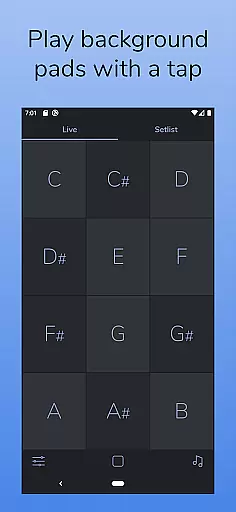
AutoPad is a versatile ambient pad loop application designed to enhance live performances and recordings with seamlessly looped drones. It provides an effortless way to incorporate tasteful soundscapes into your mix, simply by tapping a key. The app supports natural crossfades between keys, ensuring smooth transitions during performances.
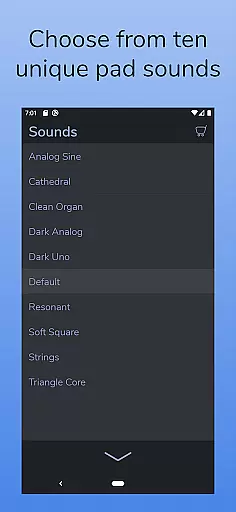
The app comes equipped with 10 expertly crafted pad sounds that create unique atmospheres in all 12 musical keys. Additionally, users can expand their sound library through in-app purchases or by importing custom WAV files. With features like a built-in metronome, MIDI support, and adjustable audio controls such as crossfade time, filters, reverb, pan, and volume, AutoPad offers musicians comprehensive control over their ambient soundscapes.
Designed for both stage and studio use, AutoPad's dark color scheme ensures optimal visibility under various lighting conditions. Its intuitive interface makes it suitable for worship music and other genres where subtle background pads are needed. Whether you're performing live or recording tracks, AutoPad provides the perfect atmospheric foundation.
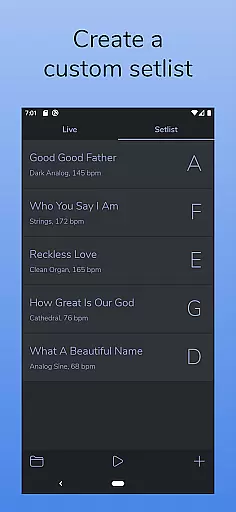
AutoPad stands out with its dual-mode functionality, offering LIVE mode for instant access to all twelve keys and SETLIST mode for creating customized song lists. This flexibility allows musicians to adapt the app to different performance scenarios effortlessly.
The app includes 10 meticulously designed pad sounds, each providing a distinct atmosphere across all 12 musical keys. Users can further expand their sonic palette by purchasing additional sound packs or importing personal pad files in WAV format. The inclusion of a built-in metronome ensures tight synchronization with other musicians without the need for external equipment.
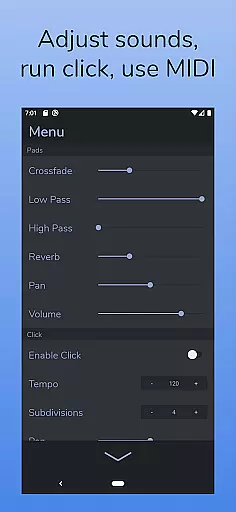
Advanced audio controls within AutoPad's menu enable precise adjustments over crossfade times, dual filters, reverb levels, panning, and volume settings. Furthermore, MIDI compatibility allows integration with external controllers, enhancing the creative possibilities for live performances and studio productions. These robust features make AutoPad an indispensable tool for musicians seeking high-quality ambient soundscapes.
AutoPad offers a rich and expandable music library that caters to diverse audio needs. With 10 carefully designed pad sounds included, each provides a unique atmosphere across all 12 keys, ensuring high-quality ambient soundscapes.
The application allows users to further expand their sound library by purchasing additional in-app sound packs or importing personal pad files, although the Android version currently supports only WAV files. This flexibility ensures that users can continually refresh their audio resources while maintaining copyright authenticity.
By providing both built-in and expandable options, AutoPad guarantees that musicians have access to a broad range of high-quality, legally obtained sounds. This makes it an invaluable tool for live performances and recordings, where variety and legal compliance are crucial.
AutoPad places a strong emphasis on delivering superior audio quality through various customizable options. The app includes a built-in metronome, which helps bands maintain tempo without the need for additional equipment, thus enhancing overall performance coherence.
Users can control crossfade time, apply two different filters, adjust reverb amount, pan, and volume through the app's comprehensive menu. These features ensure that each soundscape is not only unique but also perfectly suited to the musician's specific needs and preferences.
Additionally, AutoPad supports MIDI functionality, allowing integration with external MIDI controllers for triggering pads via a keyboard. Although virtual MIDI and Bluetooth MIDI are not supported on the Android version, this feature significantly boosts the app's utility for professional musicians seeking precise audio control.
User-friendly interface
Seamless looping technology
Versatile sound customization
Comprehensive MIDI support
Optimized visual design
Limited file format support
No virtual MIDI on Android
In-app purchases required
Basic metronome feature
Fixed sound structure

Full-featured, High-Quality Groovebox Workstation, perfect for Live Performance!
 4.80
4.80
A High-Precision Audio Spectrum Analysis App
4.20
Save hundreds of dollars for a physical strobe tuner and instead use this app.
4.50
Enjoy singing any song, no matter how high or low it is
4.30
Offline Music Player&MP3 Player with themes, equalizer, lyrics, music play mode
4.60
PowerAudio is a powerful offline music player.
4.20
The iconic iOS metronome app is now on Android.
3.70
Offline Tunes, Unlimited Vibes
3.90
Play your music offline without limits
4.80
Your song collections with lyrics and chords on Android smartphones and tablets.
4.80
Gorgeous UI, Powerful music Search and Equalizer, the great choice for you!
4.70
Listen to live FM radio stations, sports, music and news on global radios online
4.70
Walkout Song DJ is the most intuitive app to manage your sports music.
4.70
AI Music Maker: Generate And Compose AI Tunes & AI Songs & AI Music & AI Melody!
4.60
Reverse your voice & songs instantly! Fun singing challenge with cool effects.
4.60
The Music Journey in Your Hands
4.30
Bass Booster Pro takes auto-equalizing to the next level!
4.30
The original SP-1200 experience on your iPad
4.20
Slow music down without changing pitch.
3.70


User Reviews