
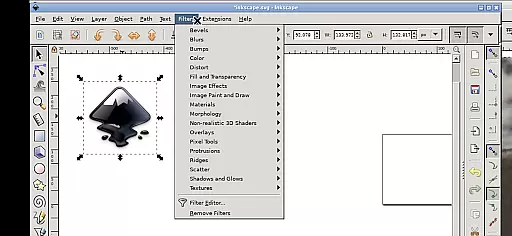
Inky is a powerful vector graphics editor tailored for Android devices, bringing the full functionality of Inkscape to mobile platforms. This app allows users to create and edit vector images in Scalable Vector Graphics (SVG) format while supporting other file types through import and export features.
With its comprehensive set of tools, Inky enables users to render primitive shapes, text, gradients, and raster graphics with adjustable transparency. The app also supports transformations such as moving, rotating, scaling, and skewing, making it ideal for professional designers who need flexibility on the go.
Inky stands out with its robust feature set designed for both casual users and professionals. It offers precise control over vector shapes, including rectangles, ellipses, polygons, arcs, spirals, stars, and 3D boxes. Users can fill these objects with solid colors, patterns, or gradients and adjust their borders with strokes.
The app's intuitive touch-based interface adapts well to Android devices. Features like pinch-to-zoom, panning with a press-and-hold gesture, and two-finger scrolling enhance usability. Additionally, Inky provides seamless access to Android files through useful links in the home directory, eliminating the need for manual imports or exports.
Inky offers a comprehensive suite of creative tools that cater to both professional designers and hobbyists. The app provides full-featured vector graphics editing capabilities, allowing users to create intricate designs with ease.
With support for primitive vector shapes such as rectangles, ellipses, polygons, arcs, spirals, stars, and 3D boxes, Inky ensures that all fundamental design elements are at your fingertips. Additionally, the ability to fill these objects with solid colors, patterns, radial or linear color gradients enhances the creative possibilities.
The inclusion of text manipulation tools further extends its utility, enabling the creation of visually appealing typography. Users can also import and trace raster graphics, transforming photos and other sources into scalable vector images.
This robust set of features empowers users to produce high-quality vector art directly on their mobile devices, maintaining the integrity and scalability essential for professional projects.
Inky excels in providing canvas and format flexibility, ensuring that users can work seamlessly across different mediums and project requirements. The app supports Scalable Vector Graphics (SVG) format, which is crucial for creating adaptable and resolution-independent designs.
Beyond SVG, Inky allows the import and export of various other formats, broadening its compatibility with different workflows and software ecosystems. This versatility means that whether you're designing for web, print, or multimedia, Inky can accommodate your needs.
Users benefit from an intuitive interface that simplifies navigation and manipulation of the canvas. Features like pinch-to-zoom and pan gestures make it easy to manage detailed work, even on smaller screens.
Furthermore, the app's integration with Androidu2019s file system through useful links in the home directory streamlines access to documents and pictures, eliminating the need for cumbersome imports and exports. This seamless interaction enhances productivity and convenience.
User-friendly interface
Full-featured vector editing
Seamless file integration
Open-source and free
Professional support available
Steep learning curve
Performance may vary
Limited stylus support
Not beginner-friendly
Requires technical knowledge

Pose and morph realistic male and female models! 3D poser app
 3.00
3.00
Floor Plan Creator lets you create, edit and share floor plans.
4.00
Sketch, trace and master AR drawing with awesome anime art!
3.30
AI Face Swap, Video Effects Editor, Realtime Morph, Funny Video FX,AI Filters
3.70
Passport size photo maker, create ID photo and visa photo in seconds
4.80
The perfect place to start sketching! Use Sketchbook to draw and paint sketches.
4.50
Image resizer to resize, crop, rotate, flip, change dpi photo or picture in bulk
4.60
Sketch and paint on your device with the feel and freedom of drawing on paper
4.00
An intuitive, high-performance painting app that lets you focus on creating
4.40
Photo stitcher for automatically screenshot stitching into a long screenshot
4.70
Painting, drawing, & sketching
4.50
AI Tattoo Generator: Create Tattoo Designs & Get Ideas! Ink & Stencil Maker
4.50
Draw, make movies & animate cartoons easily with our 2D animation maker app
4.40
AI generated images & photos, turn your words into drawing, painting & pictures.
4.30
Create Logos, Tattoos, AI Art & more with our AI Photo Generator & Design Editor
4.20
OneUI 8.5 icons ✨ Smooth, modern & based on the latest Play Store design ??
4.10
Apply cartoon, caricature, and portrait effects to make your photos stand out!
3.60
Create stunning video, photo & magic from text with FlixAI GPT video generator.
3.10
Your Essential Color Theory Guide: Red, Yellow, Blue (RYB)
4.2


User Reviews