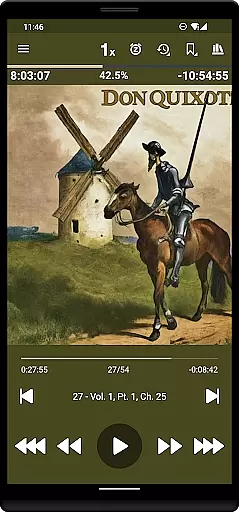
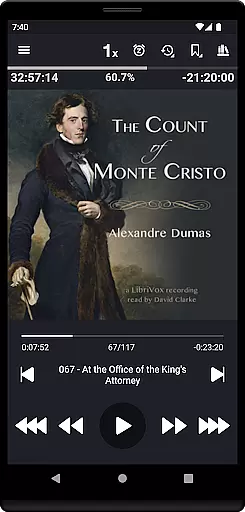
Listen Audiobook Player is a feature-rich audio player designed for audiobook enthusiasts who value flexibility and control. This app allows users to play DRM-free audiobooks from various sources, including personal libraries or curated selections from Librivox. With support for multiple formats like MP3, M4B, FLAC, and more, it ensures compatibility with a wide range of audio files. The app offers advanced playback features such as variable speed control, pitch adjustment, and an equalizer, making it adaptable to individual listening preferences.
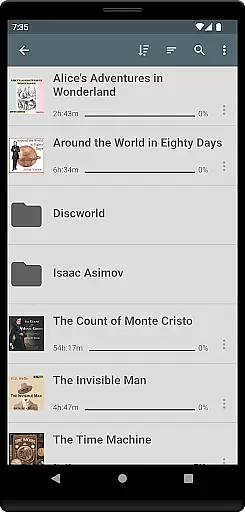
One standout feature is its folder-based library system that automatically syncs with your audiobook folders, ensuring effortless organization. Whether you're managing single books or complex subfolder structures, the app provides seamless navigation and quick search capabilities. Additionally, Listen Audiobook Player integrates with services like Plex and Audiobookshelf, enabling direct downloads from hosted servers. Its built-in synchronization functionality allows users to maintain their progress and bookmarks across multiple devices, enhancing convenience for those who switch between smartphones, tablets, or cars.
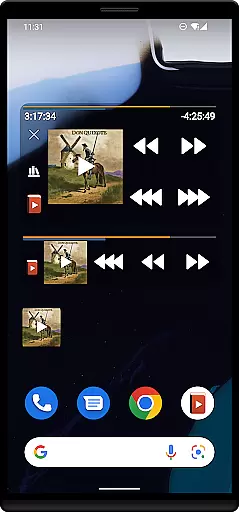
The app also supports Android Auto, Bluetooth controls, widgets, and lock-screen controls, offering a versatile and user-friendly experience. For added customization, users can personalize colors, set custom skip times, and even define actions for headset buttons. These features make it ideal for commuters, travelers, or anyone looking to optimize their audiobook listening experience without interruptions or limitations.
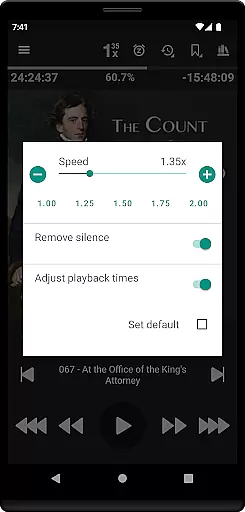
Listen Audiobook Player stands out due to its extensive list of features tailored specifically for audiobook listeners. One of its core strengths is the ability to handle a variety of audio formats, including MP3, M4B, Opus, FLAC, and others, provided they are DRM-free. Embedded chapter support enhances navigation within audiobooks, while variable playback speed (ranging from 0.5x to 4x) caters to different listening speeds. Advanced audio controls such as pitch adjustment, silence trimming, and volume boosting ensure optimal sound quality regardless of the source material.
Organization is another area where this app excels. It uses a folder-based library system that keeps audiobooks neatly categorized by folders and subfolders. Users can browse through their collection easily or use the search function to locate specific titles quickly. Cover art can be sourced from embedded metadata, local images, or downloaded directly via the app. Integration with external services like Plex and Audiobookshelf allows users to download books from remote servers into their local libraries, streamlining access to large collections.
Additional notable features include bookmarking, position history tracking, and sleep timers with customizable options. Bookmarks can be viewed in a unified interface, and users can create shareable audio clips from them. The app's synchronization capabilities enable cross-device continuity, while Android Auto and Bluetooth controls provide hands-free operation. Customizable widgets, lock-screen controls, and third-party app integrations further enhance usability, making this app a comprehensive solution for audiobook management and playback.
When it comes to digital audiobook players, the size and authenticity of the music library are crucial factors for users. Listen Audiobook Player offers an extensive collection of DRM-free books that can be easily imported from various sources such as Librivox, Downpour, and Loyal Books. This ensures that users have access to a vast array of titles without legal or ethical concerns related to copyright infringement.
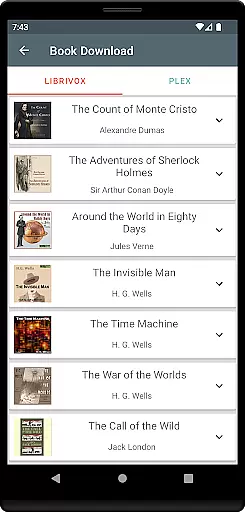
The application allows you to download curated books directly from Librivox, offering classics like 'The Count of Monte Cristo' and 'Pride and Prejudice'. By supporting a wide range of audio formats including mp3, m4b, and flac, the app caters to audiophiles who demand high-quality sound. The emphasis on DRM-free content means that users can manage and enjoy their library without restrictions, making it a trustworthy source for literary content.
For those who appreciate variety, Listen Audiobook Player not only supports personal media but also integrates with services like Plex and Audiobookshelf. This feature enables users to expand their libraries by downloading books from hosted servers directly into their local storage. With these capabilities, the app provides both depth and breadth in its music library while maintaining strict adherence to copyright laws.
Audio quality is paramount for an immersive listening experience, and Listen Audiobook Player excels in providing diverse options to enhance this aspect. Supporting multiple high-quality audio formats such as FLAC and AAC, the player ensures that listeners enjoy crystal-clear playback. Users can adjust variable playback speeds ranging from 0.5x to 4x, catering to preferences for slower or faster narration without compromising sound integrity.
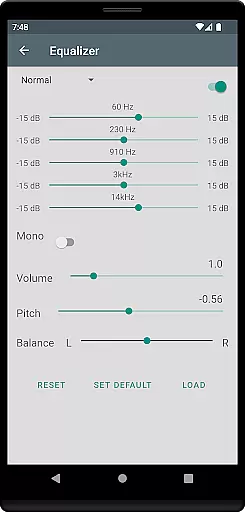
In addition to speed adjustments, the app includes advanced features like pitch control, silence trimming, and volume boosting. These functionalities allow users to customize their listening sessions according to individual tastes and environments. Whether you're in a noisy setting or require specific audio settings for comprehension, Listen Audiobook Player has you covered.
Furthermore, the inclusion of an equalizer and balance controls empowers users to fine-tune their experience even further. Per-book overrides enable personalized settings for different audiobooks, ensuring optimal enjoyment every time. With these comprehensive audio quality options, Listen Audiobook Player stands out as a top choice for discerning listeners seeking flexibility and excellence in their auditory experiences.
User-friendly interface
Wide format compatibility
Advanced playback controls
Seamless library organization
Cross-device synchronization
No cloud storage included
Limited free curated content
DRM-free requirement
Complex setup for beginners
Premium price tag

Control your MIDI USB or Bluetooth devices in app and avoid some trampling
 3.30
3.30
DJ Music Mixer Pro is a real DJ controllers and DJ Music Studio to remix DJ.
4.40
Permanently backup Now Playing. Maps, filters & listening stats.
4.00
Visualize the guitar fretboard, master scales & play through changes like a pro!
4.50
24,000 free audio books and no ads!
4.90
Smart piano keyboard, Classical to Pop, Real-time multiplayer connection!
4.20
Learn the notes on the guitar fretboard fast with this easy and fun app
4.60
Offline Tunes, Unlimited Vibes
3.90
Get alarms that fit your lifestyle and wake up to the sounds you love.
4.80
Listen radio AM / FM Stations. Live AM / FM Radio App Station. Radio Com.
4.70
Formerly known as Spotistats! View your top tracks, artists, albums and more!
4.40
Equalizer, Bass Booster and Volume Booster (Eq & Bass) improve sound quality
4.30
The Music Journey in Your Hands
4.30
PowerAudio is a powerful offline music player.
4.20
Next generation modular control surface
4.10
Slow music down without changing pitch.
3.70
Simple mp3 and mp4 player with advanced features.
3.40
The Skullcandy App Experience
3.20
MilkDrop for Android TV
3.00


User Reviews