
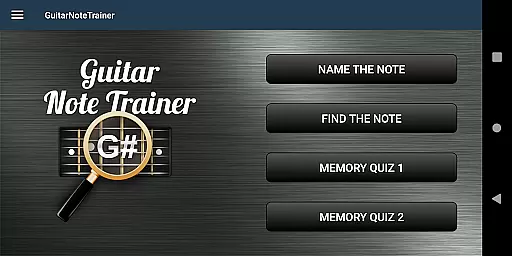

Guitar Fretboard Note Trainer is an innovative app designed to help guitarists master the notes on their instrument's fretboard. This essential skill is crucial for progressing musicians, and the app makes learning both fun and effective through engaging games.
The app features four distinct training modes that cater to different learning styles. Users can test their knowledge by naming notes, finding specific notes across all six strings, or challenging their memory with progressively difficult quizzes. Additional options like audio feedback and simplified answer ranges make it adaptable for beginners as well.
Whether you're practicing during a commute or at home, this app provides a flexible learning tool that fits into any schedule. By turning practice into an interactive experience, Guitar Fretboard Note Trainer helps users build confidence and fluency in their guitar playing.
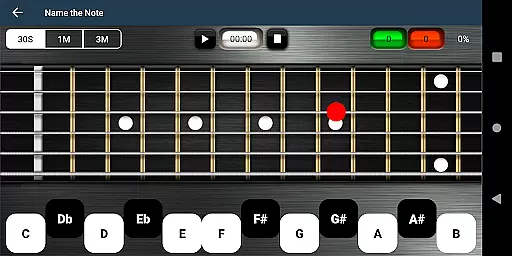
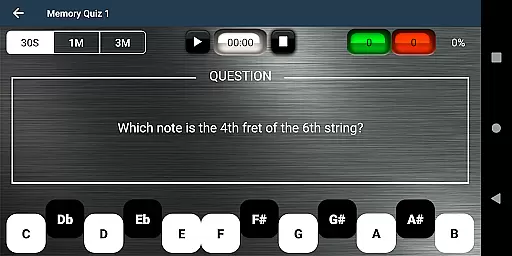
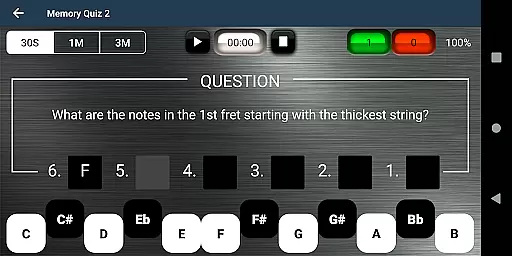
One of the standout features of Guitar Fretboard Note Trainer is its variety of interactive training modes. The Name The Note mode challenges users to identify displayed notes, while Find A Note requires locating specific notes across all strings. Memory Quiz 1 and 2 further enhance recall by testing note positions across individual frets.
To assist beginners, the app includes 'Easy' options that limit the range of possible answers, making the learning curve less steep. Additionally, an audio option allows users to hear notes as they select them, reinforcing auditory learning alongside visual recognition.
For those moments when you're truly stuck, a unique cheat feature lets you swipe diagonally across the fretboard to reveal all notes temporarily. These thoughtful features create a balanced learning environment suitable for all skill levels.
When it comes to music learning applications, the size and authenticity of the music library are crucial. The Justin Guitar Fretboard Note Trainer offers a comprehensive selection of notes and training modes that cater to guitarists at different skill levels. With four distinct training modes, users can progressively learn to identify notes on the guitar neck.
The app ensures that all musical content is accurate and respects copyright laws, providing peace of mind for users. This means that whether you're naming a note, finding notes across the fretboard, or testing your memory, you can trust the integrity of the content you're engaging with.
Additionally, the inclusion of audio options for hearing notes as you select them enriches the learning experience, making it not only about visual recognition but auditory confirmation as well. This dual approach aids in reinforcing memory retention and understanding.
Audio quality is paramount when training your ear to recognize different notes on a guitar. The Justin Guitar Fretboard Note Trainer provides high-quality audio outputs that ensure each note is clear and true to its sound. This attention to detail in audio reproduction helps users develop an acute sense of pitch.
Moreover, the ability to hear notes while interacting with the app's various games enhances the overall effectiveness of the learning process. Users can toggle this feature as they practice naming notes or testing their recall abilities, creating a more immersive educational environment.
For those who may struggle initially, having easy options that limit the range of answers can reduce frustration and help build confidence gradually. This thoughtful design demonstrates how audio quality options contribute significantly to user satisfaction and success in mastering the fretboard.
User-friendly interface
Engaging game-like structure
Flexible difficulty settings
Audio feedback enhances learning
Portable and convenient practice tool
Limited to fretboard notes only
No advanced music theory included
Graphics could be more modern
Cheat feature might reduce challenge
May become repetitive over time

Tune in to the greatest hits on UK Radio | The home of Capital, Smooth & Heart.
 4.90
4.90
VB-AUDIO Software / VBAN-Receptor allows listening to any VBAN Streams
4.10
Brian Eno and Peter Chilvers’ acclaimed music app Bloom, radically reinvented.
4.80
Record, Mix & Master with all n-Track effects, 64-bit audio and Stem Separation.
4.70
Offline Music Player&MP3 Player with themes, equalizer, lyrics, music play mode
4.60
Slow music down without changing pitch.
3.70
Versatile MP3 recorder with auto-backup to Dropbox and Google Drive
4.10
Uninterrupted Tunes, Unmatched Vibes
3.90
Melody Beat: Great for travel, workouts, offline vibes, play your tunes anytime.
4.10
Voice recorder - Audio recorder. Best recorder for recording
4.90
SqueezePlayer turns your Android phone or tablet into a SqueezeBox on its own!
4.60
A synth that really lets you shape your sounds!
4.50
DJ Music Mixer Pro is a real DJ controllers and DJ Music Studio to remix DJ.
4.40
Time Guru will strengthen your internal sense of musical time via random muting.
4.30
Equalizer, Bass Booster and Volume Booster (Eq & Bass) improve sound quality
4.30
Enjoy singing any song, no matter how high or low it is
4.30
Master Salsa Rhythm quickly and with a lot of fun!
4.30
Turn your phone into a musical instrument from the future!
3.90
Make music anywhere. Turn your device into an instrument.
4.4


User Reviews