


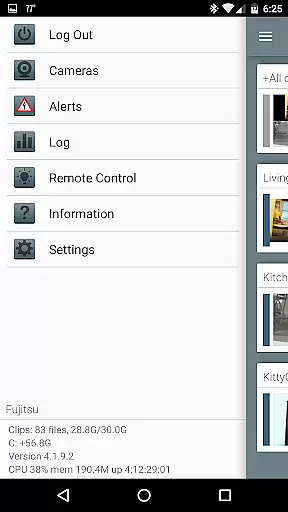


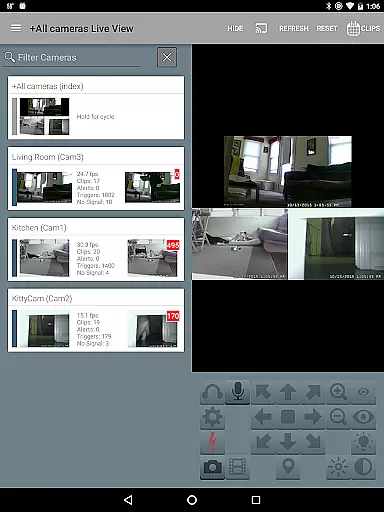
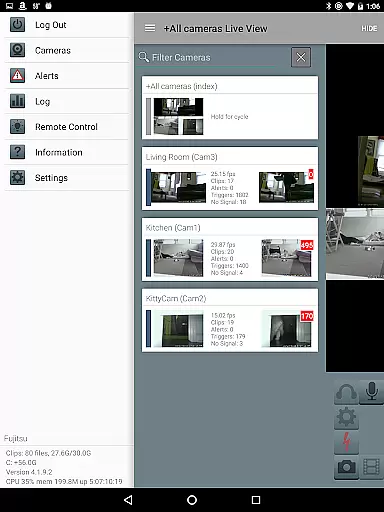
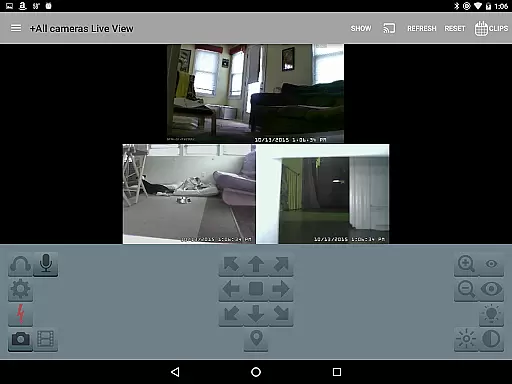
Blue Iris is a specialized client application designed for users who have the Blue Iris 5.x Windows PC software installed. This app serves as a secure gateway to your home camera network, eliminating the need to expose individual cameras directly to the internet. By connecting through a session-based protocol, it ensures that no sensitive information such as passwords are transmitted in plain text.
With Blue Iris, you can manage multiple installations of the software and control various aspects like traffic signals, scheduling, and profile selection. The app also supports advanced features including Android push alerts when a camera is triggered, fast H.264 streaming, PTZ (pan-tilt-zoom) control, IR management, audio interaction with supported cameras, and reviewing recordings stored on the Blue Iris PC at speeds up to 64x.
Blue Iris offers an array of powerful features tailored for comprehensive video surveillance management. One key feature is its ability to handle multiple Blue Iris setups from a single interface, allowing users to switch between different systems seamlessly.
The app provides real-time alerts via Android push notifications whenever there's motion detection or critical status updates from any connected camera. It also supports high-speed H.264 video streaming which ensures smooth playback even under limited bandwidth conditions. Additionally, users can remotely control PTZ functions, IR settings, listen in, and communicate through their cameras if they support these functionalities on the Blue Iris PC.
Other notable capabilities include intuitive navigation by tapping and swiping across camera feeds, reviewing recorded footage directly from the Blue Iris PC with adjustable playback speeds up to 64x, selectively deleting unwanted recordings, and managing DIO output signals on compatible devices.
Video format compatibility is a crucial feature for any video player and editor, ensuring that users can work with a wide range of video files without the need for conversion. Blue Iris stands out in this aspect by supporting various formats, allowing seamless integration with multiple camera systems.
The app provides fast H.264 streaming, which is one of the most commonly used video codecs today. This ensures smooth playback and efficient use of bandwidth, making it ideal for remote monitoring over the internet. Users can connect to their home camera network securely, without the need to open individual cameras to the internet insecurely.
With Blue Iris, you can review recordings stored on your Blue Iris PC at speeds up to 64x, offering flexibility in how you manage and watch your video content. The ability to selectively delete recordings directly from the app adds another layer of convenience, streamlining the process of managing extensive video libraries.
This compatibility extends to controlling PTZ (pan-tilt-zoom), IR, and other functionalities for any camera controllable at the Blue Iris PC. Such comprehensive support empowers users to fully utilize their existing hardware investments while enjoying an intuitive mobile interface.
AI-powered editing features are revolutionizing the way we interact with video content, providing tools that enhance productivity and creativity. While Blue Iris primarily focuses on surveillance, its intelligent features bring a new level of sophistication to video management.
One standout feature is the ability to receive Android push alerts when a Blue Iris camera is triggered or there's a critical status message. This real-time notification system uses smart algorithms to keep users informed about important events, enhancing security measures significantly.
Blue Iris also allows users to navigate cameras by tapping and swiping, offering an intuitive user experience akin to modern AI-driven interfaces. This ease of navigation ensures quick access to different camera views, improving response times during critical situations.
Additionally, the app supports two-way audio communication, enabling users to listen to and talk through any compatible camera connected to the Blue Iris PC. This interactive capability not only enhances security but also adds a personal touch to remote interactions, demonstrating how AI-powered features can transform traditional video monitoring into a dynamic and responsive system.
User-friendly interface
Secure connection protocol
Comprehensive camera control
Fast H.264 streaming
Multi-installation management
Requires Blue Iris PC software
No standalone functionality
Limited to Android devices
Dependent on network stability
Complex setup process

Video player, file manager for all formats, 4K/HD media player supports subtitle
 4.30
4.30
Fast, private downloading, video saving, social media
4.50
HD video & music player - All format support with floating & PIP mode!
3.80
Create & edit videos with AI
4.30
VLC Remote lets you control your VLC Media Player on Mac, PC or Linux.
4.60
Find, download, and play torrents with the official BitTorrent® Pro app
4.70
Manage your IPTV live channels and VOD playlists (no playlist included)
3.80
Browser for Samsung TV to stream webvideos, online movies and livestreams in HD
4.10
Browser + Remote for Roku to stream webvideos, online movies and livestreams
4.60
Play ALL formats in 4K & HD. Video downloader, MP3 player, Chromecast & more.
4.80
Video Player - Unlimited features, 30 days money back guarantee.
4.60
Search & download videos from net with all video downloader, auto-detect & safe.
4.60
Web Browser for LG TV to stream webvideos, online movies and livestreams in HD
4.20
Video player with 4K & 1080P support, popup play, background play and subtitle.
4.20
All format media Player, no need video converter any more!
4.00
Stream Web Videos to Chromecast, Samsung, LG, Sony, Roku, Fire TV, DLNA + more
4.00
Make your own Animations, Video and Photo Edits, Visual Effects, and more!
4.00
Livestream, news, & gaming content. Watch, chat, and upload. Join Rumble today!
3.80
Stream high quality video from your camera over NDI protocol
4.1


User Reviews