



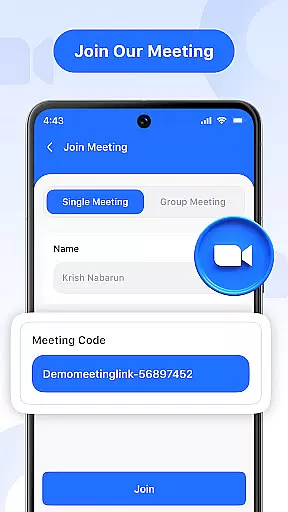
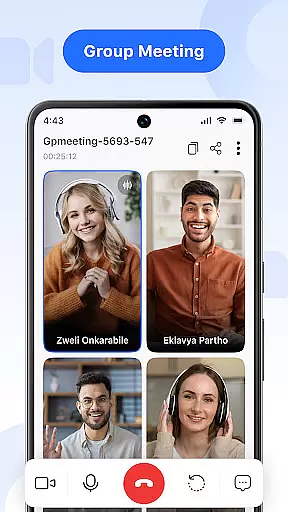
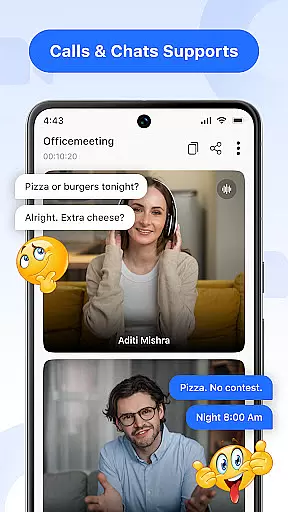

Video Meeting is a cutting-edge video conferencing app designed to enhance virtual communication and collaboration. With features like HD video calls, real-time team interaction, and seamless screen sharing, it ensures productive and secure online meetings. The app supports both professional and personal use, making it ideal for business meetings, educational sessions, or casual chats.
Key functionalities include instant meeting hosting, quick join via secure codes, private one-on-one chats, and group hangouts. Users can toggle audio and video settings, share screens, and utilize real-time chat without interrupting the call. Its multi-language support breaks communication barriers, while the easy exit and end-for-all options provide smooth session management.
This app is perfect for remote teams, students, or social groups looking to maintain effective communication regardless of location. By delivering crystal-clear video and audio quality with an intuitive interface, Video Meeting stands out as a reliable tool for modern digital interactions.
Video Meeting offers a comprehensive suite of features that cater to various communication needs. Host meetings instantly by launching your own video session and inviting participants effortlessly. The quick join functionality allows users to enter meetings using shared links or secure codes, ensuring minimal delays and maximum efficiency.
The app provides options for focused private discussions through one-on-one chats and facilitates friendly group interactions with group hangouts. Real-time chat enables continuous communication without disrupting ongoing calls. Audio controls allow users to mute or unmute their microphones easily, while video toggle options let them show or hide their camera feeds based on comfort and privacy preferences.
Screen sharing is available at a single tap, allowing users to present documents, slides, or applications seamlessly. Multi-language support enhances accessibility, breaking language barriers for global teams. With its encrypted access via unique codes, Video Meeting ensures secure and private interactions, making it suitable for work, study, or social engagements.
Real-time messaging speed and reliability are crucial for effective communication in any virtual meeting platform. Video Meeting ensures that messages are delivered instantly, allowing participants to communicate without delays. This immediacy enhances the flow of conversation, making it feel as natural as an in-person discussion.
The app employs advanced algorithms and robust server infrastructure to maintain high message delivery speeds even during peak usage times. By prioritizing message transmission over less critical data, Video Meeting guarantees that your communications remain swift and dependable. This is particularly important in professional settings where timely information exchange can impact decision-making processes.
Users benefit from a seamless interaction experience, with messages appearing in the chat interface almost instantaneously after being sent. The reliability of this feature means that participants can focus on the content of their discussions rather than worrying about whether their messages will be received. This fosters a more engaging and productive meeting environment.
In addition to speed, the app also emphasizes the security of real-time messages. All communications are encrypted, ensuring that sensitive information remains confidential while still being transmitted quickly. This combination of speed, reliability, and security makes Video Meeting an ideal choice for businesses and individuals who require efficient and trustworthy communication tools.
Media sharing support is an essential feature for modern video conferencing applications, enabling users to share various types of media seamlessly during meetings. Video Meeting offers comprehensive media sharing capabilities, allowing participants to present documents, slides, or applications live with just a single tap. This functionality enriches the collaborative experience by providing visual aids that enhance understanding and engagement.
The app supports a wide range of file formats, ensuring compatibility with most commonly used document types. Whether you need to share a PowerPoint presentation, PDF report, or multimedia file, Video Meeting handles it effortlessly. The screen sharing feature extends beyond static files, permitting dynamic demonstrations of software or web browsing sessions, which can be invaluable for training and instructional purposes.
Participants can expect smooth and high-quality media streaming, thanks to the app's optimized video encoding and bandwidth management technologies. These ensure that shared content is displayed clearly and without lag, maintaining the integrity of the original material. As a result, attendees can follow along easily, regardless of their location or device.
Moreover, Video Meetingu2019s media sharing is designed with user convenience in mind. Initiating a share session is straightforward, requiring minimal steps to activate. This ease of use encourages active participation and collaboration, ultimately leading to more successful and interactive virtual meetings. With these advanced media sharing features, Video Meeting stands out as a versatile tool for both professional and personal communication needs.
User-friendly interface
HD video and audio quality
Secure code-based access
Multi-language support
Real-time chat functionality
Limited advanced features
Occasional connectivity issues
No offline functionality
Basic free version
Dependent on internet speed

Manage your data, talk & text - affordable phone plans & data usage made simple
 4.30
4.30
Fast and simple walkie talkie app
4.20
Radio communication simulator for gaming communities
4.0
فیلتر شکن قوی پرسرعت کلید جدید برای اندرویدسریع ترین وی پی ان برای همه اپراتورها
4.70
Adblock & VPN Browser: Blocks banners, pop-ups and video ads, fast downloader!
4.60
Browse fast on Opera Mini, with Data Saving, News, Football Scores, and Download
4.60
Manage BoostMobile Account
4.60
TeamSpeak - Secure Chat for Gaming & Business
3.10
Group Chat That’s Fun & Games
4.30
Messenger for SMS - texting message app, faster, simpler & safer, for you.
4.70
Fast internet with AI, Adblock & VPN. Browse on a safe, incognito web browser.
4.70
Useful. Social. Expressive.
4.70
Manage your mobile phone plan, check unlimited 5g data usage and track rewards
4.50
Block spam calls & scam - no more annoying calls with the call blocker function
4.30
2nd Phone Number Line for Anonymous Texting, Calling, and Picture Messages
4.30
SMS & MMS Messaging App to easily send messages or schedule SMS on Chat
4.10
Share the moment!
4.10
At select facilities, you now have an easy way to video visit your loved ones!
3.30
Official NDI app: turn your phone into a professional live-streaming IP camera.
3.20


User Reviews