
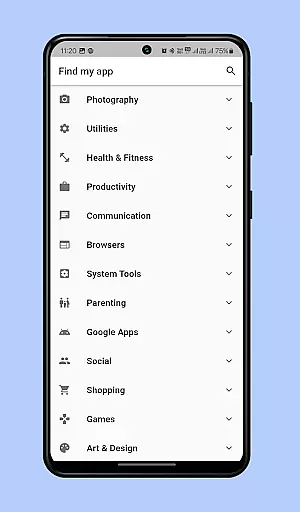
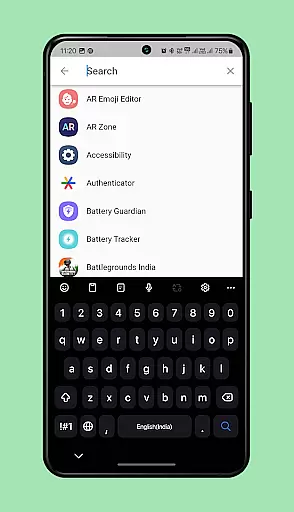
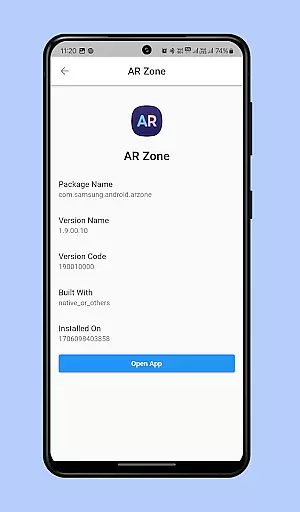
Find My App is a powerful personalization tool designed to help users efficiently manage and locate apps on their mobile devices. The application employs advanced technology to instantly identify all installed apps, both existing and newly added, organizing them into a user-friendly menu categorized by type. This allows for quick access to the desired app without endless scrolling.
A standout feature is its intelligent search functionality, which enables users to simply type part or all of an app's name to instantly locate and open it. This eliminates the frustration of manually searching through numerous pages of app icons. Whether you're struggling to find specific apps or want to streamline your app management process, Find My App provides an instant solution that enhances your device navigation experience.
Find My App offers several notable features that set it apart in the personalization category. First, its automatic app detection system continuously monitors and updates the list of installed applications, ensuring no app goes unnoticed. The app categorizes these into intuitive groups, making navigation seamless and efficient.
The search function is particularly innovative, allowing users to quickly find apps by entering partial or full names. This saves considerable time compared to traditional methods of scrolling through screens. Additionally, the app's lightweight design ensures minimal impact on device performance while delivering maximum utility. These features collectively create a personalized and optimized mobile experience tailored to each user's needs.
Customization options in applications allow users to tailor their experience to fit personal preferences and needs. Find my app offers a diverse range of customization features that enhance user interaction and satisfaction.
The application categorizes installed apps on your phone, organizing them into an efficient menu grouped by categories. This allows for quick access and eliminates the need to scroll through numerous pages of app icons.
Additionally, Find my app includes a search function where users can type the name or part of the name of the desired app. This feature instantly locates the app and opens it, providing a seamless and time-saving experience.
By offering these personalized options, Find my app ensures that users can effortlessly find and open any app on their phone, significantly improving the overall user experience.
Theme compatibility is crucial for users who wish to maintain a consistent look and feel across their devices. Find my app supports various themes, ensuring visual harmony with the user's device settings.
While primarily focused on organizing and finding apps efficiently, Find my app integrates smoothly with different device themes. This compatibility enhances the aesthetic appeal and maintains a cohesive user interface.
Users benefit from this compatibility as it reduces cognitive load, allowing them to focus on productivity rather than adjusting to inconsistent visual elements.
Overall, Find my app's theme compatibility enriches the user experience by providing a visually integrated solution that aligns with personal preferences and device standards.
User-friendly interface
Instant app detection
Efficient search function
Lightweight design
Enhanced organization
Limited customization
Requires permissions
No widget support
Premium features locked
Occasional bugs

A Colorful and Minimal icon pack in an Outline Style - Over 13,600 icons!
 4.70
4.70
Vertically oriented rectangular icons
4.70
3D, live, and moving wallpapers & themes in 4K and HD for your device.
4.50
Art & Emoji Keyboard with Cool Fonts, Cute Themes and Custom Designs.
4.40
Try creating your own keyboard with "Keyboard theme for android" app now!
4.50
The definitive Icon pack maker and editor
4.30 4.50
4.50
Your go to Weather App & Home Screen. Get your weather at a swipe of a finger!
3.80
Enjoy a variety of amazing live wallpapers and colorful EDGE lighting borders!
4.80
Sparkle your screen with Glitter Wallpapers For Girls and Cute Backgrounds!
4.80
Choose your keyboard with RGB colors effect, themes, fonts, emojis.
4.60
300+ widgets inspired by Material You and Material 3 expressive design.
4.60
A light in the dark, a unique style and an andless cutomization!
4.30
Your home screen, just the way you like it.
4.30
More than 3000+ themes and 9000+ wallpapers for everybody!
4.10
Crystal-clear, square icon provides a sleek and sophisticated visual upgrade
4.00
Design your screen with unique, vibrant clocks
3.80 3.50
3.50
HappyLighting is a Bluetooth lamp control software.
3.40


User Reviews