
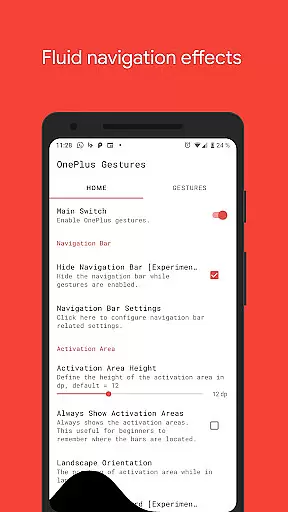
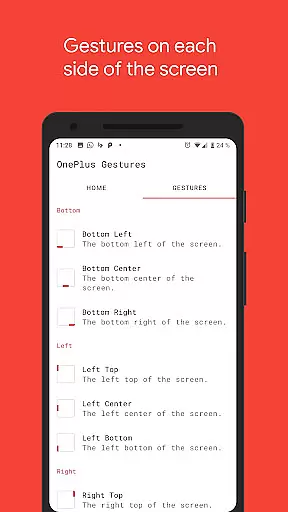
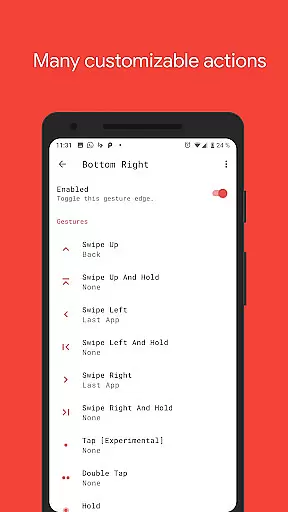
Vivid Navigation Gestures is a powerful tool that revolutionizes the way you interact with your Android device. This app allows users to control their devices through intuitive gestures, eliminating the need for traditional button presses. With support for multiple gesture triggers across different areas of the screen, it offers a highly customizable navigation experience.
The app stands out with its fluid visual effects during gesture interactions and an extensive range of available actions. From launching Google Assistant to taking screenshots, Vivid Navigation Gestures provides comprehensive control options. It even enables hiding the stock navigation bar for a cleaner interface, though this feature requires ADB or root access. Suitable for power users seeking enhanced productivity and customization.
One of the key features of Vivid Navigation Gestures is its diverse set of gesture controls. Users can perform various swipes, taps, and holds from multiple trigger points on the screen edges. The app supports complex actions like toggling split-screen mode, opening quick settings, and controlling media playback.
Accessibility services are utilized to execute system-level actions such as back navigation and home button functions without collecting any personal data. Advanced users will appreciate the ability to hide the navigation bar completely when gestures are enabled. The app also maintains beautiful fluid effects during gesture operations, enhancing the overall user experience while providing precise control over device functionality.
Gestures have become a pivotal way to interact with mobile devices, and Vivid Navigation Gestures excels in this domain by offering precise gesture controls that replace traditional button presses. The app supports multiple gesture triggers from various screen edges, ensuring users can operate their devices intuitively without the need for physical buttons.
With a wide array of available gestures such as swipe up, swipe left, and double tap, each action is accurately mapped to perform specific tasks like launching Google Assistant, going back, or opening notifications. This extensive customization empowers users to tailor the functionality according to their preferences, enhancing both convenience and efficiency.
The app's ability to execute actions programmatically through accessibility services ensures reliable performance for critical navigation functions such as back, home, or quick settings. By maintaining high standards of core function accuracy, Vivid Navigation Gestures delivers an effective tool that streamlines device interaction while preserving user privacy since it does not collect data via these services.
Vivid Navigation Gestures offers a streamlined interface that makes gesture-based navigation simple and intuitive for users. With visually appealing effects accompanying each gesture, the app provides clear feedback during interactions, which aids in learning and adapting to the new control scheme effortlessly.
Despite the complexity of its features, including multiple gesture triggers and customizable actions, the app maintains an accessible design. Users can easily navigate through options to enable or disable the navigation bar, assign gestures to specific actions, and adjust settings without feeling overwhelmed by technical jargon or complicated menus.
For advanced functionalities like hiding the stock navigation bar, which requires ADB or root access, the app supplies straightforward instructions. This approach balances powerful capabilities with user-friendly guidance, making sophisticated tools approachable even for less tech-savvy individuals while still catering to power users seeking deeper customization.
Highly customizable
Extensive gesture options
Beautiful fluid effects
No data collection
Powerful accessibility tools
ADB or root required for some features
Complex setup process
May conflict with system UI
Limited to Android platform
Steeper learning curve

Easily install aab(Android App Bundle) files on your Android device with our app
 4.80
4.80
PDF Reader - Document Viewer: Read, Manage & Organize Your Documents
3.10
Remote for Roku, Fire TV, Samsung TV, LG TV, Android TV, Chromecast and VIZIO TV
4.20
ADB support Android 4.X-Android 13(Support wireless pair mode).No root required!
4.70
View detailed information about your Nissan Leaf the dealer never shows you.
4.10
Making emulation easy for everyone!
4.30
WiFi Signal Strength Meter help you detect WiFi Signal Strength in real time.
4.80
Screen Mirroring with sound for Samsung TV, LG TV, Sony TV, Smart TV and Browser
4.20
Introducing Smart Printer, your ultimate destination for printing solutions!
4.00
Small and simple app to Verify Root Access and BusyBox Install!
4.70
HD Video player and downloader for all formats, fast & smooth 4K video playback.
4.60
Use your phone as a webcam on your computer over WiFi or USB.
4.40
Clean up large files and similar photos, fast and easy to use
4.40
Effortlessly run ADB commands directly on your device without a PC.
4.20
MS-DOS in your pocket. Play old DOS games anywhere you are ;)
4.10
Amateur Radio app for APRS: Track friends, exchange messages, get tactical info.
3.90
Create your own custom widget with endless possibilities
3.90
Clean the junk files on your device
3.40
Save any video in HD - paste the link, download fast and watch offline.
4.0


User Reviews