

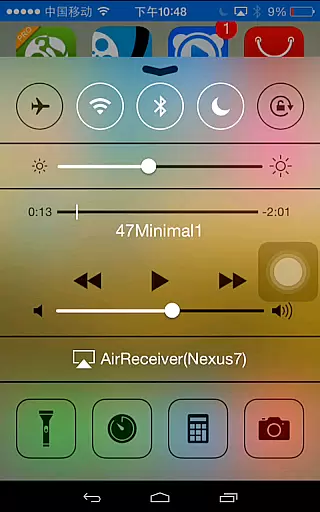
AirReceiver is a versatile streaming solution that supports multiple protocols including AirPlay, Cast, Wireless Display, and DLNA. This application allows users to stream screens, photos, music, and videos from their phones or laptops directly to their TV screens.
Designed to operate seamlessly in the background, AirReceiver is optimized for Android TV/Box, making it an ideal choice for users seeking an integrated entertainment experience. Its compatibility with various devices and support for features like Youtube video streaming and IOS16 ensures a comprehensive media streaming service.
Whether you're looking to mirror your PC screen using AirParrot or stream multimedia content from AirPlay and DLNA clients, AirReceiver provides a reliable and efficient streaming service that enhances your viewing experience.
AirReceiver stands out with its extensive feature set tailored for seamless media streaming. It supports Youtube video streaming and offers audio sync capabilities with other AirExpress devices, ensuring a synchronized audio-visual experience across different platforms.
The app excels in AirMirror functionality, offering top-tier performance among third-party AirPlay applications. With full support for IOS16 and a slideshow feature, AirReceiver caters to a wide range of user needs. Its compatibility with AirParrot further expands its utility by enabling PC screen mirroring on Android Tablets.
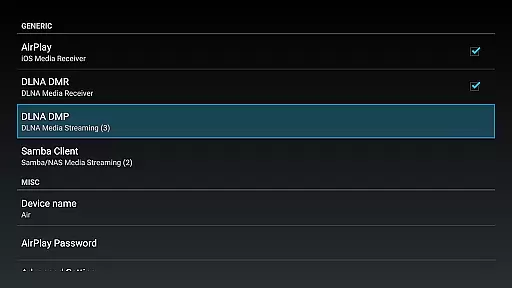
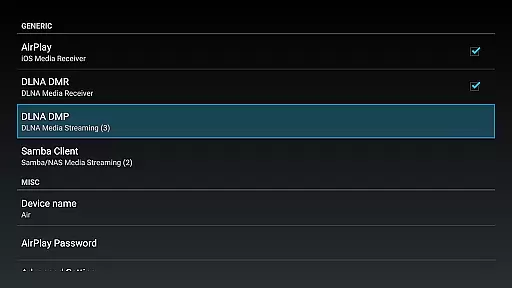
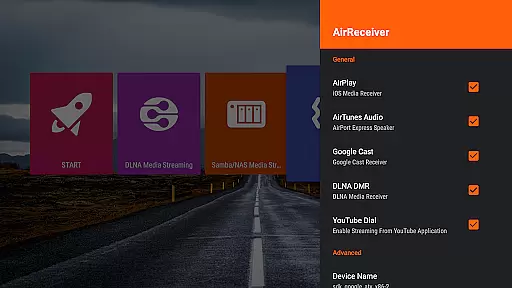
Additional features include the ability to stream audio/video/photo content from both AirPlay and DLNA clients, configurable network names, and the option to run as a background service. Users can also start the app on boot, providing convenience and uninterrupted service.
AirReceiver AirPlay Cast DLNA stands out with its extensive video format compatibility, making it a versatile tool for streaming content across devices. This application supports a wide array of formats, ensuring that users can cast their favorite videos from their phones or laptops to their TV without worrying about format incompatibility.
The app's support spans across popular protocols such as AirPlay, Cast, Wireless Display, and DLNA. Whether you're looking to stream a YouTube video or mirror your PC screen using AirParrot, AirReceiver has got you covered. It ensures seamless playback of media, regardless of the source device or file type.
Moreover, AirReceiver is optimized for Android TV/Box, providing an uninterrupted streaming experience. Its ability to run in the background as a service further enhances its utility, allowing users to multitask without interrupting their media streaming sessions.
By offering configurable network names and the option to start on boot, this app provides both flexibility and convenience. Users can easily integrate it into their existing setups, enjoying a hassle-free streaming experience that caters to all their video playback needs.
While AirReceiver AirPlay Cast DLNA primarily focuses on streaming capabilities, it also incorporates AI-powered editing features that enhance user interaction with media content. Although not its main selling point, these features contribute significantly to the overall user experience by allowing modifications and enhancements to streamed content.
The app facilitates audio sync with other AirExpress devices, showcasing an intelligent system that adjusts to ensure optimal playback quality. This feature is particularly beneficial when streaming music or videos where audio-visual synchronization is critical for the best user experience.
Additionally, AirReceiver supports slideshow features and screen mirroring through AirMirror, which, although CPU intensive, offers unparalleled performance within third-party AirPlay applications. These functionalities allow users to customize their presentations or shared screens effectively.
With full support for IOS16 and compatibility with various AirPlay and DLNA clients like iTunes, iOS devices, WMP12, and AirShare, AirReceiver ensures that users have comprehensive control over their media playback environment. This adaptability makes it an indispensable tool for those seeking advanced yet user-friendly media management solutions.
Multi-protocol support
Seamless streaming
Optimized for Android TV
IOS16 compatibility
Efficient background service
High CPU usage
Limited device compatibility
Port conflicts possible
No native Chromecast support
Premium features locked behind paywall

Auto video maker with music & exclusive filters. Video editing made simple.
 4.50
4.50
Snaptubè Video Downloader app allows to download videos and music in Snaptube. .
4.60
Play ALL formats in 4K & HD. Video downloader, MP3 player, Chromecast & more.
4.80
KMPlayer Plus (Divx Codec) officially support Divx codec.
4.30
Find, download, and play torrents with the official BitTorrent® Pro app
4.70
Browser + Remote for Roku to stream webvideos, online movies and livestreams
4.60
Browser for Fire TV to stream webvideos, online movies, livestreams in HD
4.40
AI Video Editor with Music, Filter, Slideshow, Effect, Merge & Trim Video.
4.80
Manage your YouTube channel on the go
4.40
A Quick and Pro Video Editor
4.70
GENRAL PRO - General Pro is the best video player that fully supports all formats.
4.70
All in one HD video downloader & player for multiple formats with full privacy
4.70
A Simple app to download Video & Music from the Internet.
4.70
Screen recorder with audio to take live videos & Screenshot in high quality!
4.70
Watch IPTV on your Android device
4.60
Viddo: Generate Action Figure, AI Anime, AI kiss, AI hug Video from image & text
4.40
1)AirPlay/DLNA Mirroring/Streaming, up to 4 connections; 2)Samba/NAS/DMS Player.
4.00
Online Videos Player
3.90
Cast to Smart TV, Fire TV. Cast video, photo - Fast & Stable!
3.90


User Reviews