
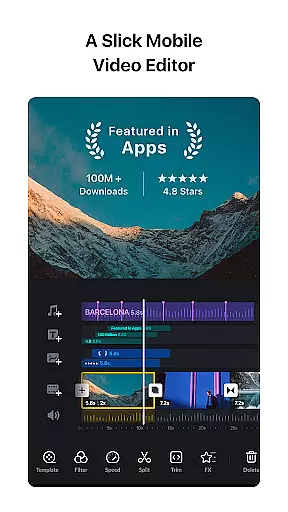
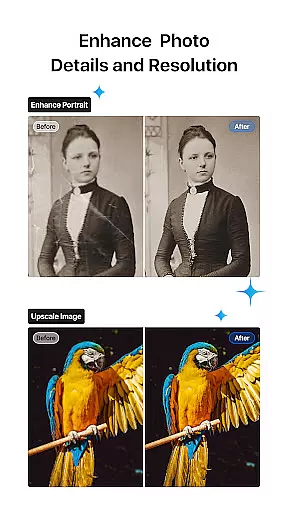
VN is a powerful yet user-friendly video editing app designed for both amateur and professional creators. With an intuitive interface, it eliminates the need for prior editing knowledge while offering advanced features to produce high-quality, professional-grade videos without watermarks. The app supports precise editing through its multi-track timeline, quick rough cut capabilities, and keyframe animations.
One of VN's standout features is its flexible use of materials, allowing users to import music, sound effects, fonts, and stickers via Wi-Fi or messaging apps like WhatsApp. Additionally, its seamless collaboration tools enable project transfers between mobile and desktop devices using cloud services such as Google Drive. Whether you're creating cinematic visuals with rich filters or adding creative transitions, VN provides all the tools necessary to bring your vision to life.
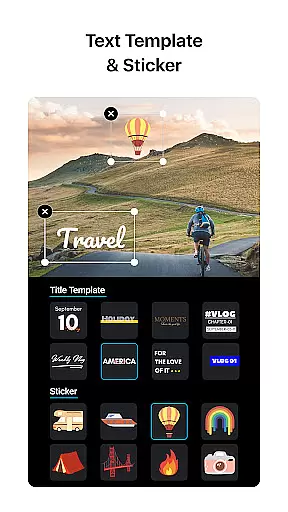
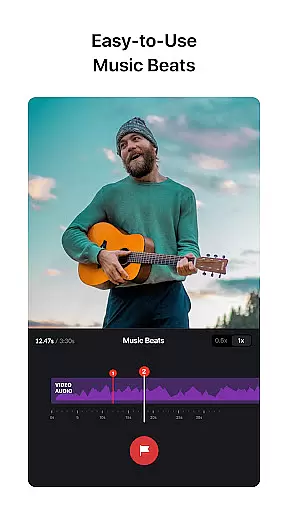
The app also caters to audio enthusiasts with its easy-to-use music beats feature, enabling users to sync video clips to music rhythms effortlessly. With support for 4K resolution exports, customizable text templates, and secure sharing options, VN ensures both creativity and convenience are prioritized. This makes it ideal for vloggers, social media creators, and anyone looking to edit videos with professional polish.
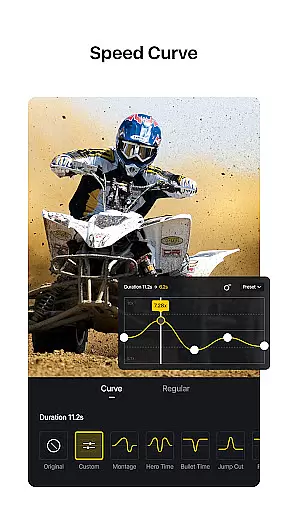
VN offers a comprehensive suite of video editing tools that cater to various creative needs. Its multi-track timeline allows users to layer videos, images, texts, and effects seamlessly. The quick rough cut functionality lets editors zoom in/out and select keyframes as short as 0.05 seconds, ensuring precision in every edit. Advanced features like speed curve adjustments and reverse playback provide dynamic control over video pacing and style.
In addition to its robust editing capabilities, VN includes trending effects and cinematic color grading filters. Users can import LUT (.cube) files to enhance their videos' visual appeal, while built-in transitions and overlays add depth and engagement. The app also supports non-destructive editing, meaning original files remain untouched even after extensive modifications. This flexibility empowers creators to experiment freely without worrying about losing their initial work.
For those focused on audio, VN's music beat markers and voice-over recording tools make synchronizing visuals with soundtracks effortless. Creative templates and rich text customization further expand creative possibilities. Moreover, VN's collaboration features ensure projects can be securely shared across devices, making teamwork smoother than ever. These innovations position VN as a top choice for modern video editors seeking efficiency and versatility.
Video format compatibility is a crucial aspect of any video editing application, ensuring that users can work with a wide range of video files without the need for prior conversion. VN addresses this need by supporting an extensive array of video formats, allowing both amateur and professional editors to import and edit their footage seamlessly.
The app's intuitive multi-track video editor enhances the format compatibility feature by enabling users to manipulate various video clips with precision. Whether it's making quick rough cuts or adjusting speed with the Speed Curve tool, VN ensures that all actions are maintained across different formats, preserving the quality and integrity of the original content.
For creators looking to add a cinematic touch to their projects, VN offers rich filters and the ability to import LUT (.cube) files. This means that regardless of the source format, users can apply sophisticated color grading to their videos, elevating the visual storytelling without worrying about format restrictions.
AI-powered editing features represent the cutting-edge evolution in video editing, automating complex tasks and providing intelligent suggestions to enhance the creative process. VN incorporates such advanced technology to cater to both novice and experienced video editors who seek efficiency and innovation in their workflow.
One of the standout AI features in VN is the Music Beats tool, which intelligently adds markers to align video edits with music beats. This simplifies the process of creating rhythmically precise edits, allowing users to produce professional-quality videos effortlessly. Additionally, the app's smart algorithms assist in optimizing transitions and effects, ensuring they complement the video content.
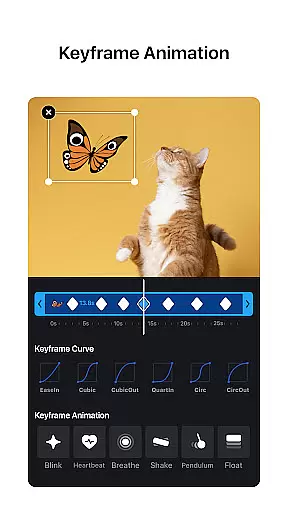
VN also leverages AI for its Keyframe Animation feature, where built-in effects can be customized further with additional keyframes or curves. This flexibility empowers creators to design unique animations that bring their stories to life while maintaining ease of use. With these powerful AI-driven tools at their disposal, users can focus on unleashing their creativity without being hindered by technical complexities.
User-friendly interface
Advanced editing tools
High-quality export options
Flexible material imports
Secure collaboration features
Limited advanced tutorials
Occasional performance lags
Fewer third-party integrations
Preset limitations in free version
Learning curve for beginners

Video player, file manager for all formats, 4K/HD media player supports subtitle
 4.30
4.30
Live TV, anywhere in your home
3.80
High-Quality USB Camera Viewer & HDMI Display
4.70
GENRAL PRO - General Pro is the best video player that fully supports all formats.
4.70
Add date and time watermark to photos and videos
4.50
This app is an emulator of some specific IPTV boxes
3.50
Livestream, news, & gaming content. Watch, chat, and upload. Join Rumble today!
3.80
Viddo: Generate Action Figure, AI Anime, AI kiss, AI hug Video from image & text
4.40
Manage your YouTube channel on the go
4.40
Flud is a simple and beautiful BitTorrent client for Android.
4.80
Cast Videos from Web Browser, IPTV to Roku, Chromecast, DLNA, Smart TV +more
4.60
Fast & Private HD Video Downloader with Built-in Proxy Browser and Video Player.
4.50
AirMirror Receiver - Screen mirroring/cast web videos to Android TV by AirPlay.
4.40
Fast & Private Video Downloader App. Save all videos easily from the Internet.
4.40
Cast to Smart TV, Fire TV. Cast video, photo - Fast & Stable!
3.90
Kodi media center, a free and open source cross-platform entertainment hub
3.60
All in one multi protocols stream receiver for AirPlay, Cast and DLNA.
3.60
Watch full episodes of your favorite Cartoon Network and Cartoonito shows!
3.50
Download videos easily & play them all in one smart, powerful video manager.
3.40


User Reviews