
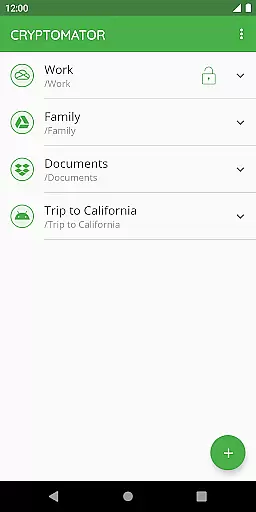
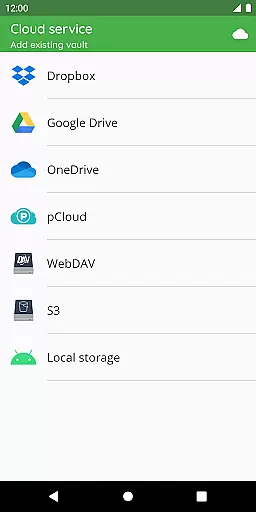
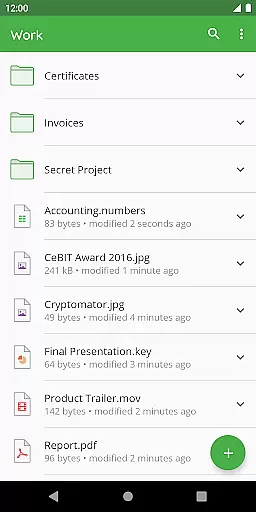
Cryptomator is a user-friendly encryption tool designed to secure your cloud-stored data. It allows you to create secure vaults protected by passwords, ensuring that only you have access to your sensitive information. With compatibility across major platforms and cloud services like Dropbox, Google Drive, and OneDrive, Cryptomator ensures seamless integration into your digital life.
What sets Cryptomator apart is its commitment to privacy and security through open-source technology. The app uses AES encryption with 256-bit key length for both file content and filenames, providing robust protection against unauthorized access. Its ease of use, combined with advanced security features such as automatic vault locking and enhanced brute-force resistance, makes Cryptomator an essential tool for safeguarding personal and professional data.
Cryptomator offers a range of features that make it an indispensable tool for securing your digital assets. One of its standout capabilities is the ability to encrypt files locally before they are uploaded to the cloud, ensuring end-to-end protection. This means that even if your cloud service is compromised, your data remains secure behind strong encryption protocols.
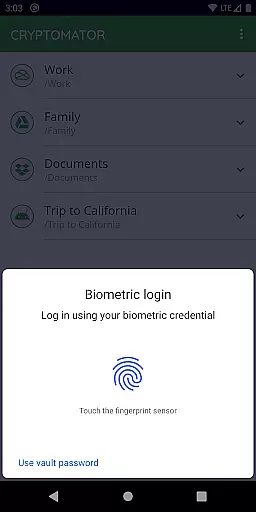
The app also supports biometric authentication, allowing users to unlock their encrypted vaults using fingerprints on compatible devices. Additionally, Cryptomator's open-source nature means that its cryptographic implementations are transparent and publicly documented, fostering trust among users. With support for various cloud storage services and cross-platform availability, Cryptomator provides a versatile solution for anyone looking to enhance their data security without sacrificing convenience.
At the heart of Cryptomator lies its robust core task management system, designed to simplify how users handle sensitive data. This feature allows you to create secure vaults effortlessly, where each vault operates as an encrypted storage space for your files.
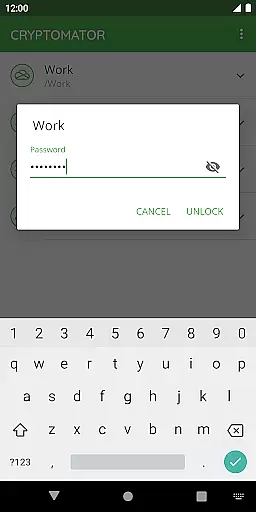
The application ensures that managing these vaults is straightforward and user-friendly. With just a few taps, you can lock or unlock your vaults using a password or even your fingerprint, streamlining access while maintaining top-notch security protocols.
This ease of task management extends to compatibility with various cloud services like Dropbox, Google Drive, and OneDrive. Users can upload their encrypted files directly to these platforms without hassle, knowing their data remains protected at all times.
Cryptomator excels in providing reliable cross-device synchronization, ensuring that your encrypted files are accessible across all your devices seamlessly. Whether you're switching from your mobile device to your computer, the transition is smooth and efficient.
The app supports local storage options on Android, allowing integration with third-party sync applications. This flexibility means you can manage and access your vaults regardless of the operating system you're using, enhancing productivity without compromising security.
Furthermore, Cryptomator's automatic locking feature activates when the app goes into the background, safeguarding your data during unexpected interruptions. This guarantees that your information stays protected, no matter where or how you access it.
User-friendly interface
Strong AES encryption
Compatible with major cloud services
Automatic vault locking
Open-source transparency
No built-in cloud storage
Limited free features
Requires manual setup
Fingerprint sensor required for biometrics
Premium version can be costly

Customizable calendar widget for seamless event sync, planning & scheduling.
 4.00
4.00
All in One PDF Reader: Manage, Read and Edit your Documents
4.20
Font maker keyboard with your own handwriting
4.10
Activate Two Factor Authentication (2FA or Multi OTP), Password manager and more
4.10
Great calculator for Android named one of USA TODAY's "25 Essential Apps".
4.90
A comprehensive suite of tools designed specifically for Lactation Consultants
4.1
Scientific calculator for Android - looks and operates like the real thing!
4.90
Intelligent AI Assistant
4.10
AI Chatbot and AI writing assistant powered by ChatGPT.
4.60
Best Tool for the professionals Electrician, Electrical contractors, etc.
4.90
Use powerful, industry-leading AI tools to generate visual charts from any data
4.80
The long-awaited modern gallery app for your Nextcloud server
4.70
Scan paperwork into PDF/JPG, generate your own e-signature and send fax or email
4.70
Planet Free VPN - The best Fast Unlimited and Secure VPN Without Logs
4.50
PDF scanner & converter for files, photos, lottery, QR codes. One swipe away!
4.50
Device's storage information in a simple and clear graphical form (infographics)
4.10
Create and edit presentations with Google Slides, part of Google Workspace.
4.00
* block pre-roll ads, pop-up and forced redirect ads * Samsung certification app
4.00
⏰ Finally a timer app which can run multiple timers simultaneously on your watch
3.90


User Reviews