
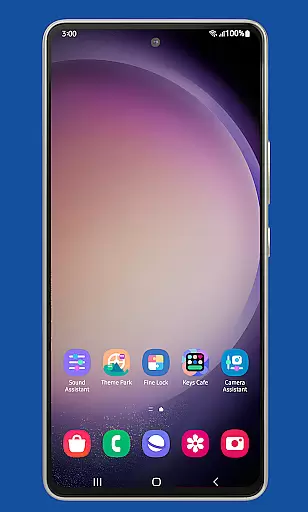
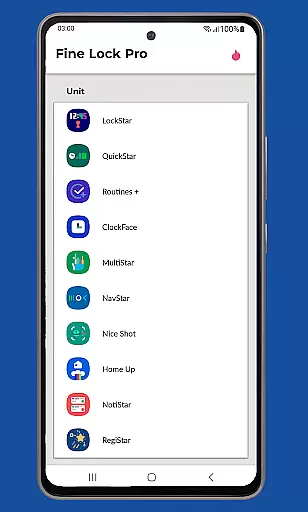
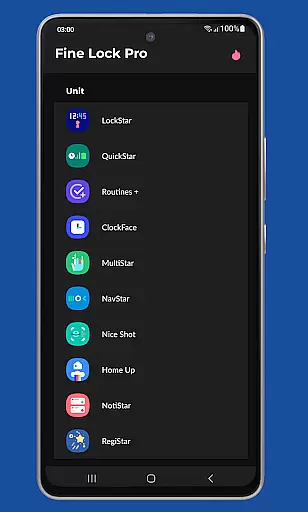
Fine Lock is a specialized launcher app designed exclusively for Samsung devices running official One UI and Android versions 8 or later. It enables users to access and utilize Good Lock and Galaxy Labs modules, which are otherwise restricted to specific markets on the Galaxy Store. The app acts as a bridge, allowing users to customize and optimize their Android experience without regional limitations.
One of its standout features is the support for PRO functionalities such as module shortcuts on the home screen, background update checks, and dynamic wallpapers that adapt to Dark/Night modes. Fine Lock ensures that Samsung users can fully leverage advanced customization tools while maintaining system stability and performance.
This app is particularly useful for tech-savvy individuals who want to personalize their Samsung devices beyond standard settings. By integrating trusted third-party APKs, Fine Lock empowers users to unlock the full potential of their devices in a secure and efficient manner.
Fine Lock offers a range of innovative features tailored for Samsung device owners. As a launcher for Good Lock and Galaxy Labs modules, it provides seamless access to powerful customization tools. Users can download APK modules from trusted sources like APKMirror or Sammobile, ensuring compatibility and security.
The PRO version enhances functionality with features such as app shortcuts on the home screen, automatic background updates, and the ability to hide uninstalled modules. Additionally, Fine Lock supports dynamic wallpapers that change based on the device's Dark or Night mode settings, available on Android 9 and later.
Another notable aspect is its strict adherence to Google Play policies, meaning Fine Lock does not directly provide module downloads. Instead, it guides users to trusted external sources, reinforcing its commitment to user safety and compliance. This makes Fine Lock an essential tool for Samsung users seeking advanced personalization options.
Fine Lock offers a unique approach to personalizing Samsung devices by acting as a launcher for Good Lock and Galaxy Labs modules. These modules provide a wide array of customization options, allowing users to tailor their Android experience on Samsung devices with official Oreo and One UI.
With Fine Lock, users can access features such as module app shortcuts on the home screen and dynamic wallpapers that adapt to the device's Dark/Night modes. This level of customization ensures that each user can create a personalized interface that suits their preferences and needs.
The app is specifically designed for Samsung devices running official Samsung's Android 8 and Android 9+ with One UI, ensuring optimal compatibility and functionality. Users should note that Fine Lock does not support devices running AOSP OS builds like LineageOS, maintaining focus on the Samsung ecosystem.
Theme compatibility is at the heart of Fine Lock's design, ensuring that all visual customizations are seamlessly integrated into the Samsung deviceu2019s existing aesthetic. The app supports dynamic wallpapers that change based on the device's Dark/Night modes, providing a cohesive look that adapts to different lighting conditions and user settings.
By focusing on Samsung's One UI, Fine Lock guarantees that themes and customizations will not lead to crashes or inconsistencies on supported devices. This compatibility allows users to enjoy a stable and visually pleasing experience without worrying about system instability.
For users seeking additional customization, Fine Lock's PRO features offer advanced options like background checks for updates and the ability to hide uninstalled modules, enhancing the overall theme management process while maintaining system performance and reliability.
Enhances customization
Dynamic wallpapers
Background updates
Trusted APK sources
PRO feature support
Samsung-only support
No direct downloads
Limited to One UI
Potential crashes
Regional restrictions

Customizable Glass widgets. Over 360+ stunning widgets and more!
 4.70
4.70
Winter's Journey: digital watch face for Galaxy Watch & Wear OS
4.80
Fingerprint Lock Screen & Live Animations with 4K Wallpapers as Live Wallpaper
4.40
Shimeji adds cute animated characters to your screen, lively and fun.
4.70
Run multiple accounts of the same app on a single device
4.10
Turn text & photos into stunning AI videos, art, and creative visual stories.
4.50
Modern Glass Icon Pack with glossy icons, clean minimal theme & aesthetic style
4.5
Transform your phone with stunning video wallpapers and a unique, personal touch
3.80
Amazing letter fonts in your messages and social statuses
4.70
300+ Stunning and well-designed widgets inspired by NOTHING.
4.70
400+ Beautifully crafted widgets inspired by NOTHING.
4.70
Stunningly Different look with Line Icons and Neon Colors
4.60
Make your phone look simple & luxury, like iDevice
4.60
Choose your keyboard with RGB colors effect, themes, fonts, emojis.
4.60
Ultra realistic gold analog watch face with lots of customization options.
4.50
Unique Fonts, typefaces and stylish text. Fonts for Instagram, Whatsapp & others
4.20
Interactive Miniature Painting Catalogue
3.30
Capture moments that pass like a storm, second by second.
4.2
⭐ OneUI inspired Fluffy Icon Pack – Soft. Stylish. Standout. ⭐
4.5


User Reviews