
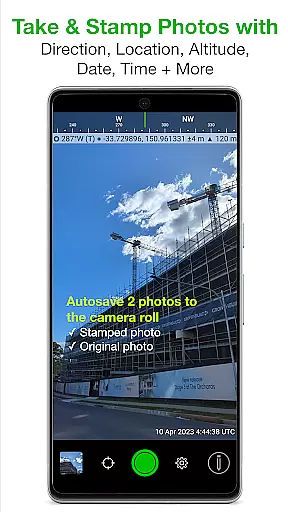
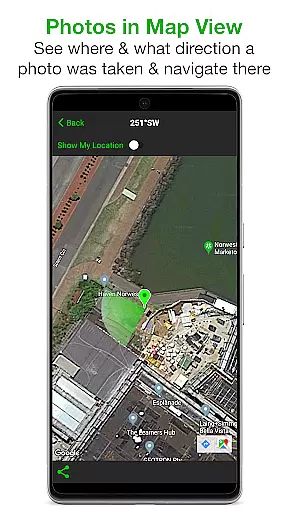
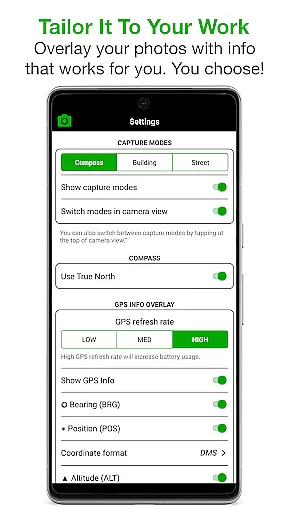
Solocator is a professional GPS camera app designed for fieldwork and photo documentation. It allows users to overlay and stamp photos with critical information such as location, direction, altitude, date, and time. This functionality proves invaluable for industries, government agencies, and professionals who require accurate photo records for their operations.
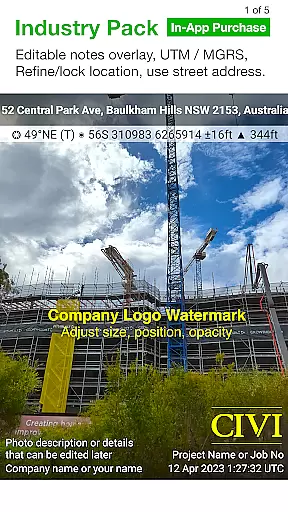
The app offers advanced features through its Industry Pack (available via In-App Purchase), enabling users to capture additional field notes like project name, photo description, and company or username. With tailored overlay options, autosave functionalities, and comprehensive sharing capabilities, Solocator ensures that every photo contains the necessary metadata for professional use.
Solocator stands out with its extensive customization options for photo overlays. Users can select from various data points to stamp on their images, including GPS position in multiple formats, compass direction, altitude, tilt and roll angles, and even street addresses with the Industry Pack. The app supports both front and back cameras, pinch zoom, self-timer, flash, and exposure controls.
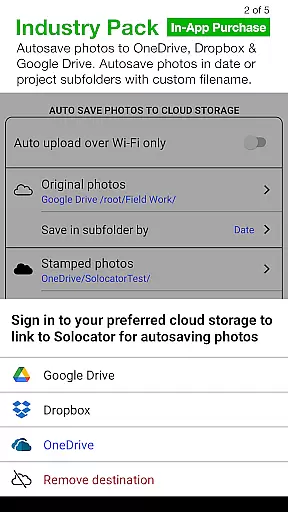
One of the key features is the autosave function, which saves two versions of each photo: one with the selected overlays and one original without any overlays. Additionally, the Industry Pack enhances functionality by allowing editable notes overlays, custom export filenames, batch editing, and integration with cloud storage services like Google Drive, Dropbox, and OneDrive. These features make photo management efficient and adaptable to different professional needs.
Real-time capture and preview functionality is essential for photography applications like Solocator. This feature ensures that users can instantly see the overlaid information on their photos, such as GPS coordinates, compass direction, altitude, and timestamps, before taking a picture. By providing immediate visual feedback, Solocator empowers professionals to verify critical details in the field.
Solocator's real-time overlay system supports both front and back cameras, enabling users to capture selfies or standard shots with equal precision. The app includes advanced camera controls such as pinch zoom, self-timer, flash, and exposure adjustments, all while maintaining the overlaid data visible on the screen. This seamless integration of technical details into the photographic process enhances the reliability of photo documentation.
The value of real-time capture extends beyond convenience; it directly impacts the accuracy of fieldwork. For example, users can ensure that location-based metadata is correctly stamped on images, reducing the risk of errors during post-processing. Additionally, features like autosave streamline workflows by simultaneously saving both original and stamped versions of each photo, ensuring no critical information is lost.
Overall, Solocatoru2019s real-time capture and preview capabilities make it an indispensable tool for industries relying on precise photo documentation. Whether used for surveying, construction, or government projects, this functionality helps professionals maintain high standards of accuracy and accountability in their work.
While Solocator does not focus on AI beauty enhancements typically found in portrait or selfie apps, its ability to naturally enhance photo utility through intelligent overlays sets it apart. Instead of altering appearances, Solocator enriches images with practical, actionable data such as UTM/MGRS coordinates, street addresses, and project-specific notes via the Industry Pack. These enhancements are designed to add professional value without compromising authenticity.
The appu2019s enhancement features extend to customizable export filenames and batch editing options, which allow users to efficiently organize large volumes of photos. By embedding relevant metadata directly into image files, Solocator ensures that every photo remains a reliable record for professional use. This approach prioritizes clarity and usability over aesthetic modifications, aligning perfectly with the needs of technical and industrial applications.
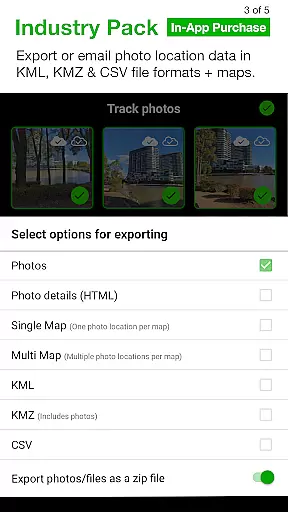
Another standout aspect is Solocatoru2019s support for cloud storage integration, including Google Drive, Dropbox, and OneDrive. This feature simplifies collaboration and backup processes, ensuring that enhanced photos are securely stored and easily accessible across devices. Furthermore, the inclusion of KML, KMZ, and CSV export formats demonstrates Solocatoru2019s commitment to delivering versatile, industry-standard solutions.
In summary, Solocatoru2019s enhancement philosophy revolves around enriching photos with accurate, meaningful data rather than superficial edits. Its natural and functional enhancements cater specifically to professionals who require dependable tools for photo documentation in demanding environments.
User-friendly interface
Comprehensive overlay options
Autosave functionality
Industry Pack enhancements
Cloud storage integration
Paid Industry Pack
Limited on older devices
Complex for casual users
Occasional GPS inaccuracies
Heavy on battery usage

How would you look like with a differently shaped nose, chin or lips?
 3.90
3.90
Safe & smart flight with Go Fly drone controller for 40+ drone camera, zone map
4.50
Turn your phone into a professional camera - full DSLR manual photography
4.30
Future baby face generator: AI kids generator, kid face! What my baby look like?
4.40
Enhance, retouch & create your story - Share the moment with Photoshop Express.
4.60
Transform Photos: Edit, Beautify and Craft Memories & Make Collages!
4.10
Astrophotography with your smartphone, photo live stacking and much more!
3.90
Remote control the phone camera shutter from your smartwatch and take a picture
1.60
Unlock the full potential of your DJI drone with Litchi
4.50
Automatically backup your photos and videos to computer, NAS and Cloud services
4.60
HD Camera Pro with HD Video shooting, Panorama, Photo editor , Beauty Camera.
4.50
Photo editor & gallery. Crop pictures & edit photos offline, no wifi!
4.50
Fit multiple photos on one post. Create carousels & scroll layouts for Instagram
4.50
Smart, light, and fast photo and video gallery
4.30
Virtual makeup, hair filters & body tuner—edit from face to full body!
4.20
Turn photos into cartoons & avatars! - Photo Editor, Cartoon Face!
3.90
USB Storage Access for Photos, Videos, Music and Documents
3.80
Perfect photos with body shaping, BG changer and object remover.
3.70
Professional video recording application with manual controls for filmmakers!
2.80


User Reviews