
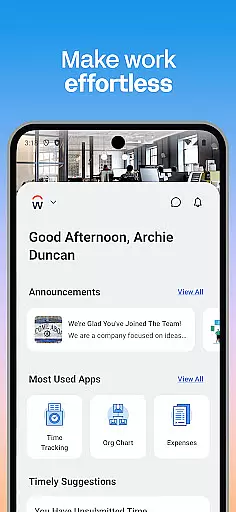
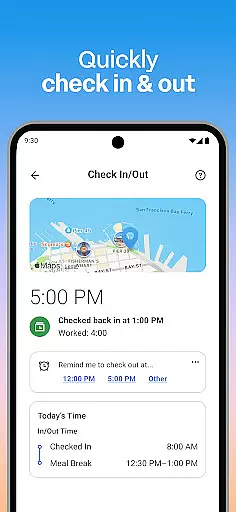
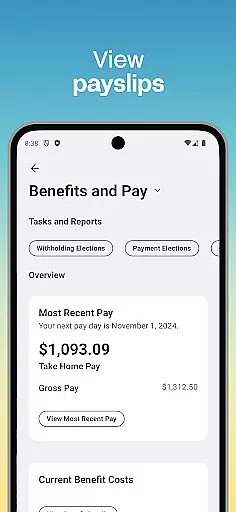
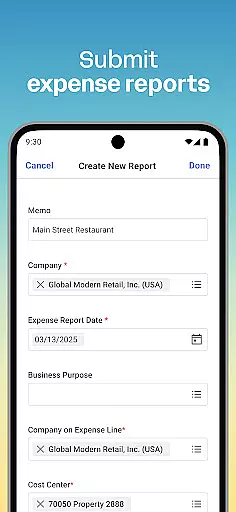
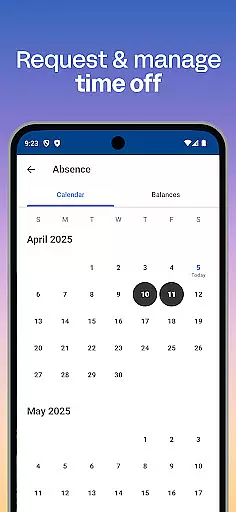
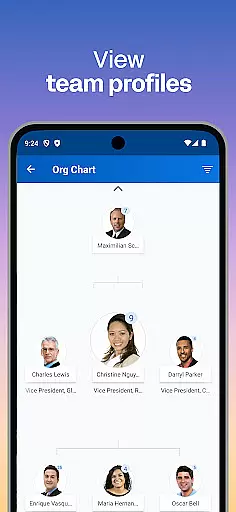
Workday is a comprehensive business management application designed to enhance workplace productivity through a single, unified platform. The app provides users with instant access to a wide array of Workday tasks, including time tracking, expense submission, and team communication.
One of the standout features of Workday is its ability to send push notifications, ensuring that users never miss important deadlines or tasks. Additionally, it offers HR and employee management tools specifically tailored for managers, allowing them to approve requests, manage payroll, and conduct performance reviews with ease.
Whether you're an employee looking to check in to work, request time off, or learn new skills, or a manager needing to oversee team operations, Workday provides a flexible and personalized experience. Its intuitive design and robust security measures, such as biometric authentication and cloud-based data storage, ensure that your information remains safe and up-to-date at all times.
Workday stands out due to its extensive range of features that cater to both employees and managers. For employees, the app offers functionalities like submitting timesheets and expenses, viewing payslips, requesting time off, and connecting with teammates. These features are designed to streamline daily tasks and improve overall productivity.
For managers, Workday provides advanced HR tools such as approving employee requests with a simple tap, viewing detailed team profiles, adjusting employee roles, managing payroll, and conducting performance reviews. The app also includes interactive reports and dashboards, offering valuable insights into team performance and operational efficiency.
Another notable aspect of Workday is its emphasis on security and ease of use. The app employs best-in-class security measures, including biometric authentication, to protect user data. Furthermore, because all information is stored in the cloud, users can access the most current data from any location, ensuring they are always informed and up-to-date.
Collaboration is at the heart of workplace productivity, and Workday excels in providing tools that enhance team cooperation. The app allows users to connect with teammates effortlessly, making communication seamless and efficient. With features like team profiles and interactive reports, users can stay informed about their colleagues' roles and contributions.
Managers have additional capabilities to foster collaboration within teams. They can approve employee requests with a simple tap, give performance reviews, and adjust employee roles as needed. This streamlined approach ensures that teamwork is not only encouraged but optimized for better results.
The app also supports real-time updates and notifications, ensuring that all team members are on the same page. Push notifications remind users of important tasks, keeping everyone aligned and productive. These collaborative features make Workday an essential tool for modern workplaces aiming to boost efficiency through enhanced teamwork.
Effective task management is crucial for maintaining productivity, and Workday offers a comprehensive suite of tools to help users manage their tasks efficiently. From submitting timesheets and expenses to requesting time off, the app covers a wide array of daily tasks that employees encounter. This ensures that users can handle their responsibilities without switching between multiple applications.
For managers, Workday provides advanced task management features such as viewing employee timesheets, managing payroll, and requesting compensation changes. These functionalities enable managers to oversee their team's workload and make necessary adjustments swiftly. The ability to browse interactive reports and dashboards further enhances their capability to monitor progress and performance.
Moreover, the app's intuitive design organizes these tasks in a user-friendly manner, making it easy for anyone to navigate and utilize its features. Whether checking in and out of work or learning new skills with training videos, Workday ensures that task management is both flexible and personalized, catering to individual needs while maintaining overall organizational efficiency.
User-friendly interface
Comprehensive task management
Robust security features
Real-time data access
Customizable user experience
Limited third-party integrations
Occasional sync issues
Steep learning curve
High cost for small businesses
Requires constant internet connection

The Penny Puss app with DG penny finder
 4.10
4.10
VSD Viewer - Visio Drawings Viewer for Android Preview VSD, VDX, VSDX drawings
4.10
Finance, Investing, Stocks, Trading and Stock news
4.60
Use Generative Summary to understand your rental or insurance docs in seconds.
4.70
All your team communication in one place
4.70
Access to Paylocity, empowering employees with information they need 24/7.
4.70
Permission Guard is a security app that helps you manage app permissions.
4.80
On the go? Take FedEx with you.
4.00
Chat, meet, and collaborate to achieve more together, all in one place on Teams
4.60
BuildCalc - the easiest AND the most advanced construction calculator app.
4.80
Make invoices, bills, receipts & estimates on the go with Invoice Generator.
4.70
We help people get jobs
4.70
Mobile POS for any business: sales, invoices, retail, restaurants & appointments
4.60
No more passwords, easier sign-in, and greater protection for your accounts.
4.60
Amazon A to Z is the place to manage your work-life at Amazon.
4.50
Say hello to the mobile work experience built to help you thrive at work.
4.30
The All-in-One File Manager for Phone, TV, Watch, Cars, XR / VR, Chromebook
4.10
Zoom built for Chrome OS
3.90
viewing and sharing of PDFs
3.60


User Reviews