
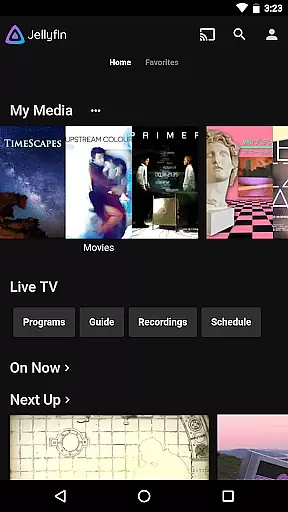
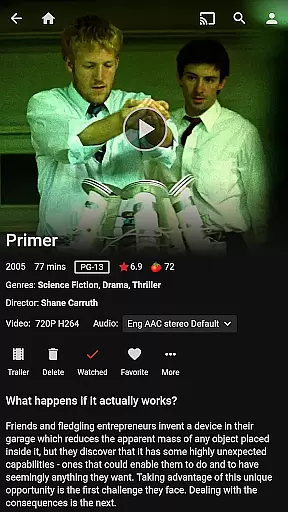

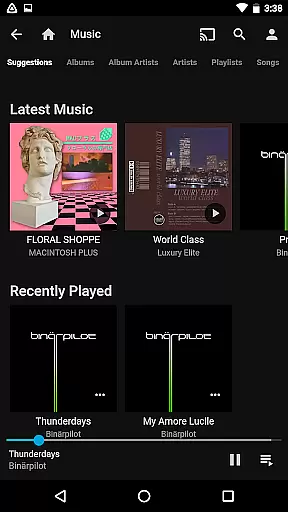


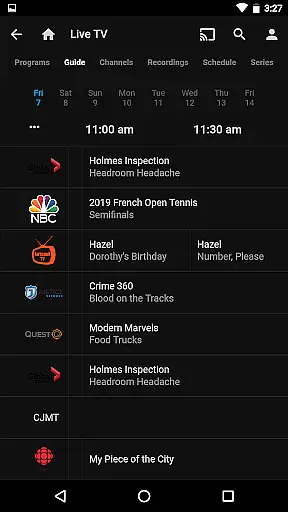

Jellyfin is an open-source media server and player that allows you to manage and stream your personal media collection. This Android app serves as the official companion, enabling users to access their media library from anywhere. With support for live TV, recorded shows, and Chromecast streaming, Jellyfin offers a complete entertainment solution.
The app provides a user-friendly interface to organize and view your audio, video, and photo collections seamlessly. Whether you're at home or on the go, Jellyfin ensures your media is accessible through a robust streaming platform. Its commitment to privacy and freedom makes it an ideal choice for those seeking an ad-free experience.
Jellyfin stands out with its comprehensive feature set tailored for media enthusiasts. The app supports Live TV and DVR functionality, allowing users to watch and record television through compatible hardware. Integration with Chromecast enables effortless streaming to your TV directly from your Android device.
One of the key highlights is its cross-platform synchronization, ensuring your media library is always up-to-date regardless of the device. The app also supports offline playback for music, making it perfect for commutes or areas with limited connectivity. With its focus on user privacy and open-source development, Jellyfin delivers a secure and customizable media experience.
Video format compatibility is a crucial feature for any video player, ensuring that users can enjoy their media without worrying about technical limitations. Jellyfin excels in this area by supporting a wide range of video formats, from common ones like MP4 and AVI to more specialized codecs such as MKV and OGG.
The app's robust decoding capabilities allow seamless playback of videos stored on your Jellyfin server. Whether you're streaming high-definition movies or home videos, the platform ensures smooth performance across different devices and network conditions.
For users, this means unparalleled flexibility in managing their media libraries. You can upload content in virtually any format and trust that Jellyfin will handle it properly. This eliminates the need for time-consuming format conversions and ensures that your viewing experience remains uninterrupted.
Moreover, Jellyfin's commitment to open standards means that its format support will continue to expand as new codecs emerge. This future-proof approach guarantees that your media collection remains accessible regardless of technological advancements.
While primarily a media server and player, Jellyfin incorporates AI-powered features that enhance the video management and playback experience. These intelligent capabilities help optimize media organization and improve overall usability.
The platform uses machine learning algorithms to automatically tag and categorize your video content. This smart organization system analyzes video metadata and visual content to create meaningful categories and collections, making it easier to navigate large media libraries.
Jellyfin's AI also contributes to improved playback performance through adaptive streaming technology. The system intelligently adjusts video quality based on your network conditions, ensuring smooth playback without manual intervention.
Although not a traditional video editor, Jellyfin's AI features provide valuable tools for media management. The automatic chapter detection and scene identification helps users quickly find specific moments in their videos, while smart thumbnails generate visually appealing preview images for each video file.
User-friendly interface
Chromecast integration
Live TV support
Offline playback
Privacy-focused
Requires separate server
Limited offline features
No built-in media store
Hardware-dependent DVR
Complex setup

A full editing room to accompany your Insta360 cameras and handheld gimbals.
 3.30
3.30
A Quick and Pro Video Editor
4.70
Fast video downloader & private browser. Save HD clips to watch offline.
4.40
HD video maker with no watermark, no ads & vlog maker with music, PIP, text
4.50
Support 1000+ Video Format, Subtitle Download, mp3 & Background Play, Cast On TV
4.60
1)AirPlay/DLNA Mirroring/Streaming, up to 4 connections; 2)Samba/NAS/DMS Player.
4.00
The essential companion to your Blue Iris PC software
2.50
Photo editor & video maker with music and slideshows.
4.10
convenient, safe and fast at Video Downloader & Player
4.60
Download videos and play them offline
4.70
HD Video player all format, HD Videos, Cast & Subtitle. No annoying ads.
4.60
KMPlayer Plus (Divx Codec) officially support Divx codec.
4.30
Powerful Video Editor & Photo Editing App —— Quick Edits & Stunning Effects!
4.30
Video Downloader is an utility that can save videos and music from web sites
4.20
Powerful, professional, versatile teleprompter. Developed by an active film crew
4.00
AI Video Editor:AI Music, Text to Video,Text to Speech,Auto Caption,Video Effect
4.00
Manage your IPTV live channels and VOD playlists (no playlist included)
3.80
This app is an emulator of some specific IPTV boxes
3.50
Download videos easily & play them all in one smart, powerful video manager.
3.40


User Reviews