
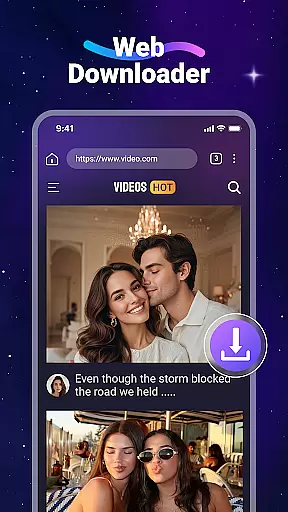



Video Downloader is a versatile utility app designed for users who want to download and manage videos and music files directly from websites. The app offers fast download speeds and supports all major file formats, including MP4, MP3, AVI, and more. With its built-in web browser, users can easily navigate to their favorite sites and download media content with just a tap.
One of the standout features is the ability to play downloaded videos offline using the integrated media player. This makes it an ideal solution for those who frequently travel or have limited internet access. Additionally, the app supports SD card storage, allowing users to manage larger files efficiently while saving internal device space.
The app's user-friendly interface and background downloading capability make it suitable for both casual users and tech-savvy individuals. By providing tools like bookmarking and file management, Video Downloader ensures that users can organize their media library effectively, enhancing their overall digital experience.
Video Downloader stands out with its comprehensive set of features tailored for seamless media management. The app boasts an impressive download speed, ensuring that users can quickly save large video files without significant delays. Its built-in web browser simplifies the process of finding and downloading content, as it automatically detects downloadable media on web pages.
Another key feature is the integrated media player, which allows users to watch downloaded videos offline without needing an internet connection. This functionality is particularly useful for long trips or areas with poor connectivity. Furthermore, the app supports background downloading, enabling users to continue using their devices while files are being saved.
For those concerned about storage, Video Downloader offers SD card support, giving users the flexibility to store files externally. The app also includes a robust file management system, accessible via the 'Files' tab, where users can organize, play, and delete their media. These features collectively provide a powerful toolset for managing digital content efficiently.
Video Downloader stands out for its extensive video format compatibility, ensuring that users can download and play videos in a wide array of formats without any hassle. This feature is crucial for those who frequently download content from various sources, as it eliminates the need for additional conversion software.
The app supports all major formats including MP4, AVI, WMV, and MOV, among others. This versatility ensures that no matter the source of the video, users can easily save it to their device. The inclusion of both standard and high-definition formats means that quality is preserved, providing an optimal viewing experience offline.
Moreover, Video Downloader's ability to handle different audio formats such as MP3 and M4A adds another layer of convenience. Users can extract audio from videos or download music files directly, catering to diverse multimedia needs. This comprehensive format support enhances user satisfaction by offering flexibility and ease of use.
By prioritizing video format compatibility, Video Downloader not only meets but exceeds user expectations, making it a reliable choice for managing digital content across multiple platforms.
In addition to its downloading capabilities, Video Downloader incorporates AI-powered editing features that elevate the user experience. These intelligent tools allow users to make quick edits to their downloaded videos, enhancing them with minimal effort. Such features are particularly beneficial for users looking to personalize their content or prepare videos for sharing on social media.
The AI technology integrated into the app can automatically adjust video settings such as brightness, contrast, and saturation, ensuring that every clip looks its best. It also offers smart trimming and cutting options, enabling users to remove unwanted sections or split videos into shorter clips effortlessly.
Furthermore, the app includes intuitive filters and effects powered by AI algorithms. These enhancements can transform ordinary footage into visually stunning creations, adding a professional touch to amateur videos. With these advanced editing capabilities at their fingertips, users can unleash their creativity without needing specialized skills or software.
By leveraging AI-powered editing features, Video Downloader not only simplifies the post-production process but also empowers users to produce high-quality content that stands out in today's digital landscape.
User-friendly interface
Fast download speeds
Offline playback
SD card support
Background downloading
No YouTube support
Limited to legal downloads
Requires permissions
Ads in free version
File format restrictions

A full editing room to accompany your Insta360 cameras and handheld gimbals.
 3.30
3.30
HD Video player all format, HD Videos, Cast & Subtitle. No annoying ads.
4.60
A Quick and Pro Video Editor
4.70
Fast video downloader & private browser. Save HD clips to watch offline.
4.40
AirMirror is Receiver for Screen Mirroring and Casting from Apple Devices.
3.60
An easy-to-use and all-round screen recorder with audio
4.80
Find, download, and play torrents with the official BitTorrent® Pro app
4.70
Browser for Fire TV to stream webvideos, online movies, livestreams in HD
4.40
Livestream, news, & gaming content. Watch, chat, and upload. Join Rumble today!
3.80
Download videos and play them offline
4.70
Fast & easy HD video downloader for all formats, support 4K playback & download.
4.60
Watch IPTV on your Android device
4.60
Auto video maker with music & exclusive filters. Video editing made simple.
4.50
This app was created to edit the metadata of music files.
4.20
Video player with 4K & 1080P support, popup play, background play and subtitle.
4.20
Your media, on your terms.
4.10
VLC for Android is the best open source video and music player, fast and easy!
4.10
Watch full episodes of your favorite Cartoon Network and Cartoonito shows!
3.50
The essential companion to your Blue Iris PC software
2.50


User Reviews