
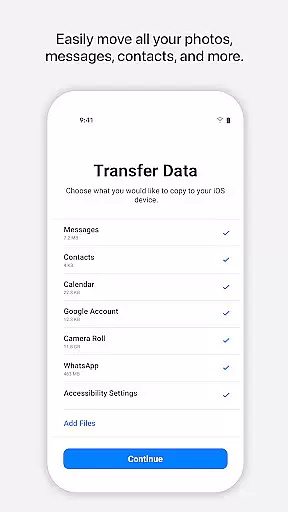
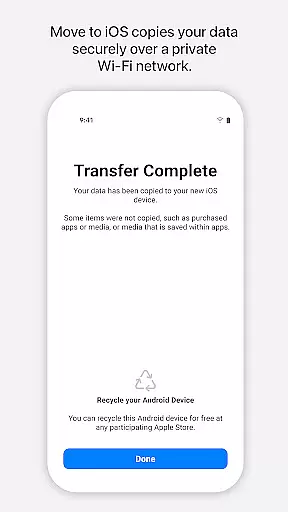
Move to iOS is a powerful migration tool designed to simplify the process of switching from Android to iPhone or iPad. This application enables users to transfer all essential content securely and automatically, including contacts, photos, videos, message history, mail accounts, calendars, and even WhatsApp data. By creating a private Wi-Fi network between devices, Move to iOS ensures a seamless transition without requiring external storage solutions.
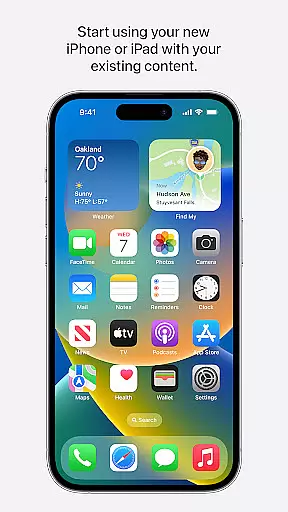
The app's standout feature is its ability to migrate data directly, eliminating the need for manual backups or third-party services. Whether you're upgrading to a new Apple device or making the switch for the first time, Move to iOS provides an intuitive solution that places your content exactly where it needs to be on your new device. With support for a wide range of content types, this tool ensures you can start using your iPhone or iPad with minimal disruption.
Move to iOS offers a comprehensive set of features tailored to streamline device migration. One key functionality is its secure private Wi-Fi network, which connects your Android device to your new iPhone or iPad without exposing your data to external threats. This ensures that sensitive information like call logs, contacts, and media files are transferred safely.
In addition to basic data migration, the app supports advanced content transfers such as WhatsApp histories, voice memos, and multi-media messages. Optional permissions allow users to customize what they wish to migrate, including SMS threads, music libraries, and phone settings. These granular controls empower users to tailor their migration experience while maintaining ease of use. The result is a highly versatile tool that adapts to individual needs, ensuring a smooth transition regardless of the volume or type of data being moved.
Move to iOS is designed with precision to ensure the seamless transfer of user data from Android devices to iOS. The app's core functionality revolves around its ability to automatically and securely migrate a wide array of content, including contacts, message history, photos, videos, mail accounts, calendars, and even WhatsApp content.
The effectiveness of Move to iOS lies in its straightforward process. By creating a private Wi-Fi network between devices, it facilitates a direct and secure connection, ensuring that all transferred information reaches the correct destination on the new iPhone or iPad without the need for third-party intervention or additional storage solutions.
Users benefit significantly from this tool as it eliminates the hassle typically associated with switching operating systems. With just a few steps, users can enjoy a complete transfer, allowing them to start using their new Apple device immediately with all their essential data intact and organized.
The interface of Move to iOS reflects Apple's commitment to simplicity and user-friendliness. It features an intuitive design that guides users through each step of the migration process without overwhelming them with technical details or complex settings.
Upon launching the app, users are presented with clear instructions that make the transition appear less daunting. Its minimalistic approach ensures that even those who may not be tech-savvy can navigate through the application effortlessly, focusing solely on entering a security code before the migration begins.
This simplistic yet effective interface design provides reassurance to users during what could potentially be a stressful switch between platforms. By reducing the cognitive load and streamlining interactions, Move to iOS delivers an experience that feels both natural and intuitive, enabling users to concentrate on enjoying their new device rather than worrying about the intricacies of data migration.
User-friendly interface
Secure data transfer
Wide content compatibility
No external storage required
Private Wi-Fi connection
Limited to Apple ecosystem
Requires stable internet
Optional permissions needed
Android version dependency
Slower for large datasets

PDF Reader - Document Viewer: Read, Manage & Organize Your Documents
 3.10
3.10
Fluid navigation gestures for all of us!
4.30
Universal TV remote control all TVs, Roku, LG, Samsung, Fire, Vizio, Sony, TCL.
4.40
App that Recover your pictures, videos or files after you delete them.
4.20
MS-DOS in your pocket. Play old DOS games anywhere you are ;)
4.10
Excellent scientific calculator with symbolic algebra, integrals, derivatives
4.80
WiFi Signal Strength Meter help you detect WiFi Signal Strength in real time.
4.80
The ultimate tool for network analysis, wifi scanning and problem detection.
4.90
Mobile Security with Scam Protection | Malware & Virus Cleaner | Safe Browser
4.70
Monitor car performance in real time and troubleshoot malfunctions.
4.80
The one-and-only remote control for PC, Mac, and Linux
4.70
Quickly switch to an encrypted DNS server on Android TV
4.50
Screen Mirroring for Roku Sticks, Roku TCL TV and Roku Hisense TV
4.50
Pro Emulator is an easy to use game console emulator for a range of consoles.
4.40
Quickly check the frequency of the Earth
4.30
Quickly & easily calculate the spacing of handrail balusters
4.20 4.10
4.10
Amateur Radio app for APRS: Track friends, exchange messages, get tactical info.
3.90
Transfer Files, APK from Phone to Watch & Install.
4.0


User Reviews