


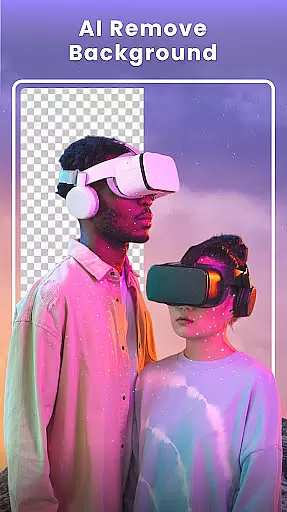



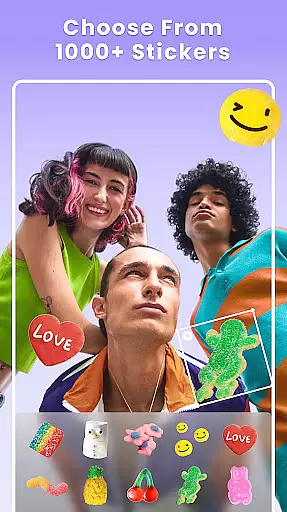

Photo Collage Maker - FunPic is a versatile photography app designed to help users create stunning photo collages and video stories. With over 300 layouts, users can combine photos into eye-catching arrangements while utilizing creative tools like filters, text, stickers, and brushes. The app also features AI-powered editing options such as background removal and object erasure, making it easy to craft flawless images.
Beyond static collages, FunPic offers dynamic video collage capabilities, allowing users to merge videos and photos with music, voice recordings, and decorative elements. Whether for Instagram posts, personal memories, or special occasions, this app provides all the tools needed to tell compelling visual stories.
FunPic stands out with its extensive range of creative features tailored for every style and occasion. Users can access over 1000 stickers, backgrounds, and themed templates to enhance their collages. The app supports advanced customization through doodles, text overlays, artistic filters, and aspect ratio adjustments, ensuring compatibility with platforms like Instagram and WhatsApp.
One of the key highlights is the AI-driven functionality, including automatic background removal and object cleanup. These tools ensure professional-quality edits without requiring expert skills. Additionally, the video collage maker lets users blend media formats seamlessly, adding music and transitions to produce captivating multimedia stories that stand out on social feeds.
Real-time capture and preview functionality is essential for any photography app as it allows users to see exactly what their camera sees before taking a shot. This ensures that the framing, lighting, and composition are all perfect before capturing the moment.
Photo Collage Maker - FunPic offers an intuitive real-time preview feature that lets you experiment with different collage layouts and photo arrangements on the fly. With over 300 layouts available, you can instantly see how your photos will look in various configurations, ensuring that your final creation matches your vision.
The app also provides live previews of filters, stickers, text overlays, and other decorative elements. This means you can witness the transformation of your photos in real time, making it easier to decide which enhancements best suit your style and story.
By offering such dynamic and responsive real-time features, Photo Collage Maker - FunPic empowers users to create stunning collages with confidence, knowing exactly how their artistic choices will appear in the final product.
AI beauty and enhancement features have become increasingly popular in photography apps, allowing users to refine and beautify their images with minimal effort. The key to successful AI enhancements lies in maintaining the natural look of the photos while still improving their overall quality.
With Photo Collage Maker - FunPic, advanced AI tools help users remove unwanted objects from images seamlessly. Whether it's a distracting background element or an unexpected photobomber, the AI eraser tool works like magic to clean up your photos without leaving any traces.
In addition to object removal, the app includes powerful AI-driven photo editing capabilities such as automatic background removal and replacement. These features ensure that every collage looks polished yet retains its authentic feel, enhancing the subject matter rather than overshadowing it.
By focusing on natural-looking enhancements, Photo Collage Maker - FunPic ensures that users can elevate their photo collages while preserving the genuine essence of their captured moments, resulting in visually appealing yet true-to-life creations.
User-friendly interface
Extensive layout options
AI-powered editing tools
Versatile customization features
Regular content updates
Premium features locked behind paywall
Ads may disrupt workflow
Occasional performance lags
Limited free template selection
Subscription costs add up

All-in-One Editor & AI Photo Enhancer, Beautify & Retouch, Collage, Cartoonify
 4.20
4.20
1M influencer's special filter
4.60
Natural Beauty, Selfie Retouch
4.30
Superimpose one photo on top of another using the original Superimpose app!
3.20
Smart, light, and fast photo and video gallery
4.30
Collage your moments in one tap: 1000+ layouts, filters, stickers, and texts.
4.90
Remote control the phone camera shutter from your smartwatch and take a picture
1.60
Discover How to Plan any Sun, Moon and Milky Way Photo You Imagine in Seconds
4.70
Photo & Video Gallery app to manage albums and save WA Status easily.
4.70
Create funny photos and videos with the popular Time Warp Scan filter.
4.90
Easily create custom gifts, cards, photo books & more on the Shutterfly app!
4.60
Unblur, enhance & restore photos with powerful AI photo enhancer tools.
4.60
Fit multiple photos on one post. Create carousels & scroll layouts for Instagram
4.50
Future baby face generator: AI kids generator, kid face! What my baby look like?
4.40
Shooting photos and records video easily and efficient with professional Camera
4.30
Professional photography on your mobile phone
4.20
All-in-One Editor & AI Photo Enhancer, Collage, Cartoonify, Funny Stickers & BGS
4.10
Create & Edit with AI: AI Remove, Enhance, Retouch, Filter
4.10
live datamoshing
4.00


User Reviews