
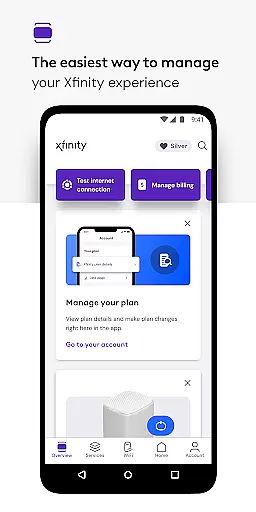
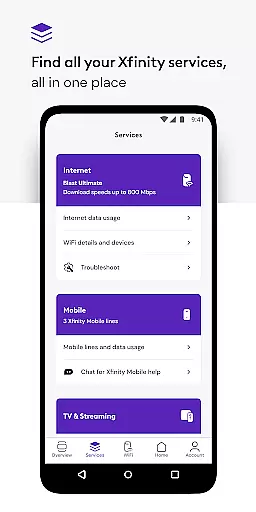
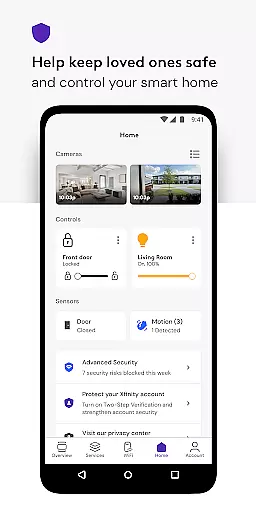
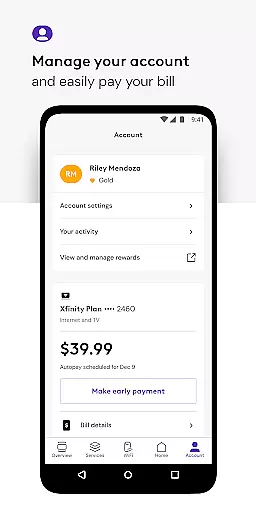
Xfinity offers a comprehensive productivity app designed to manage all your Xfinity services efficiently. With the Xfinity app, users can handle internet and mobile services with ease through its innovative NOW feature. This provides a simplified way to access services at a fixed monthly price.
Key functionalities include 24/7 real-time support, seamless equipment activation, and internet speed testing. Additionally, Xfinity Rewards offers exclusive benefits for loyal customers. The app is particularly beneficial for those renting Xfinity equipment, providing account management tools, personalized WiFi tips, and advanced security features.
Available on multiple platforms, this app ensures you stay connected and protected both at home and on the go, enhancing overall productivity and user experience.
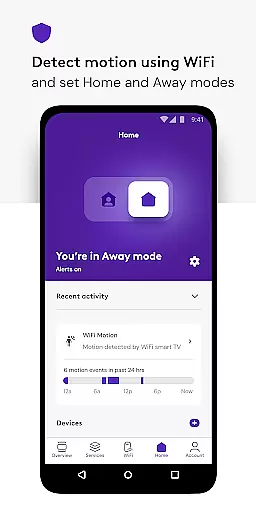
The Xfinity app stands out with its robust set of features tailored to boost user productivity. One notable feature is the Advanced Security system which safeguards devices and ensures online safety. This includes protection when connected to unsecured WiFi networks outside the home, utilizing a built-in VPN service.
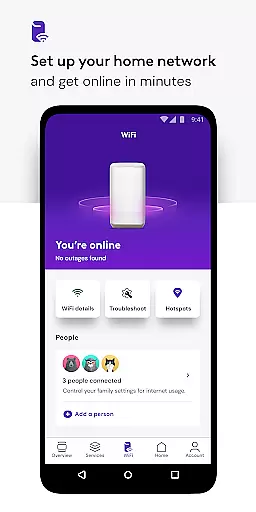
Parental controls are another significant feature, allowing users to manage family-safe browsing and control WiFi access for any device. The app also excels in WiFi management by offering tools to set up WiFi, assign user profiles, and optimize device performance.
Furthermore, the app provides account management capabilities such as bill payment, plan details viewing, and service upgrades. Personalized tips help improve WiFi performance, making it an essential tool for both personal and professional use.
Task management is a crucial aspect of productivity applications, enabling users to organize and prioritize their daily activities effectively. The Xfinity app excels in this area by providing customers with comprehensive tools to manage their accounts seamlessly.
Through the app, users can pay bills, view plan details, and make changes or upgrades to their services effortlessly. This all-in-one solution ensures that managing your account doesn't consume unnecessary time and energy, allowing you to focus on what truly matters.
The real value for Xfinity customers lies in the app's ability to consolidate various management functions into one platform. Whether it's adjusting service plans or monitoring internet usage, the app provides an intuitive interface that simplifies these tasks, enhancing overall user experience.
By integrating personalized tools and tips to improve WiFi performance, the app goes beyond basic task management. It empowers users with actionable insights and controls, making it an indispensable tool for anyone looking to streamline their digital home management efficiently.
Cross-device synchronization is essential for ensuring that users have a consistent experience across multiple devices. The Xfinity app addresses this need by offering reliable synchronization features that keep all your devices in sync.
With the app, Xfinity customers can access their account information and manage services from any device, at any time. This seamless connectivity ensures that whether you're at home or on the go, your data remains up-to-date and accessible, providing peace of mind and convenience.
One of the standout features is Advanced Security on the go, which extends protection to mobile devices connected to unsecured WiFi networks. By occasionally running a VPN service, the app safeguards your browsing and data, reinforcing its commitment to security without compromising synchronization speed.
This reliability in cross-device functionality not only enhances user satisfaction but also sets a benchmark in the productivity category. Users can trust that their actions on one device will reflect accurately on others, maintaining continuity and coherence in their digital interactions.
User-friendly interface
Comprehensive security features
24/7 real-time support
Personalized WiFi management
Exclusive rewards program
Limited to Xfinity customers
Advanced features require rental equipment
VPN permissions needed
Occasional connectivity issues
Geographically restricted features

Client for Nextcloud Deck
 4.60
4.60
When you Focus, so will your Bean in this cozy focus timer
4.30
A simple, portable logger for POTA, SOTA, Field Day, and more
4.5
Mind Map and brainstorm, note taking and idea collection
4.80
⏰ Finally a timer app which can run multiple timers simultaneously on your watch
3.90
IP Camera Viewer - Android TV : RTSP Surveillance camera viewer for Android TV
4.1
Pwnagotchi companion app
4.20
Stay on top of your to-dos with Google Tasks, part of Google Workspace.
4.60
Secure, open-source, SPICE and SSH Remote Desktop for QEMU KVM virtual machines
4.00
Seamlessly integrate data and reports to build your presentation to impress
4.80
Secure, fast, open-source, VNC and SSH Remote Desktop for Windows, Linux and Mac
4.70
Direct Chat without saving contacts & Dual WA Account on Single Device
4.70
Translate text/voice/photos in 150+ languages. Offline & fast translator app.
4.50
Secure your apps with lock screens, use custom themes and different features.
4.40
Access, manage and transfer files on Android, PC, Mac, NAS and cloud storages.
4.30
Intelligent AI Assistant
4.10
Create and edit presentations with Google Slides, part of Google Workspace.
4.00
Ultimate Virtual AI Character for immersive Roleplay Chat. Perfect Companion
3.90
A comprehensive suite of tools designed specifically for Lactation Consultants
4.5


User Reviews