
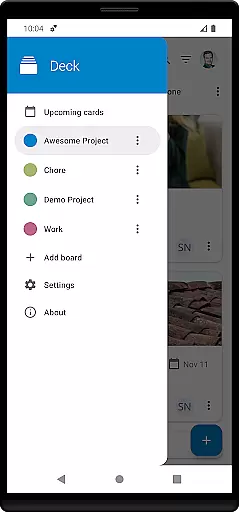
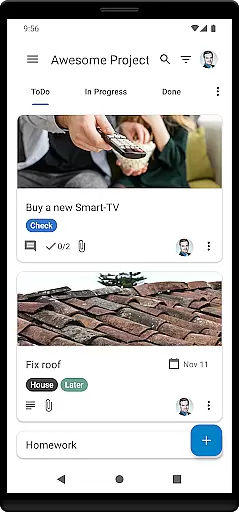
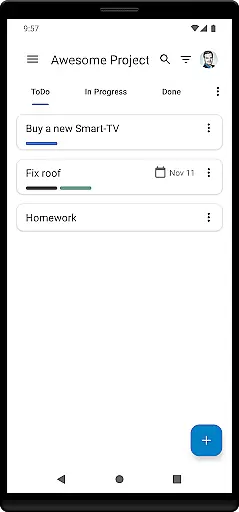
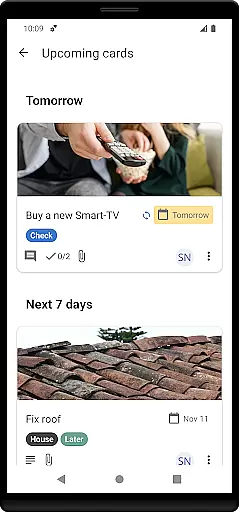

Nextcloud Deck is a productivity-focused application designed to streamline task management and team collaboration. This app allows users to create, organize, and manage cards, lists, and boards efficiently, making it an ideal tool for both personal task tracking and team project coordination.
One of the standout features of Nextcloud Deck is its support for multiple accounts and offline functionality, ensuring that users can access their data anytime, anywhere. Additionally, the app supports attachments, activities, and comments, providing a comprehensive platform for communication and document sharing. With dark mode and multi-language support, Nextcloud Deck offers a customizable and user-friendly experience tailored to individual preferences.
Whether you're managing a complex project or simply keeping track of daily tasks, Nextcloud Deck provides a robust solution that enhances productivity and ensures seamless collaboration among team members.
Nextcloud Deck boasts a variety of features that cater to efficient task and project management. The app supports multiple accounts, allowing users to switch between different Nextcloud instances effortlessly. Its offline capabilities ensure that users can continue working even without an internet connection, with changes syncing automatically once online.
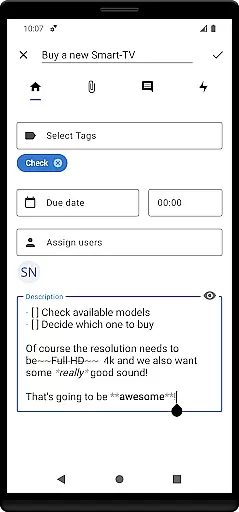
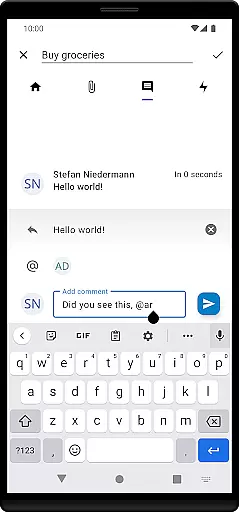
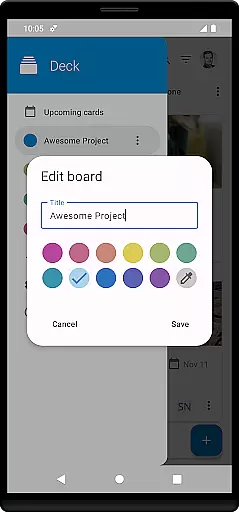
The core functionality revolves around managing cards, lists, and boards, which helps in organizing tasks systematically. Users can also manage tags, attach files, view activities, and add comments to cards, facilitating clear communication and easy tracking of progress. The inclusion of a dark mode enhances usability in low-light environments, reducing eye strain and improving focus.
Furthermore, Nextcloud Deck is translated into many languages, making it accessible to a global audience. These features collectively contribute to a versatile and powerful productivity tool that meets the diverse needs of its users.
Nextcloud Deck offers a robust solution for managing tasks and projects efficiently. The app allows users to create, organize, and prioritize cards, lists, and boards, which are essential for task management. This functionality is crucial for individuals and teams who need to keep track of their work and deadlines.
The app supports multiple accounts and works offline, ensuring that users can access and update their tasks anytime, anywhere. These features enhance productivity by providing flexibility and reliability, even in environments with limited connectivity. Additionally, the ability to manage tags, attachments, activities, and comments within each card ensures comprehensive tracking and collaboration.
Users benefit from the app's seamless integration with Nextcloud, enhancing data security and accessibility. With support for dark mode and translations in many languages, Nextcloud Deck caters to a global audience, offering a personalized and comfortable user experience. This makes it an ideal tool for those seeking an efficient and versatile task management solution.
Cross-device synchronization is a vital feature of Nextcloud Deck, ensuring that all your data is consistently updated across various devices. This reliability is critical for users who switch between their mobile devices and computers throughout the day. By maintaining real-time updates, the app guarantees that every change made on one device is immediately reflected on others.
Nextcloud Deck's synchronization capabilities are bolstered by its requirement for the Nextcloud Android app, ensuring a smooth and integrated experience. This setup not only enhances the reliability of data sync but also provides additional layers of security and backup options. Users can trust that their information is safe and accessible, no matter where they are or which device they use.
Moreover, the app's offline functionality means that even without an internet connection, users can continue working on their tasks. Once online, all changes automatically sync, preserving data integrity and consistency. This combination of offline access and reliable cross-device synchronization makes Nextcloud Deck a powerful tool for productivity and task management.
User-friendly interface
Offline functionality
Multi-account support
Comprehensive task management
Dark mode available
Requires Nextcloud setup
Limited standalone use
No built-in calendar
Dependent on third-party apps
Advanced features need technical knowledge

A customizable calendar for your Wear OS watch
 4.20
4.20
Unlock AutoNotification
4.00
Customizable calendar widget for seamless event sync, planning & scheduling.
4.00
Todo reminder
4.10
Simple and reliable communication between inmates, friends and family
3.20
Experience and share your SolidWorks designs on your Android® phone and tablet.
2.50
Share files & memories safely. Keep your photos and videos secure.
4.40
Understand anything with a personalized AI research assistant
4.80
Scan paperwork into PDF/JPG, generate your own e-signature and send fax or email
4.70
Seamlessly integrate data and reports to build your presentation to impress
4.80
Protect and view your important info on your phone and tablet with eWallet®
4.80
Stay on top of your to-dos with Google Tasks, part of Google Workspace.
4.60
Planet Free VPN - The best Fast Unlimited and Secure VPN Without Logs
4.50
Cloud storage, automatic phone backup, and more.
4.10
⏰ Finally a timer app which can run multiple timers simultaneously on your watch
3.90
Mega cloud explorer plugin for Solid Explorer
3.80
Code on-the-go with VScode for Android. Edit,debug and collaborate from mobile!!
3.10
Ads Free App! Editor, Hide File, Copy, Move, Delete and Rename.. all facility av
1.70
A simple, portable logger for POTA, SOTA, Field Day, and more
4.2


User Reviews