
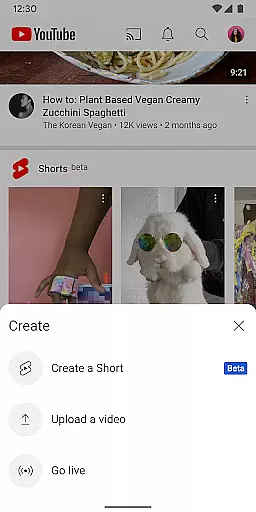




YouTube is the world's leading video-sharing platform, offering a vast array of content across multiple categories. The app allows users to watch, create, and engage with videos on Android devices. With personalized recommendations, subscription management, and content creation tools, YouTube delivers an immersive experience. Users can explore trending topics, popular channels, and even support creators through memberships. The platform also offers family-friendly options and ad-free viewing via YouTube Premium, making it versatile for different user needs.
The app stands out with its seamless integration across devices, enabling users to transition from mobile to tablet or desktop effortlessly. Whether you're interested in music, gaming, news, or educational content, YouTube provides a centralized hub for all video consumption needs. Its powerful recommendation engine ensures users are always up-to-date with relevant content tailored to their preferences.
YouTube offers a comprehensive suite of features designed to enhance user engagement and convenience. Key functionalities include personalized home recommendations, subscription tracking, and a library to manage watched and saved videos. The Explore section highlights trending content and showcases rising creators, keeping users informed about global trends. Additionally, interactive features like comments, live streams, and community posts foster deeper connections between creators and viewers.
For creators, YouTube provides robust tools to produce and share content directly from mobile devices. Live streaming allows real-time audience interaction, while channel memberships enable creators to monetize their work. Family-friendly settings and YouTube Premium further elevate the user experience by offering customizable options such as ad-free playback and offline viewing. These features collectively position YouTube as a leader in the Video Players & Editors category.
Video format compatibility is a crucial feature for any video player, ensuring that users can access content in various formats without technical barriers. YouTube excels in this area by supporting a wide range of video formats, from common ones like MP4 and AVI to more specialized codecs.
The app's adaptive streaming technology automatically adjusts the video quality based on your device's capabilities and internet connection, providing an optimal viewing experience. This means whether you're watching on a high-end smartphone or an older tablet, YouTube ensures smooth playback without manual adjustments.
For content creators, this compatibility offers peace of mind knowing their videos will reach the broadest audience possible. The platform handles all necessary format conversions in the background, allowing creators to focus on producing engaging content rather than worrying about technical specifications.
Users benefit from this comprehensive format support through seamless video playback across devices and reliable offline viewing. The app maintains consistent quality while downloading videos for offline use, regardless of the original upload format, making it easy to enjoy content anytime, anywhere.
AI-powered editing features have revolutionized how users create and edit video content directly within the YouTube app. These intelligent tools utilize machine learning algorithms to simplify complex editing tasks, making professional-quality video production accessible to everyone.
The app offers automatic video enhancement features that analyze and improve video quality based on lighting conditions, stabilization needs, and color balance. This AI-driven optimization ensures that even amateur footage looks polished and professional without requiring manual adjustments.
YouTube's AI capabilities extend to content creation with smart editing suggestions. The app can recommend optimal clip lengths, suggest relevant transitions, and even propose suitable background music based on the video's content and pacing. These features help creators maintain viewer engagement while saving time during the editing process.
Additionally, the platform's AI-powered captioning system automatically generates accurate subtitles in multiple languages, enhancing accessibility and global reach. This combination of intelligent editing tools empowers users to produce high-quality content efficiently while maintaining creative control over their videos.
User-friendly interface
Extensive content library
Personalized recommendations
Offline viewing options
Live streaming capabilities
Ads in free version
Limited offline features
High data usage
Premium subscription cost
Restricted content in some regions

A full editing room to accompany your Insta360 cameras and handheld gimbals.
 3.30
3.30
Video Player - Unlimited features, 30 days money back guarantee.
4.60
Play ALL formats in 4K & HD. Video downloader, MP3 player, Chromecast & more.
4.80
AirMirror is Receiver for Screen Mirroring and Casting from Apple Devices.
3.60
Video player with powerful streaming playback and various convenient features.
2.10
An easy-to-use and all-round screen recorder with audio
4.80
Watch IPTV on your Android device
4.60
Browser for Fire TV to stream webvideos, online movies, livestreams in HD
4.40
convenient, safe and fast at Video Downloader & Player
4.60
A Simple app to download Video & Music from the Internet.
4.70
A Quick and Pro Video Editor
4.70
Cast Videos from Web Browser, IPTV to Roku, Chromecast, DLNA, Smart TV +more
4.60
Snaptubè Video Downloader app allows to download videos and music in Snaptube. .
4.60
Turn your phone into a wireless camera!
4.20
Video player with 4K & 1080P support, popup play, background play and subtitle.
4.20
Browser for Samsung TV to stream webvideos, online movies and livestreams in HD
4.10
IPTV-Smarters Player Pro M3U - Watch Live Stream TV Channels with Chromecast
4.00
Capture images & record videos for USB Camera, Webcam, Microscopes, Endoscopes
3.80
Play and download HD videos from all sources — fast, simple, and all-in-one.
4.5


User Reviews