
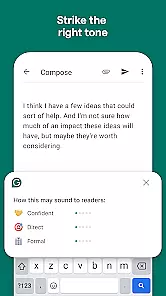
Grammarly is a productivity app designed to enhance your writing skills. It functions as an advanced text editor that checks for grammar, spelling, and punctuation errors in real-time. The app also provides suggestions to improve clarity, engagement, and overall delivery of your writing.
This tool is particularly useful for students, professionals, and content creators who need to produce high-quality written materials. Grammarly supports multiple platforms including web browsers, desktop applications, and mobile keyboards. Its AI-powered algorithms ensure accurate recommendations tailored to different writing styles and contexts.
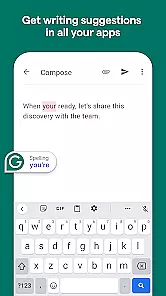
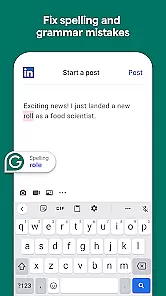
Grammarly offers a comprehensive suite of features to refine your writing. It includes a grammar checker that detects errors such as subject-verb agreement issues, article misuse, and sentence structure problems. Additionally, the spell checker identifies misspelled words and suggests corrections.
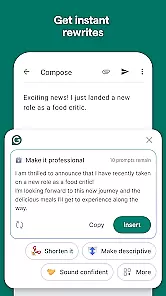
Beyond basic editing tools, Grammarly provides style suggestions to enhance readability and tone. Users can customize their experience by setting goals related to audience, formality, and intent. Advanced features like plagiarism detection and vocabulary enhancement are available through premium subscriptions, making it a versatile tool for various writing needs.
Task management is a cornerstone of productivity applications, and Grammarly excels in this area by offering users the ability to handle writing tasks efficiently. The app provides real-time suggestions for grammar, punctuation, and style improvements, which helps users focus on their core writing responsibilities without getting bogged down by errors.
Grammarly's implementation includes an intuitive interface that integrates seamlessly with various platforms such as email clients, word processors, and social media. This ensures that wherever you write, Grammarly is there to assist, making task management fluid and unobtrusive.
For users, this means enhanced productivity and confidence in their written communications. With Grammarly managing the intricacies of language, users can concentrate on the content and purpose of their writing, leading to more effective and professional outcomes.
The true value of Grammarly's task management lies in its ability to adapt to different writing environments and needs, ensuring that whether you're crafting an important email or drafting a report, your writing tasks are streamlined and error-free.
Cross-device synchronization is vital for users who operate across multiple devices throughout their day. Grammarly ensures that your preferences, saved corrections, and personalized dictionary are synced reliably across all your devices, providing a consistent experience no matter where you are writing.
The application achieves this through cloud-based synchronization, which updates your data in real time. Whether you switch from your mobile device to your desktop, Grammarly maintains continuity in your writing process, allowing you to pick up right where you left off.
This feature benefits users by saving time and reducing the frustration of repetitive setups or lost information. It ensures that every device you use is equipped with the latest insights and customizations tailored to your writing style.
Ultimately, Grammarly's reliable cross-device synchronization empowers users to maintain productivity and consistency in their writing, regardless of the platform they choose to work on, thus enhancing both efficiency and convenience.
Accurate error detection
User-friendly interface
Customizable writing goals
Multi-platform support
Real-time feedback
Premium features costly
Limited offline functionality
Occasional incorrect suggestions
Privacy concerns with data
Heavy on system resources

Experience real multitasking on your Android!
 4.00
4.00
We're working to become the best machining app on the market! www.cncdirt.com
4.80
Todo reminder
4.10
Functional QR scanner and barcode reader that requires little storage space.
4.60
The AI assistant that thinks with you - write, code, and solve complex tasks
4.60
Quickly and easily keep track of your work shifts
4.70
Intelligent AI Assistant
4.10
Daily processing of PDF documents.
4.40
Note taking, handwriting, record audio, PDF annotation, planner & journal
4.20
QuickBooks Workforce lets teams view pay info and track time in one place.
4.70
Fill, sign & send docs, forms, agreements & contracts via electronic signature.
4.50
Translate text/voice/photos in 150+ languages. Offline & fast translator app.
4.50
Automates browsing any website and notifies you of important changes or events
4.30
All in One PDF Reader: Manage, Read and Edit your Documents
4.20
Device's storage information in a simple and clear graphical form (infographics)
4.10
Wake up & get tasks done! Add alarms & reminders on the Clock Launcher.
4.00
Simple and reliable communication between inmates, friends and family
3.20
Code on-the-go with VScode for Android. Edit,debug and collaborate from mobile!!
3.10
Create study competitions, track your hours, and stay consistent with friends
4.3


User Reviews