
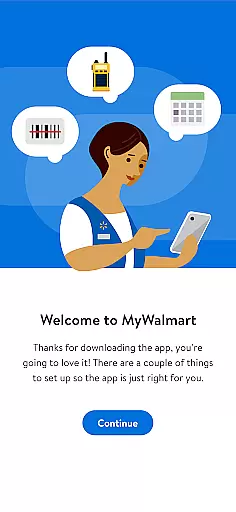
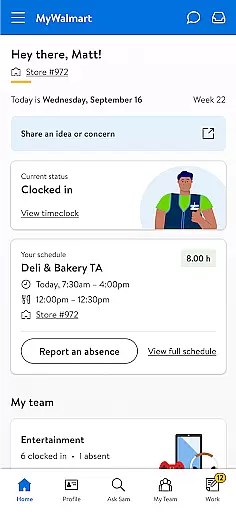
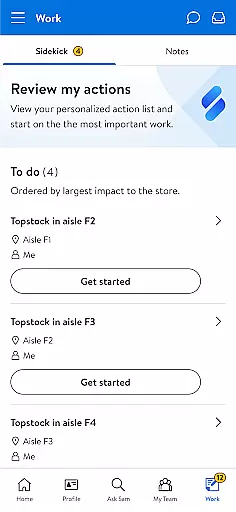
MyWalmart is a comprehensive business application designed to cater to both Walmart associates and potential job applicants. The app serves as an essential tool for employees to manage their work schedules, communicate with team members, and access important company information. It also provides a platform for customers interested in pursuing a career with Walmart, offering insights into the company's history, cultural values, and benefits.
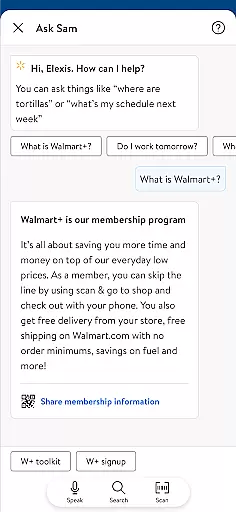
One of the standout features of MyWalmart is its integration of productivity tools such as Ask Sam, a voice assistant that helps answer product-related queries, and My Team, which facilitates communication among colleagues. These functionalities make it easier for associates to perform their daily tasks efficiently while ensuring they stay connected with their teams. For those considering employment with Walmart, the app streamlines the application process by providing all necessary information in one place.
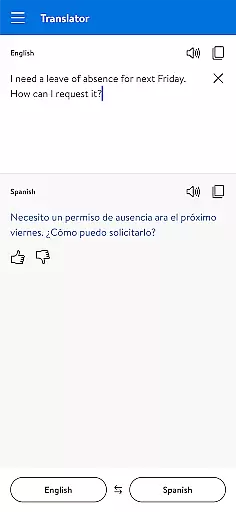
The app's ability to handle scheduling and time-off requests through its internal features demonstrates its practical value for Walmart associates. By consolidating these essential functions into a single platform, MyWalmart enhances workplace productivity and simplifies employee management processes.
MyWalmart offers a robust set of features tailored specifically for Walmart associates and job seekers. For associates, the app provides powerful tools like Schedule, which allows users to view their work schedules, manage time-off requests, and even swap or pick up unfilled shifts. This feature ensures that employees can efficiently organize their work commitments and maintain a healthy work-life balance.
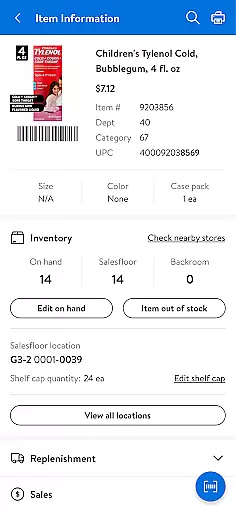
Another notable feature is Ask Sam, a voice-activated search assistant designed to answer questions related to products, metrics, and more. As users interact with Ask Sam, the tool becomes increasingly intelligent, providing more accurate responses over time. Additionally, the My Team feature offers a roster view of working associates and includes an in-app walkie-talkie function to facilitate seamless communication among team members.
For individuals interested in joining Walmart, the app provides detailed information about the company's history, cultural values, and benefits. This makes it easier for potential applicants to learn about the organization and apply for positions directly through the app. Overall, these features highlight MyWalmart's commitment to enhancing both employee experience and recruitment efficiency.
Collaborative work features are essential for modern business applications, enabling seamless teamwork and communication. MyWalmart app excels in this area by offering tools that connect associates and streamline workflows.
The app includes 'My Team,' a feature that provides a roster view of who is working, coupled with an in-app walkie-talkie function to maintain constant contact with team members. This ensures that all associates can collaborate effectively, regardless of their physical location within the store.
Additionally, the 'Ask Sam' feature serves as a search and voice assistant, helping to answer queries related to products and metrics. As it learns from the questions asked, it becomes an indispensable tool for associates seeking quick and accurate information to better serve their teams and customers.
These collaborative features not only enhance productivity but also foster a connected work environment where information is shared swiftly and efficiently, empowering Walmart associates to perform at their best.
Effective task management is crucial for maintaining operational efficiency, and the MyWalmart app addresses this need by providing comprehensive scheduling capabilities. Associates can view their work schedules, manage time-off requests, and engage in shift swapping or pickup for unfilled shifts.
The scheduling feature is designed to give associates control over their work-life balance by allowing them to plan and adjust their availability with ease. This level of autonomy is vital for employee satisfaction and retention.
Beyond scheduling, the app's 'Inbox' feature consolidates notifications and actions related to various tasks such as time-off requests and scheduling updates. By centralizing these communications, the app ensures that no critical task falls through the cracks.
Overall, MyWalmart equips its users with robust task management tools that simplify complex processes, thereby enhancing both individual and team performance within the Walmart ecosystem.
User-friendly interface
Comprehensive scheduling tools
Efficient communication features
Intelligent voice assistant
Streamlined job application process
Limited to Walmart employees
Some features region-restricted
Requires two-step verification
Occasional connectivity issues
Not available for non-Walmart users

The All-in-One File Manager for Phone, TV, Watch, Cars, XR / VR, Chromebook
 4.10
4.10
Get your benefits on-the-go.
3.80
Manage work life on the go
4.50
All your team communication in one place
4.70
Access to Paylocity, empowering employees with information they need 24/7.
4.70
Access All PDF Files
3.40
All-in-one Mobile solutions for employees & managers to succeed at work
4.30
Earn money with the driver & delivery partner app for Uber, UberEats & Postmates
4.60
Make money as a delivery driver with DoorDash and work when you want as a Dasher
4.30
BuildCalc - the easiest AND the most advanced construction calculator app.
4.80
Chat, meet, and collaborate to achieve more together, all in one place on Teams
4.60
ANDROID'S TOP MOBILE OFFICE - Word, Excel, PowerPoint and PDF at your fingertips
4.50
Collaborate seamlessly with Google Chat, part of Google Workspace
4.50
One marketplace. Hundreds of services. Unlimited possibilities. All on Fiverr.
4.40
Build a store in minutes with our full suite of AI tools. Start for free!
4.20
On the go? Take FedEx with you.
4.00
Simple, Fast & Lightweight
3.90
Quickly open and manage PDF files on your device.
3.80
Take the stress out of storage with the all-in-one app to manage your space.
3.70


User Reviews