


Notes Launcher is a productivity app designed to help users efficiently manage their daily tasks and important information. The app allows you to create quick notes or to-do lists with a simple swipe from your home screen, making note-taking seamless and immediate. With added functionalities such as text formatting tools, color-coding, locking sensitive notes, categorization, sorting, and an intuitive search feature, Notes Launcher ensures that organizing your thoughts has never been easier.
Beyond basic note-taking, the app offers enhanced features like home screen widgets displaying time and weather, personalized wallpapers, and multi-touchpoint search powered by Yahoo. These elements not only improve accessibility but also personalize user experience. Whether you need to jot down a grocery list, plan a vacation, or secure confidential information, Notes Launcher provides a comprehensive solution for all your note-taking needs while keeping your data safe and organized.
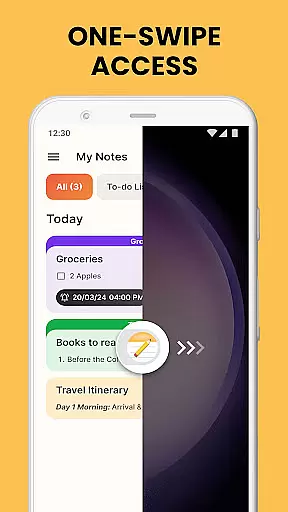
Notes Launcher stands out in the productivity category due to its rich set of features tailored for efficient task management. One of its key highlights is the one-swipe access functionality, which lets users instantly create notes and to-do lists by swiping right from their home screen. This feature significantly reduces the time required to document ideas or tasks. Additionally, the app includes a robust text formatting toolset, allowing users to customize fonts, apply styles like italics or underlining, and even create bulleted or numbered lists.
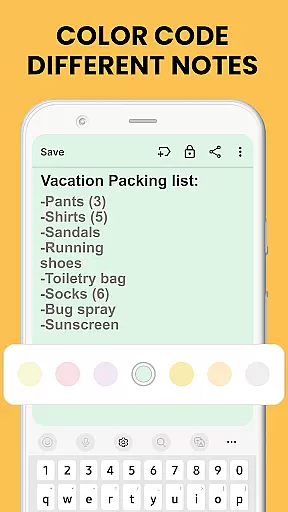
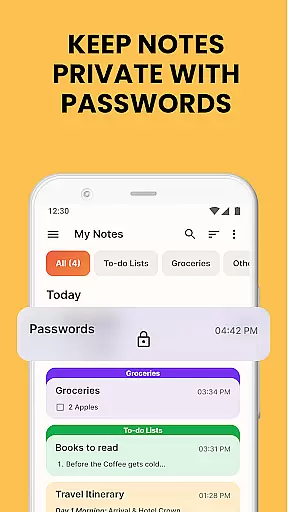
The ability to color-code notes adds another layer of utility, enabling users to visually prioritize and categorize different types of information. For those dealing with sensitive data, the lock notes feature provides peace of mind by securing confidential content behind a passcode. Furthermore, advanced organizational tools such as categorization, sorting filters, and an intuitive search function ensure that finding specific notes is hassle-free. Sharing options via email or social media make collaboration effortless, whether planning a group project or coordinating travel itineraries.
Effective task management is essential for staying organized and productive in daily life. Notes Launcher excels in this area by providing users with a comprehensive suite of tools to manage their tasks efficiently.
The app allows you to create quick notes or to-do lists with just a swipe from your home screen. This instant access ensures that you can capture important thoughts or tasks the moment they come to mind. Additionally, the ability to categorize and sort notes makes it easy to keep track of different types of information, whether it's work-related tasks or personal reminders.
One standout feature is the rich-text editor, which lets you format your notes with various font sizes, styles, and lists. This enhances readability and helps prioritize tasks effectively. You can also color-code notes to visually organize them based on urgency or category, making it simpler to identify and tackle high-priority items.
By integrating these robust task management features, Notes Launcher empowers users to maintain an organized lifestyle, ensuring no important detail is overlooked.
In todayu2019s interconnected world, reliable cross-device synchronization is crucial for maintaining seamless productivity. Notes Launcher addresses this need by offering dependable synchronization features that ensure your data remains consistent across multiple devices.
With Notes Launcher, you can securely lock sensitive information such as passwords and bank account details within the app. This feature not only protects your private data but also synchronizes it safely across your devices, giving you peace of mind about your information's security.
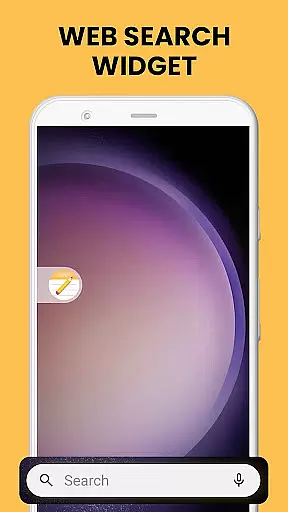
Moreover, the app supports multi-touchpoint search capabilities, allowing you to find installed apps or perform web searches powered by Yahoo from various access points. This functionality enhances your ability to retrieve necessary information quickly, regardless of the device you are using.
By prioritizing synchronization reliability, Notes Launcher ensures that all your notes, to-do lists, and important data are always up-to-date and accessible wherever you go, thus supporting a truly integrated digital experience.
User-friendly interface
Quick note creation
Secure note locking
Customizable organization
Multi-touchpoint search
Home screen layout changes
Limited design customization
No cloud sync option
Ads in free version
Occasional bugs

A Revolutionary All-in-One Artificial Intelligence Tools
 3.80
3.80
When you Focus, so will your Bean in this cozy focus timer
4.30
Total remote control for your Android device, PC and cloud services (IFTTT)!
4.20
Easily read and manage all your PDF files
4.10
Customizable calendar widget for seamless event sync, planning & scheduling.
4.00
App lock - lock apps with fingerprint, password, pin or pattern, protect privacy
4.70
Translate text/voice/photos in 150+ languages. Offline & fast translator app.
4.50
Experience and share your SolidWorks designs on your Android® phone and tablet.
2.50
Share files & memories safely. Keep your photos and videos secure.
4.40
Best Tool for the professionals Electrician, Electrical contractors, etc.
4.90
Android Wallet Password Manager
4.80
Protect and view your important info on your phone and tablet with eWallet®
4.80
The Pro Version of Android's tiniest Notepad app. Just 0.3MB but feature-packed!
4.60
All document reader, all in one file viewer read PDF, DOCX, XLS, PPT, TXT files.
4.60
Send files, sync SMS, notifications & clipboard across devices via local network
4.40
Docker, Kubernetes management over Portainer Mobile
4.40
Unlock AutoNotification
4.00
Create and edit presentations with Google Slides, part of Google Workspace.
4.00
ID.me Authenticator is a simple and free Two Factor Authentication solution
3.50


User Reviews