


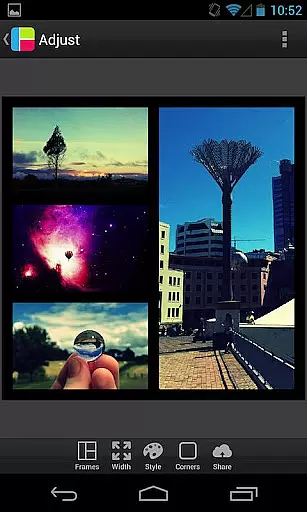
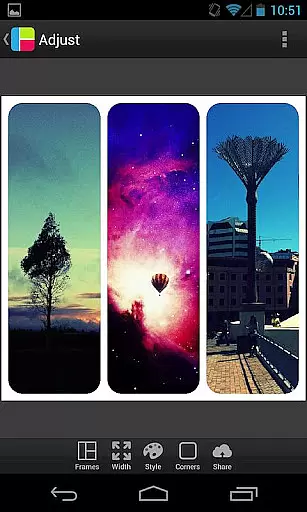

PicFrame is a versatile photography app that allows users to create stunning photo collages by combining multiple images into customizable frames. With 36 adjustable frame layouts, users can include up to five photos in a single frame, offering endless customization through features like rounded corners, border adjustments, and unique shapes such as hearts or hexagons.
The app also provides advanced editing tools, including brightness, contrast, and saturation adjustments for each photo, along with rotation and zoom capabilities. Designed for creativity and sharing, PicFrame supports various aspect ratios and enables direct sharing to social media platforms like Instagram and Facebook. Whether for personal memories or professional projects, PicFrame ensures your photo collages stand out with its intuitive design and powerful features.
PicFrame stands out with its extensive range of creative features tailored for photography enthusiasts. The app offers 36 fully adjustable frames, allowing users to customize layouts by dragging inner borders for endless design possibilities. Unique options like rounded corners, custom shapes (heart, circle, hexagon), and an easy-to-use color picker for borders provide a personalized touch to every frame.
In addition to layout customization, PicFrame includes robust photo editing tools. Users can adjust brightness, contrast, and saturation for individual photos, ensuring optimal quality. The app also supports pinch-to-zoom, photo rotation, and six different aspect ratios, including square format. With 52 background patterns and multiple output resolutions, PicFrame empowers users to create professional-quality collages and share them seamlessly on platforms like Instagram, Facebook, and Twitter.
Real-time capture and preview functionality is essential for photography apps as it allows users to see exactly what the final image will look like before taking a photo. PicFrame offers this feature by enabling users to adjust various settings such as brightness, contrast, and saturation in real time.
The app provides an interactive interface where users can pinch to zoom and drag to move photos within frames. This ensures that each composition is perfectly aligned and visually appealing even before saving or sharing the image. The ability to rotate photos adds another layer of customization, allowing for creative freedom.
With multiple output resolutions available, PicFrame caters to different needs whether you're posting on social media or printing your creations. Users can select from six different aspect ratios including popular formats like square (1:1) and widescreen (16:9), ensuring their images fit perfectly wherever they are shared.
AI beauty and enhancement features have become increasingly important in photography applications, offering tools that improve image quality while maintaining natural aesthetics. PicFrame includes several options designed to enhance photos without making them appear overly processed or artificial.
One standout feature is the adjustable border width and easy-to-use color picker which lets users customize frame borders to complement their photos naturally. Additionally, the app offers 52 background patterns for frames, providing a variety of choices that maintain visual harmony with the main subject of the photo.
PicFrame also allows users to change the shape of their photos into creative forms such as circles, hearts, and hexagons. These enhancements not only add artistic flair but do so in a way that feels organic and unforced, preserving the authenticity of the original images while adding personal touches.
User-friendly interface
Extensive customization options
Advanced photo editing tools
Direct social media sharing
Variety of frame designs
Limited to five photos per frame
No automatic enhancement feature
Some features may feel complex for beginners
Occasional performance lags
Ads in the free version

A collection of tools and reference tables for DPs, ACs, DITs and Operators.
 4.70
4.70
Shooting photos and records video easily and efficient with professional Camera
4.30
Create & Edit with AI: AI Remove, Enhance, Retouch, Filter
4.10
Superimpose one photo on top of another using the original Superimpose app!
3.20
Light-weight Media Gallery app for Android made with Jetpack Compose
4.60
Photo Exif Editor allows to view, add and modify EXIF data of multiple photos
4.50
Photo editor & gallery. Crop pictures & edit photos offline, no wifi!
4.50
Add a dreamy vibe to your selfies and videos with soft style filters
4.5
GCamera allows all GCam features on all phone models! Better photos with GCamera
3.30
Create Business Headshots, Polaroid Filter, Retake Photos,Profile Pics,AI Photos
4.50
Effortlessly organize, view and share your photos & videos with Gallery app!
4.40
All-in-One Editor & AI Photo Enhancer, Beautify & Retouch, Collage, Cartoonify
4.20
AI-powered video creator by MiniMax - Where ideas meet cinema
4.20
Professional quality photo edits with the new Snapseed.
4.00
How would you look like with a differently shaped nose, chin or lips?
3.90
Astrophotography with your smartphone, photo live stacking and much more!
3.90
USB Storage Access for Photos, Videos, Music and Documents
3.80
Raw Image Viewer. Gallery with support of raw images (.cr3, .cr2, .nef, .raf).
2.00
HD Photo gallery and photo manager to edit, hide private photos, videos & albums
4.5


User Reviews