




XPlay Browser is a versatile app designed for users seeking a fast, private, and video-focused browsing experience. It combines speed, privacy protection, and seamless video tools into one lightweight package. With its modern interface and efficient performance, the browser ensures smooth navigation even on older devices while offering features like Private Mode to safeguard user data.
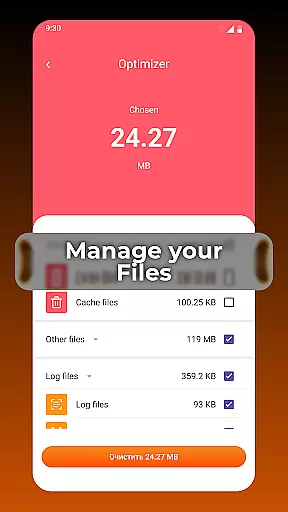
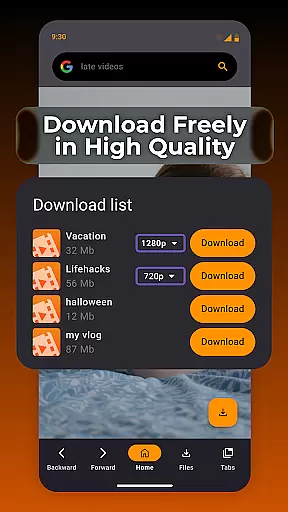
One standout feature of XPlay Browser is its ability to save videos directly from supported websites, allowing users to download and watch content offline without needing additional apps. Additionally, it includes smart file management tools that help keep your device organized by identifying unnecessary files. This makes XPlay Browser not just a web browser but also an all-in-one solution for managing media and optimizing storage space efficiently.
XPlay Browser stands out with several key features tailored for today's digital consumers. First, it offers fast and smooth browsing through a lightweight design that loads pages quickly, making it ideal for both new and older devices. The clean UI enhances user experience by providing instant navigation and a comfortable flow during use.
Privacy is another core aspect of this app, thanks to its Private Browsing Mode which ensures no history or cookies are stored after sessions end—perfect for confidential activities online. Moreover, the Easy Video Downloads feature allows users to save videos directly from supported sites without requiring extra software. Combined with smart file management capabilities that organize and maintain device storage effectively, these functionalities make XPlay Browser an innovative choice in the realm of mobile browsers.
Video format compatibility is a crucial feature for any video player, ensuring that users can enjoy content in various formats without interruptions or the need for additional software. XPlay Browser excels in this area by supporting a wide range of video formats, making it versatile and user-friendly.
The browser's ability to handle different video types means you can stream or download videos from multiple sources across the web. Whether you're accessing MP4, AVI, or more specialized codecs, XPlay Browser provides seamless playback without requiring conversions or external plugins.
For users who frequently interact with diverse multimedia content, having a browser that supports extensive video format compatibility simplifies their digital experience. It eliminates the hassle of dealing with unsupported files and enhances productivity by allowing uninterrupted access to important media resources.
By integrating robust video capabilities directly within its interface, XPlay Browser ensures an efficient and enjoyable viewing experience. This focus on comprehensive format support underscores the appu2019s commitment to delivering fast, private, and video-focused web interactions.
AI-powered editing features represent a significant advancement in how users can manipulate and enhance their video content directly within a browser environment. XPlay Browser incorporates intelligent tools that leverage artificial intelligence to simplify complex editing tasks, providing users with powerful capabilities at their fingertips.
These AI-driven functionalities allow for automatic video enhancements such as color correction, stabilization, and audio adjustments. By analyzing video data in real-time, the browser can suggest optimal edits tailored to individual clips, ensuring professional-quality results without manual intervention.
Users benefit from these smart editing options by saving time and effort while achieving polished outcomes. The intuitive nature of AI-based tools makes advanced video editing accessible even to those without prior expertise, democratizing content creation and fostering creativity among all user levels.
XPlay Browser's dedication to integrating cutting-edge technology like AI-powered editing reaffirms its position as a forward-thinking solution in the realm of Video Players & Editors. With these innovations, users are empowered to produce high-quality multimedia projects efficiently and effectively.
Fast page loading
Private browsing mode
Easy video downloads
Smart file management
Battery efficient
Limited video site support
No advanced privacy controls
Basic UI customization
Fewer extensions available
Occasional bugs reported

Connect 2 UVC devices for recording and broadcast video/audio stream
 3.90
3.90
Video Downloader is an utility that can save videos and music from web sites
4.20
Full HD Video mp3 Player, MP4 player play 1080p, File manager, Video Downloader
4.40
An easy-to-use and all-round screen recorder with audio
4.80
Movie maker & video editing app with AI effects and green screen
4.30
Play and download HD videos from all sources — fast, simple, and all-in-one.
4.1
IPTV Player - Watch live TV from m3m & m3u8 playlist, stream IPTV on mobile
3.30
Add date and time watermark to photos and videos
4.50
Screen recorder with audio to take live videos & Screenshot in high quality!
4.70
Tik & Story Saver-Download ALL social media videos, photos & reels no watermark.
4.80
A Quick and Pro Video Editor
4.70
Snaptubè Video Downloader app allows to download videos and music in Snaptube. .
4.60
Seamlessly connect and control your smart devices, anytime, anywhere with ease.
4.60
KMPlayer Plus (Divx Codec) officially support Divx codec.
4.30
1)AirPlay/DLNA Mirroring/Streaming, up to 4 connections; 2)Samba/NAS/DMS Player.
4.00
Stream Web Videos to Chromecast, Samsung, LG, Sony, Roku, Fire TV, DLNA + more
4.00
Live TV, anywhere in your home
3.80
Watch full episodes of your favorite Cartoon Network and Cartoonito shows!
3.50
Powerful HD video player with support for all formats & subtitles.
4.2


User Reviews