




Microsoft Copilot is an advanced AI-powered productivity tool designed to assist users in accomplishing a wide range of tasks efficiently. This app integrates the latest OpenAI and Microsoft AI models, offering features such as AI chat assistance, photo generation from textual descriptions, and multilingual support. It acts as a personal writing assistant, helping with content creation, editing, and research.
The application's core strength lies in its ability to provide summarized answers to complex questions through simple conversations. Whether it's drafting emails, creating shopping lists, or translating text across multiple languages, Copilot streamlines these processes. Additionally, its voice chat functionality allows for hands-free interaction, making it versatile for various use cases like composing stories or generating high-quality visuals.
With capabilities extending to logo design, brand motif development, and even children's book illustrations, Microsoft Copilot proves invaluable for creative professionals. Its comprehensive suite of tools supports users in visualizing ideas, curating social media content, and building portfolios, thus enhancing productivity and creativity in everyday tasks.
Microsoft Copilot boasts a rich array of features that cater to both productivity and creativity. One standout feature is the AI chat assistant, which delivers quick, summarized answers to complex queries, simplifying tasks like drafting emails, creating shopping lists, and translating text across hundreds of languages, including regional dialects.
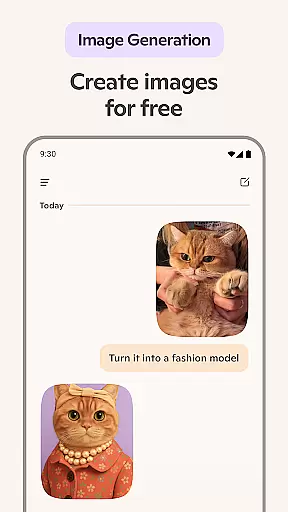
The app also includes an AI photo generator, allowing users to create images from textual descriptions. This functionality extends to generating high-quality visuals, from abstract concepts to photorealistic images, using either text prompts or voice commands. Furthermore, Copilot's AI voice chat enables hands-free operation, useful for composing narratives or sparking inspiration for new projects.
Copilot serves as a creative companion by assisting with logo designs, brand motifs, and illustrations for various purposes, such as children's books or film storyboards. The app's ability to search by images and curate social media content adds another layer of utility, making it an indispensable tool for modern professionals seeking efficiency and innovation.
At the heart of Microsoft Copilot lies its robust core task management capabilities, designed to streamline your daily workflow. This feature is pivotal for users seeking an efficient way to handle multiple tasks without losing track of important details.
The application employs advanced AI algorithms to prioritize tasks based on urgency and user-defined parameters. It offers a seamless experience by integrating with various productivity tools, ensuring that all your assignments are organized in one accessible location.
Users benefit from real-time updates and notifications, keeping them informed about deadlines and progress. The smart assistant suggests optimal times for task completion, enhancing productivity by aligning with individual work patterns.
This functionality not only simplifies task organization but also empowers users to accomplish more in less time, making it an indispensable tool for both personal and professional environments.
Microsoft Copilot excels in cross-device synchronization reliability, ensuring that your data remains consistent across all your devices. This feature is crucial for users who rely on multiple gadgets throughout their day, providing peace of mind that their information is always up-to-date.
The app utilizes state-of-the-art cloud technology to sync data instantly and securely. Whether you're switching from your smartphone to your laptop or tablet, you can expect a smooth transition with no loss of information or functionality.
One of the standout benefits is the ability to start a task on one device and seamlessly continue on another. This flexibility supports a dynamic lifestyle, allowing users to be productive regardless of their location or the device they are using.
By prioritizing synchronization reliability, Microsoft Copilot ensures that users can trust their data to be accurate and available whenever needed, enhancing overall efficiency and convenience.
User-friendly interface
Advanced AI capabilities
Versatile language support
Efficient task management
Creative design assistance
Limited offline functionality
Premium features require subscription
Occasional response latency
Dependent on internet connectivity
Learning curve for new users

When you Focus, so will your Bean in this cozy focus timer
 4.30
4.30
Ads Free App! Editor, Hide File, Copy, Move, Delete and Rename.. all facility av
1.70
Mind Map and brainstorm, note taking and idea collection
4.80
IP Camera Viewer - Android TV : RTSP Surveillance camera viewer for Android TV
4.1
Customizable calendar widget for seamless event sync, planning & scheduling.
4.00
App Lock with fingerprint, password: Lock apps & hide photos with lock screens
4.60
Calendar 2023 widget for Android. Appointment scheduler, planner, and reminder
4.60
Scientific calculator for Android - looks and operates like the real thing!
4.90
AT&T Internet customers can use this app to personalize their Wi-Fi network.
4.40
aCalendar+ makes your day, week and month
4.70
App lock - lock apps with fingerprint, password, pin or pattern, protect privacy
4.70
Secure, fast, open-source, Remote Desktop Client for Windows and Linux with SSH
4.60
The AI assistant that thinks with you - write, code, and solve complex tasks
4.60
Tally and goal counter for Wear OS & mobile
4.50
Font maker keyboard with your own handwriting
4.10
Mega cloud explorer plugin for Solid Explorer
3.80
Make your handwriting beautiful, even more than pen on paper.
3.60
Simple and reliable communication between inmates, friends and family
3.20
A comprehensive suite of tools designed specifically for Lactation Consultants
4.3


User Reviews