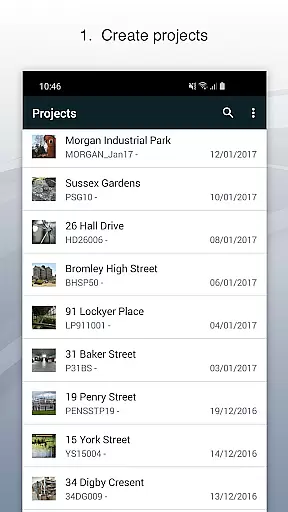
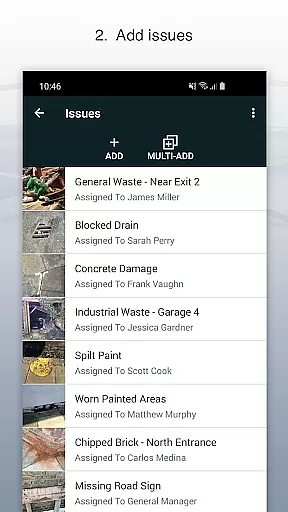
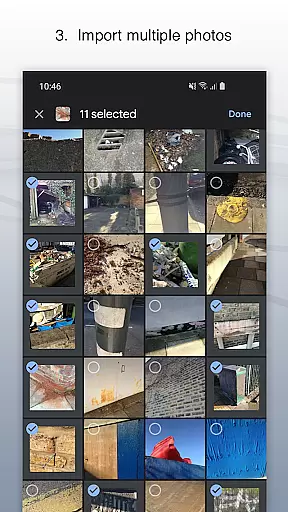
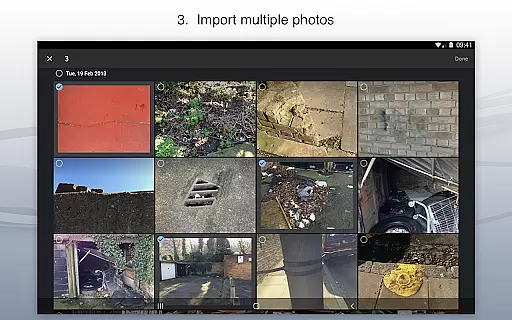
Site Audit Pro is a powerful productivity tool designed to streamline the auditing and inspection process for businesses across various industries. This mobile application allows users to efficiently record issues by capturing photos, annotating them to highlight critical details, and assigning tasks with comments. The app's intuitive interface makes it easy to organize findings into projects, complete with site and client information.
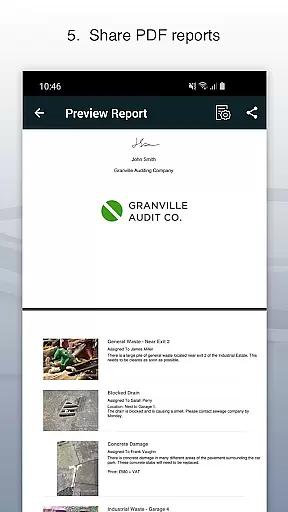
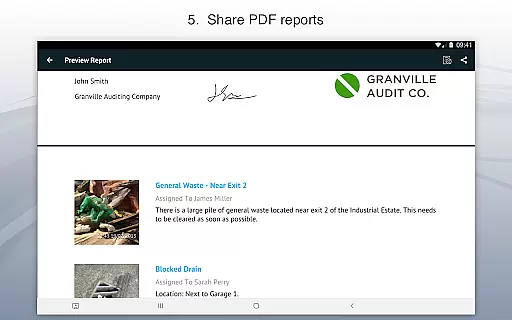
What sets Site Audit Pro apart is its ability to generate professional, customizable audit reports instantly. Users can share these reports as PDFs via email or cloud services like Dropbox without needing to return to the office. With over 40,000 businesses worldwide already benefiting from its capabilities, this app significantly enhances productivity by simplifying audits, inspections, punch lists, snagging, and more.
Site Audit Pro offers an impressive array of features that cater to diverse auditing needs. One standout feature is the ability to annotate photos, allowing users to emphasize important aspects of their findings. This functionality ensures that recipients of the audit reports fully understand the context and urgency of each issue. Additionally, the app supports organizing data into distinct projects, making it simple to manage multiple clients or sites simultaneously.
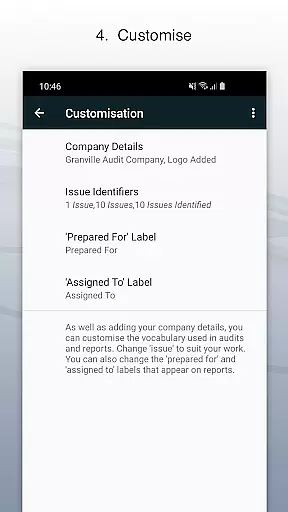
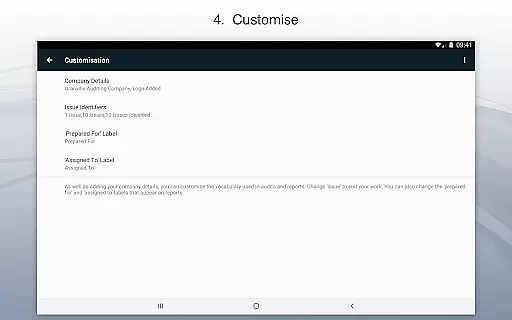
The customization options in Site Audit Pro are particularly noteworthy. Businesses can tailor reports to reflect their branding by including company names, logos, auditor details, and signatures. Moreover, the language used in reports can be adjusted to suit specific industries, ensuring relevance and clarity. With eight professional report designs to choose from, users can select a format that best represents their professional image while maintaining a personal touch.
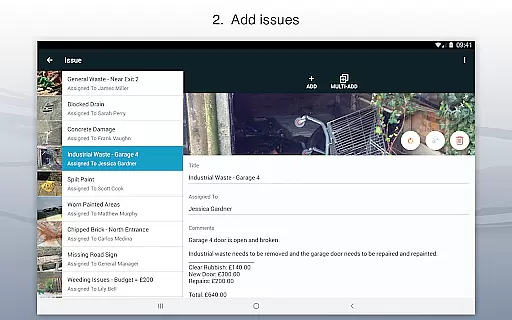
Site Audit Pro excels in core task management by providing a comprehensive suite of tools designed to streamline the auditing process. The app allows users to record issues efficiently, complete with photos, titles, assignees, and comments. This ensures that every detail is captured accurately, making it easier to manage tasks effectively.
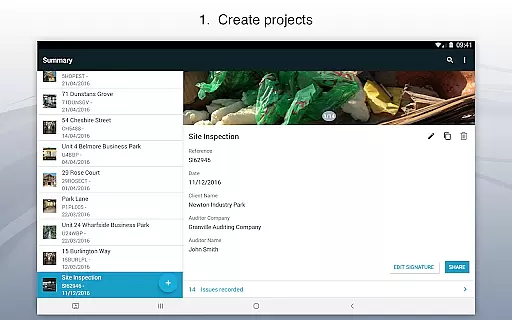
The application's strength lies in its ability to organize issues into projects, adding specific site and client details for each project. This structured approach not only enhances productivity but also ensures that all relevant information is easily accessible. Users can annotate photos to highlight critical information, ensuring that nothing is overlooked during the audit process.
By offering these robust task management features, Site Audit Pro helps businesses worldwide improve their efficiency. Whether performing safety inspections, creating punch lists, or providing quotations, the app enables users to collate and share findings seamlessly. This results in audits and inspections that are quicker to carry out and easier to manage, ultimately saving time and resources.
Cross-device synchronization is a crucial feature of Site Audit Pro, ensuring that data is reliably shared across multiple devices. This functionality allows users to access their audit reports and project details from any device, providing flexibility and convenience. Whether you're in the office or on-site, your data is always up-to-date and accessible.
The app supports instant sharing of professional audit reports without the need to return to the office. This is made possible through reliable cross-device synchronization, which ensures that all changes are reflected in real-time across all connected devices. Users can share their reports as PDFs via email, Dropbox, and other platforms, enhancing collaboration and communication.
Moreover, Site Audit Pro's synchronization capabilities extend to customization options. Users can add personal details such as company name, logo, auditor name, and signature to their reports. These customizations are synced across devices, ensuring consistency and professionalism in every report. With Site Audit Pro, you can trust that your data is always current and readily available, no matter where you are.
User-friendly interface
Customizable reports
Instant report sharing
Photo annotation tools
Project organization
Limited free version
Occasional bugs
Subscription costs
Learning curve
Offline limitations

Secure, fast, open-source, VNC and SSH Remote Desktop for Windows, Linux and Mac
 4.70
4.70
A customizable calendar for your Wear OS watch
4.20
Experience real multitasking on your Android!
4.00
Create study competitions, track your hours, and stay consistent with friends
4.3
Wake up & get tasks done! Add alarms & reminders on the Clock Launcher.
4.00
The Pro Version of Android's tiniest Notepad app. Just 0.3MB but feature-packed!
4.60
Font maker keyboard with your own handwriting
4.10
All document reader, all in one file viewer read PDF, DOCX, XLS, PPT, TXT files.
4.60
Note taking, handwriting, record audio, PDF annotation, planner & journal
4.20
8 custom complications. Custom Time Fonts. Beautiful color schemes. A++ Design.
5.00
Seamlessly integrate data and reports to build your presentation to impress
4.80
Protect and view your important info on your phone and tablet with eWallet®
4.80
Quickly and easily keep track of your work shifts
4.70
Calendar 2023 widget for Android. Appointment scheduler, planner, and reminder
4.60
Professional calendar app for Google Calendar, MS Outlook & Exchange
4.20
* block pre-roll ads, pop-up and forced redirect ads * Samsung certification app
4.00
Make your handwriting beautiful, even more than pen on paper.
3.60
Easiest event planning, volunteer signups & parent teacher conference scheduling
2.20
A simple, portable logger for POTA, SOTA, Field Day, and more
4.4


User Reviews